Bouncewise › Features › Email activity search app for your phone
Search every email you send, and see what happened to it
The Activity tab searches the email you've sent by recipient, subject or tag:name and shows each message's status. Open one for its timeline (sent, delivered, opened, clicked or bounced) and its HTML, Text and Source views. Previews load no remote images or tracking pixels, so looking never counts as an open.
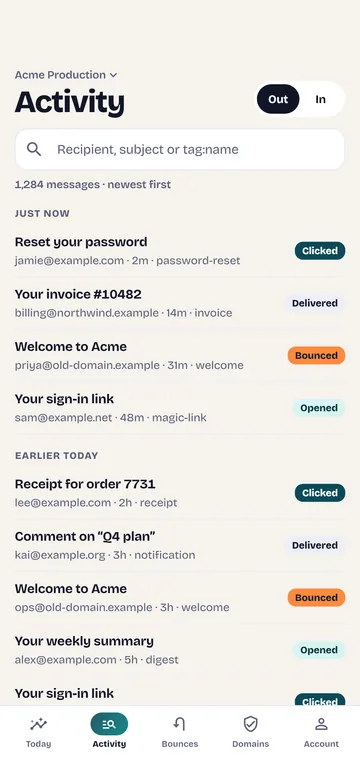
Search the way you think
Type an address to find everything sent to it, tag:welcome to find a tag, or any words to search subjects. Each row shows the latest status, looked up a few at a time as you scroll. What you can search depends on the provider:
| Provider | Activity |
|---|---|
| Postmark | Search by recipient, tag or subject; inbound mail with failed, blocked and processed counts |
| Mailgun | Recipient, tag or subject over the last 30 days of logs |
| SendGrid | Recipient, category or subject over the last 30 days of Email Logs |
| Resend | Your latest 100 emails (Resend's API can't search) |
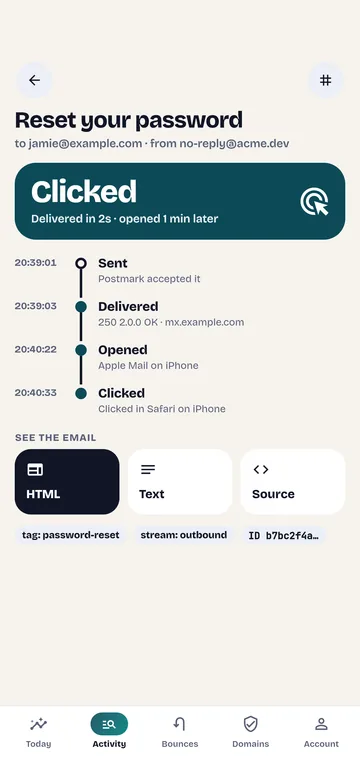
A timeline for each message
A message opens with what happened last in large type, for example Delivered in 2s · opened 4 min later, and the full timeline with times to the second. Tags, stream and the message ID sit underneath; tap the ID icon to copy it for a support ticket.
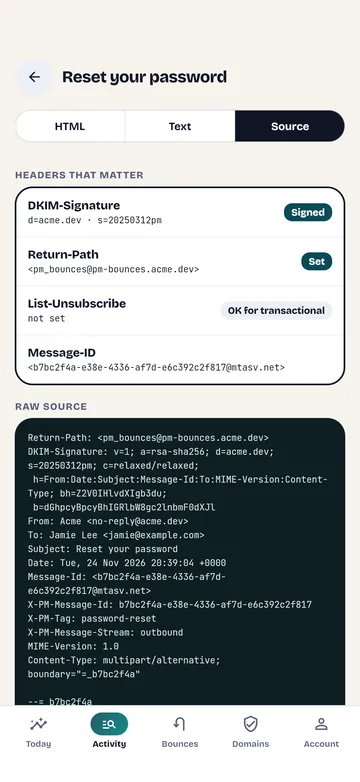
HTML, Text and Source, safely
The HTML view blocks every remote load, has JavaScript off and refuses navigation, so tracking pixels never fire and the recipient's stats stay true. Check the layout at phone width, desktop width or in dark mode. The Text tab hides token-like values in links (password-reset links, magic links) until you tap Show tokens in links. Source shows the raw message, or headers where only those are available. The free version opens content from the last 24 hours; Pro opens older messages while your provider still keeps them. SendGrid's API doesn't return sent content, so it shows status only.
Questions
Does opening an email in the app count as an open?
No. Remote images, including tracking pixels, never load in the preview.
How far back can I search?
As far as your provider's API allows: Postmark keeps content for the server's retention period (45 days by default), Mailgun and SendGrid logs are searched over 30 days.
Related
- SendGrid Email Activity history: 30 days and missing mailSendGrid Email Logs keeps 30 days of events for every customer. The older Email Activity Feed needs a paid add-on for 30 days. Why a message may not show.
- Resend email statuses: delivered, bounced, delayedWhat each Resend last_event means: sent, delivered, delivery_delayed, bounced, complained, failed, suppressed and more, with the matching webhook events.
- Email bounce checker app: exact server repliesEvery bounce with the receiving server's exact reply, plus suppression lists and reactivation, for Postmark, Mailgun, SendGrid and Resend.
- How Bouncewise keeps your email API keys safeBouncewise keeps API keys in the iOS Keychain or Android Keystore, sends them only to your provider, never to us, and has a read-only mode.