SendGrid Email Activity: how far back you can search, and why messages are missing
SendGrid's Email Logs keeps 30 days of email events for all email customers, in the console and through the API (POST /v3/logs), and that period can't be extended. The older Email Activity Feed keeps events for up to 30 days only if you buy the Email Activity history add-on, and its API (/v3/messages) needs the add-on as well. For anything older than 30 days, you have to store events yourself with the Event Webhook.
Two tools, two rules
| Email Logs | Email Activity Feed | |
|---|---|---|
| History | 30 days, all email customers, can't be extended | Up to 30 days with the Email Activity history add-on |
| API | POST /v3/logs, GET /v3/logs/{sg_message_id} | GET /v3/messages, add-on required |
| Results per API call | limit 1–1000 (default 10), no pagination | limit parameter |
| Region | Logs from EU subaccounts stay in the EU | All data stored in the United States |
Twilio's Email Activity Feed page states the 30-day figure only for accounts with the add-on; it doesn't give a number without it, so check what your console shows. Reseller accounts and extra-high-volume accounts can't use the new feed at all and get Legacy Email Activity instead. Accounts bought through Azure, Google Cloud, Heroku or KKE can't buy the add-on.
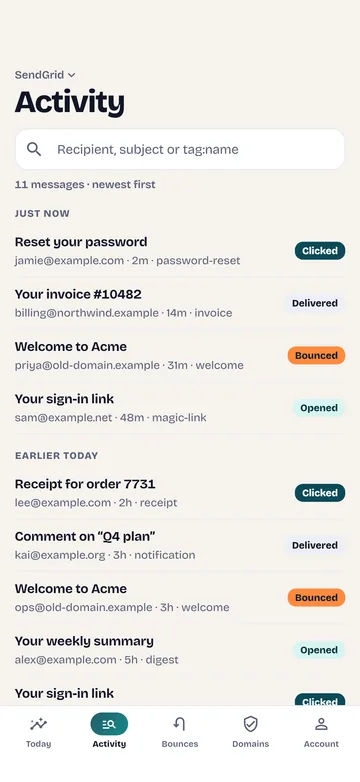
Searching Email Logs
In the console, Email Logs filters by recipient, date, subject, status, response, from address, message ID, outbound IP, category, events and API key ID. The date filter offers Last 3 days, Last 7 days or a custom range up to the last 30 days. Filters combine with AND, so each one narrows the result. Status is one of Processed, Deferred, Delivered, Dropped, Bounced or Blocked.
Through the API, send a query string and a limit:
curl -s -X POST https://api.sendgrid.com/v3/logs \
  -H "Authorization: Bearer $SENDGRID_API_KEY" \
  -H "Content-Type: application/json" \
  -d '{"query": "to_email = \"[email protected]\" AND sg_message_id_created_at > TIMESTAMP \"2026-11-20T00:00:00Z\"", "limit": 100}'
Other fields you can query include from_email, subject (with containsAll(subject, "…")), status IN (…), categories IN (…) and api_key_id.
Each result has sg_message_id, from_email, to_email, subject, status, sg_message_id_created_at and, for drops, bounces and deferrals, a reason. Fetch the full event timeline for one message with GET https://api.sendgrid.com/v3/logs/{sg_message_id}. EU subusers use https://api.eu.sendgrid.com. The key needs the Email Activity permission (email_activity.read); without it, the call returns 403.
Why a message isn't there, most common first
- SendGrid never accepted it. If Mail Send answered 400, 401 or 403 (for example the sender identity error), no message was created, so there is nothing to find. Only a 202 response means SendGrid took it.
- It is older than the window. Past 30 days in Email Logs, or past the feed's retention without the add-on, the events are gone for good.
- The API call returned only the first few results. Email Logs defaults to 10 messages and has no pagination; raise
limit(up to 1000) or narrow the query with a time condition onsg_message_id_created_at. - The match is case-sensitive. Email Logs matching is case-sensitive except
containsAll.[email protected]and[email protected]are different strings to=. - You are looking in the wrong account. Mail sent by a subuser belongs to that subuser; when you query Email Logs from the parent account, name one subuser at a time in the
subusersfield. - It was dropped, not sent. A send to an address on a suppression list shows status Dropped with a reason, not Delivered or Bounced. See bounces vs blocks.
The add-on and the 403 on /v3/messages
The Email Activity Feed API (GET https://api.sendgrid.com/v3/messages) answers 403 Access Forbidden for two reasons: the account hasn't bought the additional Email Activity history add-on, or the key lacks Email Activity permission. The add-on is added under Settings > Account Details, Your Products, by the account's primary administrator or a teammate with Administration permissions. SendGrid says to allow 12 hours after buying it before the API works. The add-on isn't available on Marketing Campaigns-only plans.
If you only need 30 days, Email Logs gives you that without the add-on, so new integrations should use /v3/logs rather than /v3/messages.
Keeping more than 30 days
Neither tool goes past 30 days. If you need a longer record (support disputes, compliance, bounce trends over a quarter), turn on the Event Webhook and store the events yourself: SendGrid then posts each event (delivered, deferred, bounce, dropped, open, click and so on) to your URL as it happens. CSV export from the Activity Feed is the other option, but it's limited to the last one million events.
Note what isn't recorded anywhere: Inbound Parse events don't appear in the Activity Feed, and Email Logs holds events, not message bodies.
Questions
How long does SendGrid keep email activity?
Email Logs keeps 30 days of events for all email customers. The Email Activity Feed keeps up to 30 days with the paid Email Activity history add-on.
Can I get SendGrid activity older than 30 days?
Not from SendGrid. Store events yourself from the Event Webhook going forward, or export CSVs regularly before they age out.
Why does /v3/messages return 403?
The account lacks the additional Email Activity history add-on or the key lacks Email Activity permission. Use /v3/logs instead if 30 days is enough.
Related
- SendGrid bounces vs blocks vs invalid emailsIn SendGrid a bounce is a problem with the address and stays suppressed; a block is about your IP or content and isn't. How all six lists differ.
- SendGrid API key permissions: Full, Custom and BillingSendGrid API keys are Full Access, Custom Access (chosen scopes) or Billing Access. The scopes sending and read-only monitoring need, and how to check.
- SendGrid 403: from address not a verified Sender IdentitySendGrid returns 403 when the From address isn't a verified single sender or on an authenticated domain. The fix, and the other 403: access forbidden.
- How to monitor email delivery from your phoneWatch bounce rate, spam complaints, failed inbound and DNS status from your phone, with spike alerts and widgets for Postmark, Mailgun, SendGrid, Resend.
- Email activity search app for your phoneSearch sent email by recipient, subject or tag, follow each message's timeline and read its HTML, text and source safely: viewing never counts as an open.
- Bouncewise SendGrid API key: read-only scopesCreate a SendGrid Custom Access key with Read on Stats, Email Activity, Suppressions and Domain Authentication, then pick Global or EU in Bouncewise.