How to monitor email delivery from your phone
Watch four things: today's bounce rate against your usual level, new spam complaints, failed inbound messages (your webhook is down), and whether your domain's DKIM and Return-Path are still verified. Provider dashboards are built for desktop, so on a phone use an app that reads your provider's API, sends you a notification when one of those changes, and puts the numbers in a widget.
- Create a read-capable API key Use a Postmark server or account token, or a Mailgun, SendGrid or Resend API key.
- Connect it in the app Add the key on the Connect screen; it is stored only on your phone.
- Check Today See today's bounce rate and complaints against the previous 7 days.
- Turn on alerts Enable spike, complaint and failed inbound alerts (Pro).
- Add a widget Put a Delivery or Needs attention widget on your home or Lock Screen.
What to watch, and why
| Signal | Why it matters | When to act |
|---|---|---|
| Bounce rate today vs usual | A bad import or a sign-up form under attack shows up here first | When today is a multiple of your recent average, not at a fixed number |
| Spam complaints | Gmail wants below 0.1%; Postmark's limit is 0.1% | On any new complaint for transactional mail |
| Failed inbound | Replies and inbound parsing stop when your webhook errors | As soon as one fails |
| DKIM and Return-Path status | DNS changes and host moves silently break authentication | When a verified record turns pending or failed |
| Sent volume | A sudden drop to zero is usually your app, not the provider | When a normal day goes quiet |
Gmail's own figures live in Google Postmaster Tools, which is updated daily and useful for trends; your provider's API is where you see today's problems.
What a phone can and cannot replace
A phone is for noticing and triaging: is this a spike, which domain, which template, does it need a laptop now? Most incidents can be judged in a minute from the bounce text and the recipient domains. Reading a bounce's SMTP report tells you whether it is 550 5.1.1 typos (not urgent) or 550 5.7.26 authentication failures (urgent, everything is affected).
Fixes that need DNS changes, code deploys or template edits still happen at a desk. Some actions are reasonable from a phone: reactivating one address a customer has confirmed, retrying failed inbound messages once your webhook is back, or sending a test email after a DNS fix. Each of those changes what your provider does, so do them deliberately, and remember that reactivating an address resumes sending to it.
A phone view of today
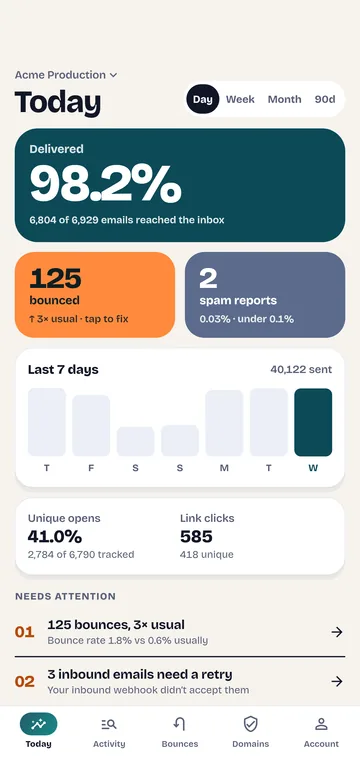
Bouncewise is an independent app that connects to Postmark, Mailgun, SendGrid and Resend with your API key. Its Today screen shows sent, delivered, bounced and spam figures for the day, week or month, compares them with the previous 7 days as "N× usual", and draws the last 7 days as bars. A Needs attention list collects what needs a look, such as a bounce spike, failed inbound or a pending DKIM record. Keys stay on the phone in the iOS Keychain or Android Keystore and are never sent to Bouncewise's servers.
Alerts that come to you
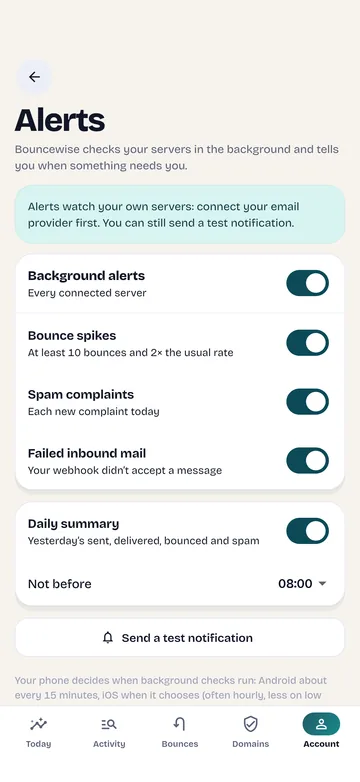
With Pro, Bouncewise checks each server in the background and sends a local notification for:
- Bounce spikes: at least 10 bounces and at least twice the usual rate, at most once a day.
- New spam complaints.
- Failed inbound messages it has not told you about before.
- A daily summary after the hour you choose.
These are background checks on the phone, so they arrive on the system's schedule rather than instantly. Tapping one opens the server and the right tab. For second-by-second alerting on a production incident, keep your provider's webhooks wired to your own monitoring as well.
Widgets for a glance
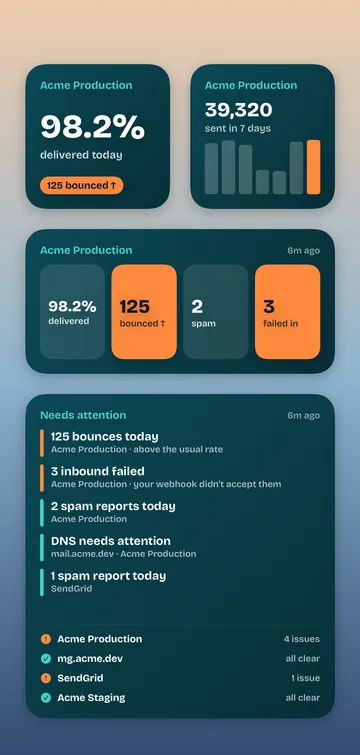
Home screen widgets show the numbers without opening anything. On iPhone, Bouncewise offers Delivery (one server, small to large and on the Lock Screen), Needs attention, All servers, and a 7-day trend; Android has a current-server widget and an all-servers widget. Widgets refresh from the app and from the background checks, and need Pro.
A sensible setup: one Delivery widget for your main production server, Needs attention on the Lock Screen, and alerts on for spikes and complaints only, so a notification always means something.
Questions
Do provider dashboards work on a phone?
They load in a mobile browser, but they are designed for desktop screens and do not send phone notifications for bounce spikes.
Is it safe to put an email API key on my phone?
In Bouncewise the key is kept in the iOS Keychain or Android Keystore and is only sent to your email provider. Read-only mode in the app also hides actions such as reactivate and retry.
Are the alerts instant?
No. They come from background checks that the phone's operating system schedules, so expect delays of minutes or more.
Related
- What is a good email bounce rate? Limits and targetsFor transactional email, keep your bounce rate well under 5%; Postmark requires under 10%. Most bounces should be rare hard bounces, so watch for spikes.
- Gmail and Yahoo spam rate limit: the 0.3% rule explainedGmail and Yahoo require a spam complaint rate below 0.3%; Gmail says aim under 0.1%. How it is measured, who it applies to, what it means for receipts.
- Postmark inbound failed: why, and how to retry messagesFailed means your inbound webhook didn't return 200 after 10 retries over about 10.5 hours. Fix the endpoint, then PUT /messages/inbound/{id}/retry.
- Bounce alerts on your phonePhone notifications for bounce spikes, new spam complaints, failed inbound mail and a daily summary from Postmark, Mailgun, SendGrid or Resend.
- Email delivery widgets for iPhoneSee today's delivered rate, bounces, spam reports and failed inbound mail on your iPhone Home Screen and Lock Screen: four widgets, 16 layouts.
- Bouncewise widgets: Home Screen and Lock ScreenFour Bouncewise widgets: Delivery, Needs attention, All servers and 7-day trend. How to add them, choose a server with Edit Widget, and how they refresh.