SMTP bounce codes: the full list with what to do for each
A bounce has two codes: a three-digit SMTP reply (RFC 5321) and an enhanced status code (RFC 3463) such as 5.1.1. The first digit decides what to do: 4 means temporary, so retry; 5 means permanent, so stop and fix something. The enhanced code says what: x.1.x is the address, x.2.x the mailbox, x.4.x routing, x.7.x security or policy.
How to read a bounce line
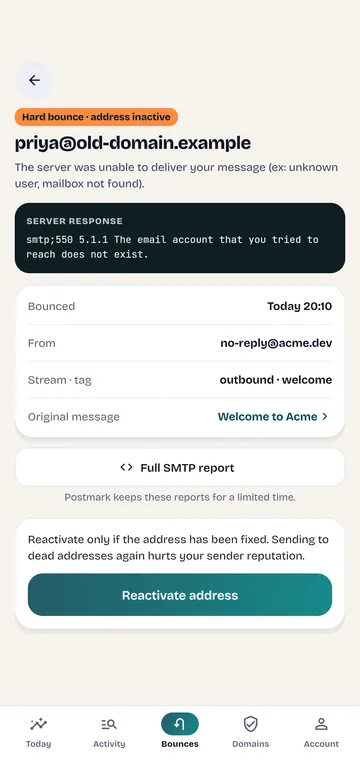
Take a typical line: 550 5.1.1 The email account that you tried to reach does not exist.
550is the basic SMTP reply. The first digit is the class: 2 success, 4 transient failure, 5 permanent failure.5.1.1is the enhanced status code: class.subject.detail. Subject 1 is addressing, detail 1 is Bad destination mailbox address.- The rest is free text from the receiving server. It is not standardised, and it often matters most.
Subjects in RFC 3463: X.0 other, X.1 addressing, X.2 mailbox, X.3 mail system, X.4 network and routing, X.5 mail delivery protocol, X.6 message content or media, X.7 security or policy. As a rule of thumb, x.1 and x.2 problems are about the recipient; x.7 problems are about you.
SMTP reply codes (RFC 5321)
Texts are as RFC 5321 section 4.2.3 gives them. Servers may send their own wording with the same code.
| Code | RFC 5321 text | Type | What to do |
|---|---|---|---|
421 | <domain> Service not available, closing transmission channel | Temporary | Server busy or limiting you. Retry later; if it persists at one provider, check reputation. |
450 | Requested mail action not taken: mailbox unavailable (e.g., mailbox busy or temporarily blocked for policy reasons) | Temporary | Retry. Often greylisting or a temporary policy block. |
451 | Requested action aborted: local error in processing | Temporary | Receiver-side problem. Retry. |
452 | Requested action not taken: insufficient system storage | Temporary | Receiver out of space, or too many recipients in one transaction. Retry. |
455 | Server unable to accommodate parameters | Temporary | Retry; check MAIL FROM / RCPT TO extensions. |
500 | Syntax error, command unrecognized | Permanent | Sending software problem, not the address. |
501 | Syntax error in parameters or arguments | Permanent | Often a malformed address. Check the address syntax. |
502 | Command not implemented | Permanent | Client/server mismatch. Not a recipient issue. |
503 | Bad sequence of commands | Permanent | Client problem, or authentication required first. |
504 | Command parameter not implemented | Permanent | Client problem. |
550 | Requested action not taken: mailbox unavailable (e.g., mailbox not found, no access, or command rejected for policy reasons) | Permanent | Read the enhanced code: 5.1.1 = no such user; 5.7.x = policy or authentication. |
551 | User not local; please try <forward-path> | Permanent | Address has moved. Get the new one. |
552 | Requested mail action aborted: exceeded storage allocation | Permanent | Mailbox full or message too big. Check size; treat a long-full mailbox as dead. |
553 | Requested action not taken: mailbox name not allowed (e.g., mailbox syntax incorrect) | Permanent | Invalid address syntax. Fix the address. |
554 | Transaction failed (Or, in the case of a connection-opening response, "No SMTP service here") | Permanent | Often a spam or policy rejection. Read the text. |
555 | MAIL FROM/RCPT TO parameters not recognized or not implemented | Permanent | Client problem. |
RFC 5321 says a client should retry 4xx replies and should not repeat a 5xx request unchanged. It suggests waiting at least 30 minutes between retries and a give-up time of at least 4 to 5 days; providers usually give up sooner and report the message as failed.
Enhanced status codes (RFC 3463)
Replace X with 4 (temporary) or 5 (permanent); 2 means success. Titles are from RFC 3463.
| Code | Meaning | What to do |
|---|---|---|
X.0.0 | Other undefined Status | Read the text; the server gave no detail. |
X.1.0 | Other address status | Address problem; check the address. |
X.1.1 | Bad destination mailbox address | Mailbox does not exist. Suppress; ask for a corrected address. |
X.1.2 | Bad destination system address | Domain does not accept mail (typo, expired domain). |
X.1.3 | Bad destination mailbox address syntax | Malformed address. Validate on input. |
X.1.4 | Destination mailbox address ambiguous | Receiver matched more than one mailbox. |
X.1.5 | Destination address valid | Informational (used with 2.x.x). |
X.1.6 | Destination mailbox has moved, No forwarding address | Address is gone. Remove it. |
X.1.7 | Bad sender's mailbox address syntax | Your From/envelope sender is malformed. |
X.1.8 | Bad sender's system address | Your sending domain cannot be resolved or accept replies. |
X.2.0 | Other or undefined mailbox status | Mailbox issue; read the text. |
X.2.1 | Mailbox disabled, not accepting messages | Account suspended or inactive. Treat 5.2.1 as hard. |
X.2.2 | Mailbox full | Retry 4.2.2; a 5.2.2 usually means long-term full. |
X.2.3 | Message length exceeds administrative limit | Make the message smaller (attachments). |
X.2.4 | Mailing list expansion problem | Problem at a list the recipient address belongs to. |
X.3.0 | Other or undefined mail system status | Receiver-side issue. |
X.3.1 | Mail system full | Receiver out of storage. Retry. |
X.3.2 | System not accepting network messages | Receiver shutting down or refusing. Retry. |
X.3.3 | System not capable of selected features | Receiver lacks a feature the message needs. |
X.3.4 | Message too big for system | Reduce message size. |
X.3.5 | System incorrectly configured | Receiver misconfiguration. Contact their admin if it persists. |
X.4.0 | Other or undefined network or routing status | Routing problem; retry. |
X.4.1 | No answer from host | Receiver unreachable. Retry. |
X.4.2 | Bad connection | Connection dropped. Retry. |
X.4.3 | Directory server failure | Receiver's lookup failed (often DNS). Retry. |
X.4.4 | Unable to route | No usable MX or A record for the domain. |
X.4.5 | Mail system congestion | Receiver overloaded. Retry later. |
X.4.6 | Routing loop detected | Forwarding loop at the receiver. |
X.4.7 | Delivery time expired | Retries gave up. Message was never delivered. |
X.5.0 | Other or undefined protocol status | Protocol problem. |
X.5.1 | Invalid command | Client sent an unknown command. |
X.5.2 | Syntax error | Client sent a malformed command. |
X.5.3 | Too many recipients | Split the recipient list. |
X.5.4 | Invalid command arguments | Bad parameters, often an address. |
X.5.5 | Wrong protocol version | Protocol mismatch. |
X.6.0 | Other or undefined media error | Content could not be handled. |
X.6.1 | Media not supported | Content type rejected. |
X.6.2 | Conversion required and prohibited | Message needs conversion it may not have. |
X.6.3 | Conversion required but not supported | Receiver cannot convert the content. |
X.6.4 | Conversion with loss performed | Delivered, but content was changed. |
X.6.5 | Conversion Failed | Content conversion failed. |
X.7.0 | Other or undefined security status | Policy or reputation block. Read the text. |
X.7.1 | Delivery not authorized, message refused | Blocked by policy, blocklist or content filter. Not an address problem. |
X.7.2 | Mailing list expansion prohibited | You may not send to that list. |
X.7.3 | Security conversion required but not possible | Encryption or signing requirement not met. |
X.7.4 | Security features not supported | Receiver cannot handle required security. |
X.7.5 | Cryptographic failure | Signature or encryption failure. |
X.7.6 | Cryptographic algorithm not supported | Unsupported algorithm. |
X.7.7 | Message integrity failure | Message was altered in transit. |
Later RFCs register more codes in the same scheme, which is why you will see values such as 5.7.26 or 5.7.509 that are not in RFC 3463. Read them by their subject digit: anything in x.7.x is a security or policy decision.
The codes you will actually see
These combinations make up most real bounces from Gmail and Microsoft. Gmail and Microsoft texts are quoted from their own error references (start of the message only).
| Code | Typical text | Action |
|---|---|---|
550 5.1.1 | Gmail: The email account that you tried to reach does not exist. Microsoft: Bad destination mailbox address | Hard. Suppress the address. |
550 5.1.10 | Microsoft: Recipient not found (shown as RESOLVER.ADR.RecipientNotFound) | Hard. Address does not exist at that Microsoft 365 tenant. |
550 5.2.1 | Gmail: The email account that you tried to reach is inactive. | Hard. Abandoned account. |
452 4.2.2 | Gmail: The recipient's inbox is out of storage space. | Soft. Retry later. |
552 5.2.2 | Gmail: The recipient's inbox is out of storage space and inactive. | Treat as hard. |
450 4.2.1 | Gmail: The user you are trying to contact is receiving email too quickly. | Soft. Retry later. |
421 4.7.0 | Gmail, several texts, e.g. This message is suspicious due to the very low reputation of the sending domain. | Reputation or setup (PTR, TLS). Fix the sending side. |
421 4.7.28 | Gmail: Gmail has detected an unusual rate of email. | Rate limited. Slow down; check complaint rate. |
550 5.7.1 | Gmail: The user or domain that you are sending to (or from) has a policy that prohibits the email that you sent. | Policy block. Not an address problem. |
550 5.7.26 | Gmail: This email has been blocked because the sender is unauthenticated. | Fix SPF/DKIM/DMARC alignment. |
550 5.7.509 | Microsoft: Access denied, sending domain [$SenderDomain] does not pass DMARC verification and has a DMARC policy of reject. | Fix DMARC alignment. |
Where each provider shows the code
- Postmark: the bounce record's
Detailsholds the server response, and the bounce dump returns the raw report. TheType(HardBounce,SoftBounce…) is Postmark's own classification. - Mailgun:
failedevents carry adelivery-statusobject with the code and message, plusseveritypermanentortemporary. - SendGrid:
bounceanddeferredevents include the server's response; bounce events are typedbounceorblocked. - Resend: bounces are typed
Permanent,TransientorUndeterminedwith a subtype such asMailboxFull.
When the provider's label and the SMTP code disagree, trust the code and the text.
Questions
What is the difference between 550 and 5.5.0?
550 is the basic SMTP reply. 5.x.x is the enhanced status code that adds detail. Microsoft uses 550 5.5.0 for an outlook.com or hotmail.com address that was not found.
Is a 4xx code a bounce?
Not yet. A 4xx reply is a temporary failure, so the sending server retries. It only becomes a bounce if the retries run out.
Which codes mean the address is bad?
5.1.1, 5.1.2, 5.1.3, 5.1.6, 5.1.10 (Microsoft) and 5.2.1 almost always mean the address cannot receive mail. Suppress it.
Which codes mean my setup is the problem?
Most 5.7.x codes: 5.7.1 policy refusals, 5.7.26 unauthenticated mail at Gmail, 5.7.509 DMARC failure at Microsoft. Fix authentication and reputation rather than the recipient list.
Related
- Hard bounce vs soft bounce: what each means, what to doA hard bounce is a permanent failure (5xx, e.g. 550 5.1.1): stop sending to it. A soft bounce is temporary (4xx, e.g. full mailbox): retry, then stop.
- 550 5.1.1 user unknown: the address does not exist550 5.1.1 means the recipient's server says the mailbox does not exist. It is a hard bounce: suppress the address and get a corrected one. Don't resend.
- SPF, DKIM and DMARC for transactional email: setupSign with DKIM on your domain, align SPF via a custom Return-Path, start DMARC at p=none. The records for Postmark, Mailgun, SendGrid and Resend.
- Transactional emails going to spam: a checklist that worksCheck in order: SPF, DKIM and DMARC pass and align; links and content; reputation; complaint rate; list hygiene. Start with the message headers.
- Mailgun failed events: permanent vs temporary failuresA Mailgun failed event has severity permanent (dropped, not retried) or temporary (retried for up to 8 hours). How to read reason and delivery-status.