Transactional emails going to spam: a checklist that fixes it
Work through it in this order: read the Authentication-Results header of a message that landed in spam and make sure SPF, DKIM and DMARC all pass on your own domain; then check links and content; then reputation and complaint rate in Google Postmaster Tools; then whether you are mailing old or unconfirmed addresses. Most cases are fixed at the first two steps.
- Read the headers Open a message that landed in spam, show the original, and find Authentication-Results.
- Fix authentication Make sure dkim, spf and dmarc all pass on your own domain; add DKIM and a custom Return-Path if not.
- Check From, links and content Use your own domain in From, test without click tracking, and remove link shorteners.
- Separate marketing Move newsletters to another stream, IP pool or subdomain.
- Check complaint rate Look at the spam rate in Google Postmaster Tools and keep it below 0.1%.
- Clean the list Confirm addresses at sign-up and stop sending to hard bounces and old, unconfirmed addresses.
Start with the headers of a message in spam
Get a message that actually went to spam (ask a user, or send to your own Gmail and Outlook accounts). In Gmail, open it and choose Show original. Find the Authentication-Results header (defined in RFC 8601), added by the receiving server:
Authentication-Results: mx.google.com;
  dkim=pass [email protected];
  spf=pass smtp.mailfrom=pm-bounces.example.com;
  dmarc=pass header.from=example.com
Read it like this:
dkim=passwithheader.iorheader.don your domain. If it shows only your provider's domain, your DKIM record is not live.spf=passwithsmtp.mailfromon your domain. If it is the provider's domain, SPF passes but does not align; add a custom Return-Path.dmarc=pass. If it saysfailor is missing, fix that before anything else.
Gmail's guidelines require SPF or DKIM for all senders, and for bulk senders SPF, DKIM and DMARC with the From domain aligned.
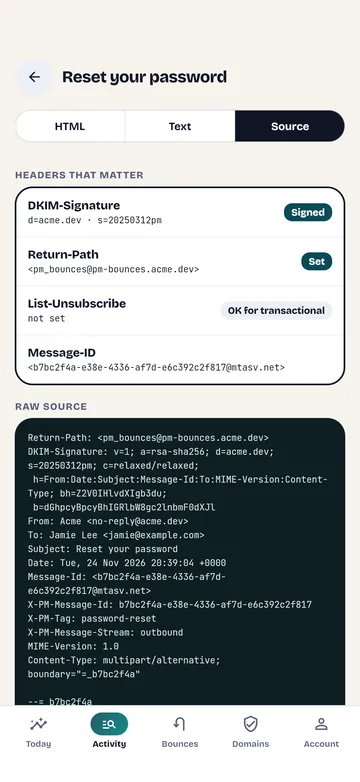
The checklist, in order
- Authentication and alignment. As above. Also confirm the sending IP has a valid PTR (reverse DNS) record and that mail uses TLS; your provider normally handles both, and Gmail requires them for all senders.
- From address. Send from your own domain, never from
@gmail.comor another free mailbox: Gmail's guidelines say not to impersonate Gmail From headers. Keep the From name and address stable. - Links and content. Link domains matter. A link shortener, a click-tracking domain with poor reputation, or a link to a domain that does not match your brand can sink an otherwise clean email. Try a send with click tracking off. Avoid image-only emails and include a text part.
- Mixed traffic. If newsletters go out from the same domain, IPs or stream, their complaints count against your receipts. Separate them.
- Complaint rate. Check Google Postmaster Tools. Gmail wants the spam rate below 0.10% and never at 0.30%.
- List hygiene. Sending to old, unconfirmed or bot-generated addresses raises bounces and spam-trap hits. Confirm addresses at sign-up and stop mailing hard bounces.
Patterns and what they usually mean
| What you see | Likely cause |
|---|---|
Spam at Gmail only, dmarc=fail | DKIM not set up on your domain and the Return-Path is the provider's |
| Spam everywhere after a new template | Content or a link in that template |
| Spam started after a marketing send | Complaints from the campaign on shared reputation |
Bounces with 550 5.7.26 at Gmail | Unauthenticated mail: fix SPF/DKIM |
Deferrals with 421 4.7.0 at Gmail mentioning low reputation | Domain or IP reputation; check complaints and volume changes |
| One corporate recipient only | Their own filter; ask their IT to allow your domain |
After you fix it
Reputation recovers over days, not minutes. Keep sending normal, wanted mail; do not pause everything and then send a burst. Re-test with a fresh message to Gmail and Outlook accounts and check the headers again. Watch Postmaster Tools for the trend, and watch your provider's bounce and complaint figures daily for a week. If you changed DNS, re-check it after any registrar or DNS host move, which is when DKIM records most often go missing.
Questions
Why do my emails go to spam in Gmail but not Outlook?
Each mailbox provider has its own filters and reputation data. Check the Gmail headers first: a DMARC failure or unaligned DKIM is the usual reason it differs.
Will a dedicated IP fix spam placement?
Not by itself. A dedicated IP needs steady volume to build reputation, and domain reputation and authentication still apply.
Can users fix it by marking 'Not spam'?
It helps that user, and it is a positive signal, but it will not fix an authentication or reputation problem.
Related
- SPF, DKIM and DMARC for transactional email: setupSign with DKIM on your domain, align SPF via a custom Return-Path, start DMARC at p=none. The records for Postmark, Mailgun, SendGrid and Resend.
- Custom Return-Path domain: why and how to set it upA custom Return-Path puts bounces on your own subdomain so SPF aligns for DMARC. On Postmark: CNAME pm-bounces.example.com to pm.mtasv.net, then verify.
- Gmail and Yahoo spam rate limit: the 0.3% rule explainedGmail and Yahoo require a spam complaint rate below 0.3%; Gmail says aim under 0.1%. How it is measured, who it applies to, what it means for receipts.
- Transactional vs marketing email: send them separatelyTransactional email is triggered by a user action; marketing goes out on your schedule. Split them by stream, IP and subdomain to protect receipts.
- SMTP bounce codes: full list and what to do for eachEvery SMTP reply code (421 to 555) and enhanced status code (X.1.1 to X.7.7) from RFC 5321 and RFC 3463, with what each means and what to do next.