Spam complaint rate: the 0.3% Gmail and Yahoo limit explained
Since February 2024, Gmail and Yahoo require every sender to keep the rate of messages users mark as spam below 0.3%. Gmail recommends staying below 0.1% and never reaching 0.3%; above that, a bulk sender loses eligibility for Gmail's mitigation until the rate stays under 0.3% for 7 consecutive days. Gmail's figure is the spam rate shown in Google Postmaster Tools.
What the rules say
| Gmail | Yahoo | |
|---|---|---|
| All senders | Keep spam rates reported in Postmaster Tools below 0.3% | Keep spam complaints below 0.3% |
| Recommended | Below 0.10%, and avoid ever reaching 0.30% | No separate target published |
| Authentication | SPF or DKIM; bulk senders need SPF, DKIM and DMARC (p=none is enough), with the From domain aligned | SPF or DKIM; bulk senders need both plus DMARC with at least p=none |
| Unsubscribe | One-click for marketing and subscribed messages from bulk senders | One-click for marketing and subscribed messages; honour within 2 days |
Gmail defines a bulk sender as one that sends close to 5,000 messages to personal Gmail accounts in 24 hours. Mail from subdomains is counted together with the primary domain, and once you meet the threshold you are considered a bulk sender permanently.
How the rate is measured
Gmail calculates the spam rate daily and shows it in Postmaster Tools, which you set up by verifying your sending domain. If your daily volume to Gmail is low, Postmaster Tools may show no data at all, which is a privacy safeguard rather than a sign that everything is fine. Yahoo says bulk sender complaint rates are calculated from mail delivered to the inbox.
Because the denominator is inbox mail at one mailbox provider, the rate in your sending provider's dashboard is not the same number. Use the provider's figure as an early warning and Postmaster Tools as the one Gmail acts on.
What it means for transactional email
Transactional mail is not exempt from the 0.3% limit; it is exempt from the one-click unsubscribe requirement. Google's FAQ says one-click unsubscribe is required only for marketing and promotional messages, and gives password resets and reservation confirmations as examples that do not need it.
Complaints on transactional mail usually come from:
- People who do not recognise the sender. A From name or domain that does not match your product, or a receipt from a payment subdomain they have never seen.
- Marketing inside transactional mail. Promotional blocks in receipts, or newsletters sent through the transactional stream. Postmark, for example, keeps transactional and broadcast streams on separate IPs for this reason.
- Mail people did not ask for. Notification emails turned on by default with no settings link, or sends to addresses someone else typed in.
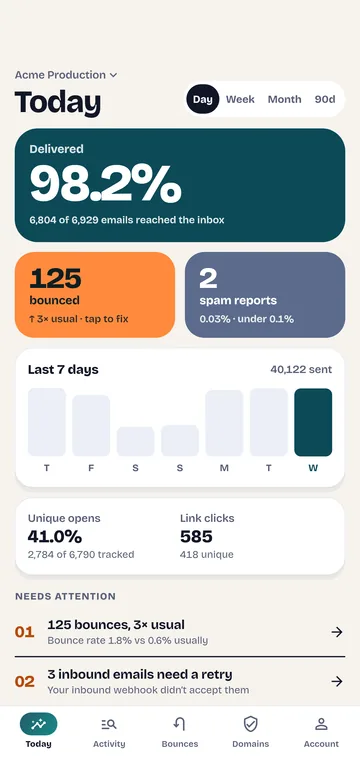
Postmark sets its own account limit at 0.1%, a third of Gmail's ceiling, so on Postmark you will hit your provider's limit first.
Bring it down
- Separate marketing from transactional mail (different stream, ideally a different subdomain).
- Add a List-Unsubscribe header with one-click support to anything promotional, and a visible link in the body.
- Use a From name people recognise and keep it the same.
- Let users turn off non-essential notifications from inside your app.
- Stop sending to anyone who has complained. Most providers suppress complainers automatically; do not remove them from suppression to "try again".
- Watch for a complaint spike after any new email goes live, and check it against Postmaster Tools the next day.
Questions
Does the 0.3% limit apply if I send fewer than 5,000 emails a day?
Yes. Both Gmail and Yahoo list the spam rate requirement for all senders. The 5,000-message threshold adds extra requirements such as DMARC and one-click unsubscribe.
Do transactional emails need one-click unsubscribe?
No. Google's FAQ says it is required only for marketing and promotional messages. Password resets and confirmations do not need it.
How long until Gmail trusts me again after going over 0.3%?
Google says eligibility for mitigation returns once the spam rate stays below 0.3% for 7 consecutive days.
Why does Postmaster Tools show no data?
Google may hide data when daily volume to Gmail is too low. Check again once you have sent more mail to Gmail users.
Related
- Postmark spam complaints: what they mean, what to doA Postmark spam complaint (SpamComplaint, 100001) deactivates the address at once, and only Postmark support can reactivate it. How to cut the rate.
- Transactional vs marketing email: send them separatelyTransactional email is triggered by a user action; marketing goes out on your schedule. Split them by stream, IP and subdomain to protect receipts.
- SPF, DKIM and DMARC for transactional email: setupSign with DKIM on your domain, align SPF via a custom Return-Path, start DMARC at p=none. The records for Postmark, Mailgun, SendGrid and Resend.
- Transactional emails going to spam: a checklist that worksCheck in order: SPF, DKIM and DMARC pass and align; links and content; reputation; complaint rate; list hygiene. Start with the message headers.
- What is a good email bounce rate? Limits and targetsFor transactional email, keep your bounce rate well under 5%; Postmark requires under 10%. Most bounces should be rare hard bounces, so watch for spikes.