Hard bounce vs soft bounce: what each means and what to do
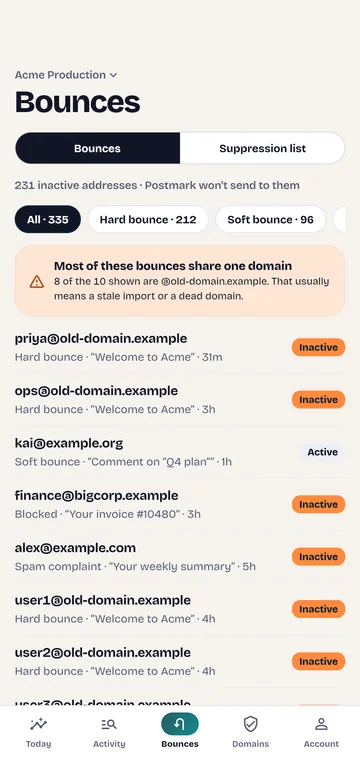
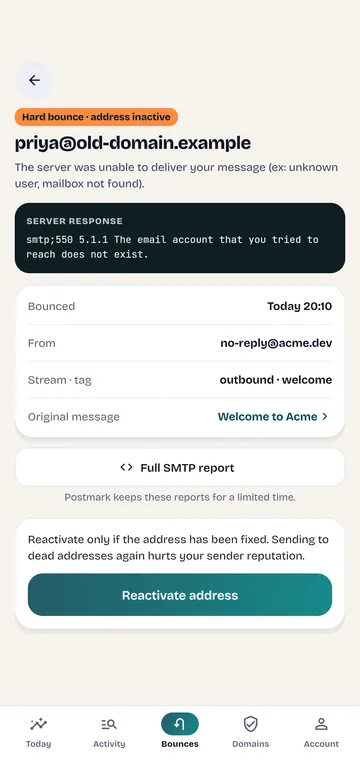
A hard bounce is a permanent failure: the receiving server answered with a 5xx code such as 550 5.1.1 (the mailbox does not exist), so sending again will not work and the address should be suppressed. A soft bounce is a temporary failure, usually a 4xx code such as a full mailbox or rate limiting, so the message can be retried and may still arrive. If an address keeps soft-bouncing for days, treat it as hard.
The difference in one table
The split comes from SMTP itself. RFC 5321 calls 4xx replies transient (the same command may succeed if repeated) and 5xx replies permanent (the client should not repeat the exact request). Enhanced status codes follow the same rule in their first digit: 4.x.x is temporary, 5.x.x is permanent.
| Hard bounce | Soft bounce | |
|---|---|---|
| SMTP class | 5xx / 5.x.x | 4xx / 4.x.x (sometimes a mislabelled 5xx) |
| Typical codes | 550 5.1.1, 550 5.1.10, 553 5.1.3 | 452 4.2.2, 450 4.2.1, 421 4.7.0 |
| Usual cause | Address does not exist, domain has no mail server, bad syntax | Mailbox full, server busy, you are being rate limited |
| What the provider does | Stops sending to the address (suppression) | Retries for a while, then gives up |
| What you do | Fix or remove the address. Do not just reactivate it. | Wait. If it repeats across many recipients at one domain, look at your reputation. |
How Postmark, Mailgun, SendGrid and Resend label them
Each provider uses its own words, which is why the same failure looks different in each dashboard.
| Provider | Hard | Soft | Notes |
|---|---|---|---|
| Postmark | HardBounce (type code 1) | SoftBounce (4096), Transient (2), DnsError (256) | Each bounce has an Inactive flag saying whether Postmark deactivated the address, and CanActivate saying whether you may reactivate it. SpamComplaint (100001) is listed as a bounce type too. |
| Mailgun | failed event, severity=permanent | failed event, severity=temporary | Permanent failures include hard bounces and messages that reached their retry limit. Bounced addresses go on the Bounces suppression list. |
| SendGrid | Bounce event "type": "bounce" | Bounce event "type": "blocked"; deferred while retrying | Bounces are suppressed for future sends; blocks are not. Deferred mail is retried for up to 72 hours, then lands on the block list. |
| Resend | Permanent (subtypes General, NoEmail) | Transient (General, MailboxFull, MessageTooLarge, ContentRejected, AttachmentRejected) | A third type, Undetermined, means the bounce message did not say enough. Hard bounces are added to the suppression list. |
The grey zone: when the label is wrong
Receiving servers do not always use the right class, so read the text as well as the number.
- 5xx that is really about you, not the address.
550 5.7.1and550 5.7.26are policy or authentication rejections. Gmail's 5.7.26 text startsThis email has been blocked because the sender is unauthenticated.The recipient exists; fix SPF, DKIM and DMARC instead of suppressing them. - 5xx for a full mailbox. Gmail returns
552 5.2.2withThe recipient's inbox is out of storage space and inactive.That address has been full for a long time; treat it as hard. - 4xx that never clears. A mailbox that has been full for a week will not empty itself. Postmark's own guidance is to retry soft bounces, but not too often, and to treat them as hard after a few tries.
- 4xx that is rate limiting. Gmail's
421 4.7.28beginsGmail has detected an unusual rate of email.Hundreds of these at one domain mean the problem is your sending, not the recipients.
What to do with each
Hard bounce: let the provider suppress the address and find out why. Most are typos (gmial.com), people who left a company, or fake sign-ups. Ask the user to correct their address through your app. Reactivating a hard-bounced address without changing anything just produces another hard bounce, and each one counts against your bounce rate.
Soft bounce: do nothing for the first few hours; the provider retries. Act when the same address soft-bounces across several days, or when many addresses at one domain soft-bounce at once, which points at throttling or a block of your IP or domain.
Watch the mix, not just the total. A sudden rise in hard bounces usually means a bad import or a sign-up form under attack. A rise in soft bounces at one mailbox provider usually means reputation.
Questions
Do soft bounces hurt sender reputation?
A few do not matter. A pattern of soft bounces at one mailbox provider is often a symptom of poor reputation (throttling or temporary blocks) rather than a cause, so look at complaints and authentication.
Should I remove addresses that soft-bounce?
Not after one bounce. If the same address soft-bounces on every send for several days, stop sending to it as you would a hard bounce.
Is a 552 mailbox full error a hard or soft bounce?
It is a 5xx code, so many systems record it as hard, but the cause is a full mailbox. Gmail's 552 5.2.2 says the inbox is out of storage and inactive, so treating it as permanent is reasonable.
Can I send to a hard-bounced address again?
Most providers let you reactivate or remove it from suppression, but only do it once the address is known to be fixed. Sending to it unchanged will bounce again.
Related
- SMTP bounce codes: full list and what to do for eachEvery SMTP reply code (421 to 555) and enhanced status code (X.1.1 to X.7.7) from RFC 5321 and RFC 3463, with what each means and what to do next.
- 550 5.1.1 user unknown: the address does not exist550 5.1.1 means the recipient's server says the mailbox does not exist. It is a hard bounce: suppress the address and get a corrected one. Don't resend.
- What is a good email bounce rate? Limits and targetsFor transactional email, keep your bounce rate well under 5%; Postmark requires under 10%. Most bounces should be rare hard bounces, so watch for spikes.
- Reactivate a bounced address in Postmark (UI and API)Reactivate in the stream's Suppressions tab, with PUT /bounces/{id}/activate or the suppressions delete endpoint. Spam complaints need Postmark support.
- SendGrid bounces vs blocks vs invalid emailsIn SendGrid a bounce is a problem with the address and stays suppressed; a block is about your IP or content and isn't. How all six lists differ.
- Mailgun failed events: permanent vs temporary failuresA Mailgun failed event has severity permanent (dropped, not retried) or temporary (retried for up to 8 hours). How to read reason and delivery-status.