SendGrid bounces vs blocks vs invalid emails: what's the difference
A bounce means the receiving server rejected the recipient address, and SendGrid keeps suppressing it. A block means the message was rejected because of your sending IP or its content, and the address is not suppressed, so the next send will be attempted. Invalid emails are addresses that are malformed or don't exist at the receiving server, and they stay suppressed like bounces. Fix bounces by cleaning your list; fix blocks by fixing reputation, authentication or content.
The six lists side by side
SendGrid's suppression documentation puts it in one table. "Keep suppressing" means SendGrid will refuse later sends to that address until you remove it:
| List | Why an address lands there | Keeps suppressing? | What to do |
|---|---|---|---|
| Bounces | A problem with the recipient address | Yes | Fix or drop the address; don't just delete the entry |
| Blocks | Your sending IP or the message content | No | Fix reputation, authentication or content |
| Spam reports | The recipient marked a message as spam | Yes | Leave it; never re-mail without fresh consent |
| Invalid emails | The address is malformed or doesn't exist | Yes | Fix the typo at the source (signup form, import) |
| Global unsubscribes | Opted out of everything from you | Yes | Respect it |
| Group unsubscribes | Opted out of one unsubscribe group | Yes | Respect it for that group |
Each send you attempt to a suppressed address still uses one credit, so a list that keeps re-mailing suppressed addresses costs money as well as reputation.
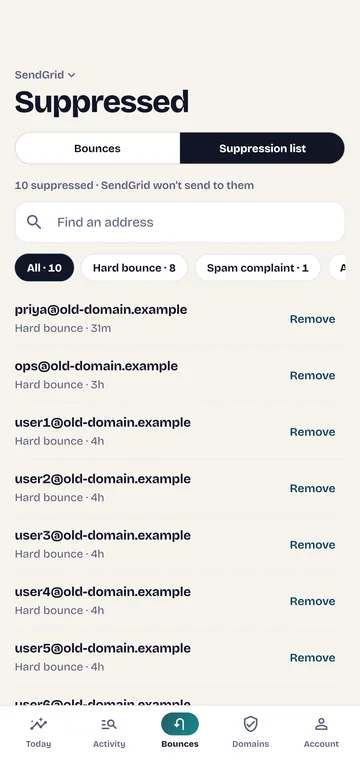
Bounces: the address is the problem
A bounce happens when the receiving server rejects the message. SendGrid distinguishes a synchronous bounce (rejected during the delivery attempt) from an asynchronous one (accepted, then reported back later as a bounce). Either way, the address goes on the bounce list, and later sends to it are suppressed because SendGrid has recorded it as invalid.
The entry's reason usually holds the SMTP code, the enhanced status code and the server's text, for example 550 5.1.1 The email account that you tried to reach does not exist. Read it before deciding anything: a mailbox that doesn't exist will never come back. See 550 5.1.1 user unknown and SMTP bounce codes.
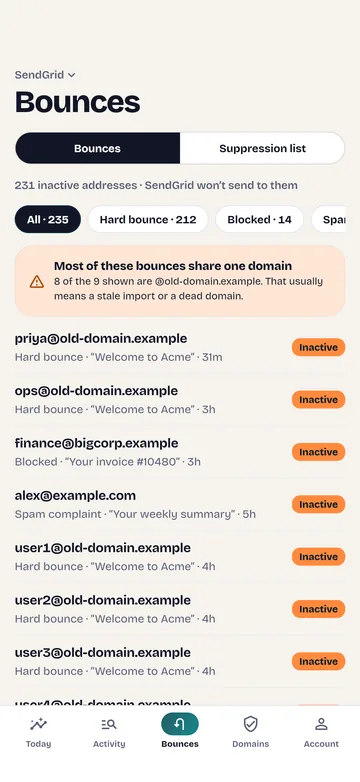
Blocks: you are the problem
SendGrid calls it a block when an inbox provider rejects your message for a reason that isn't the address: your IP is on a deny list, the provider is refusing mail from your sending IP, or a content filter rejected the message. In SendGrid's words, a block event will not result in the recipient address being added to a suppression list. The block list records what happened; it doesn't stop the next send.
That is the trap. Because blocked addresses are retried on every send, a block problem doesn't go away by itself, and repeated sends into a provider that is blocking you can deepen it. Typical fixes, in the order to check them:
- Domain authentication and DMARC. Unauthenticated mail is rejected outright by Gmail, Yahoo and Microsoft. See SendGrid domain authentication.
- A deny list. Look up your sending IP (shown in the block reason or in Email Logs) on the list named in the rejection text.
- Content and links: URL shorteners, a link domain with poor reputation, or attachment types the receiver refuses.
- Volume spikes from a new or shared IP.
If most blocks come from one provider, the rejection text usually names its postmaster page.
Invalid emails and spam reports
An address is invalid if it fails format rules or doesn't exist at the recipient's mail server. These come from typos ([email protected]), imports and fake signups, so the fix belongs on your form: validate, and confirm addresses before sending anything important.
Spam reports arrive through feedback loops when a recipient presses "Report spam". Transactional senders get them too, usually from receipts or notifications people no longer want. Leave these suppressed. Keep your complaint rate well under 0.3%, the line Gmail and Yahoo draw; see spam complaint rate.
Removing an address, and the bypass trap
After you remove a recipient from the bounce or block list, SendGrid lets you send to that address again. Do that only when you know the cause is fixed: the person corrected their mailbox, or the block was a one-off from a deny list you've since cleared. Removing a hard bounce without a reason just earns another bounce and hurts your bounce rate.
List the bounce list and delete a single block over the API:
curl -s "https://api.sendgrid.com/v3/suppression/bounces?limit=100" \
  -H "Authorization: Bearer $SENDGRID_API_KEY" \
  -H "Accept: application/json"

curl -s -X DELETE https://api.sendgrid.com/v3/suppression/blocks/[email protected] \
  -H "Authorization: Bearer $SENDGRID_API_KEY"
Bounce entries carry email, reason, status and created (a Unix timestamp); limit goes up to 500, with offset for later pages.
The v3 Mail Send API also accepts mail_settings.bypass_list_management, which ignores every suppression list for that message. It exists for things like password resets to an address that unsubscribed from marketing. Don't use it to push mail to bounced or complaining addresses.
Questions
Does SendGrid retry a blocked email?
A block is a rejection, so that message is not delivered. The address is not suppressed, though, so your next send to it will be attempted.
Is a SendGrid block a soft bounce?
Not exactly. SendGrid separates blocks (IP or content) from deferrals, which it retries, and from bounces (the address). A block is closest to a policy rejection rather than a temporary mailbox problem.
Should I delete blocks from the list?
It makes no difference to sending, because blocks don't suppress future mail. Fix the cause; the list is a record of what was rejected.
Related
- Hard bounce vs soft bounce: what each means, what to doA hard bounce is a permanent failure (5xx, e.g. 550 5.1.1): stop sending to it. A soft bounce is temporary (4xx, e.g. full mailbox): retry, then stop.
- SMTP bounce codes: full list and what to do for eachEvery SMTP reply code (421 to 555) and enhanced status code (X.1.1 to X.7.7) from RFC 5321 and RFC 3463, with what each means and what to do next.
- What is a good email bounce rate? Limits and targetsFor transactional email, keep your bounce rate well under 5%; Postmark requires under 10%. Most bounces should be rare hard bounces, so watch for spikes.
- SendGrid domain authentication: CNAMEs and fixing VerifySendGrid domain authentication adds three CNAMEs (em…, s1._domainkey, s2._domainkey) plus DMARC. What each record does and why Verify fails.
- SendGrid Email Activity history: 30 days and missing mailSendGrid Email Logs keeps 30 days of events for every customer. The older Email Activity Feed needs a paid add-on for 30 days. Why a message may not show.
- Email bounce checker app: exact server repliesEvery bounce with the receiving server's exact reply, plus suppression lists and reactivation, for Postmark, Mailgun, SendGrid and Resend.