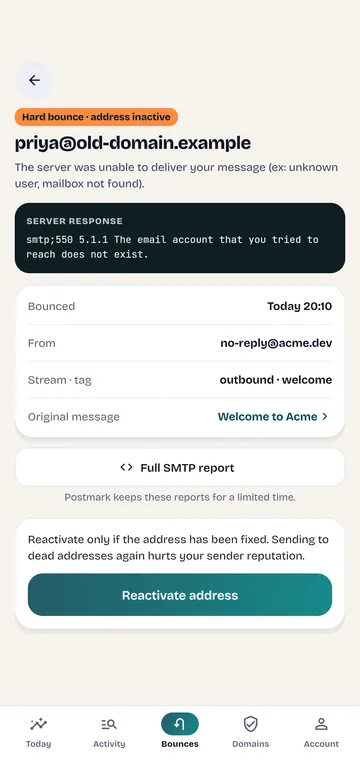
550 5.1.1: the email account does not exist
550 5.1.1 is a permanent failure meaning "bad destination mailbox address": the receiving server has no mailbox with that name. Resending will bounce again. Let your provider suppress the address, check it for typos, and ask the person for a working address through your app or another channel.
- Confirm it is a 5.1.1 Open the bounce and read the SMTP response. 5.1.1, 5.1.10 and 5.2.1 mean the mailbox cannot receive mail.
- Check for a typo Compare the address with what the user meant: common misspellings of gmail.com, outlook.com and company domains.
- Leave the address suppressed Do not reactivate it unchanged; another send will hard-bounce again.
- Ask for a working address Show an in-app prompt or contact the user another way, and update the address in your database.
- Reactivate only after a real fix If the recipient's admin confirms the mailbox now exists, reactivate it at your provider and send once.
What it looks like
The code is standard; the wording depends on who runs the recipient's mail. Versions you will see:
- Gmail and Google Workspace:
550 5.1.1 The email account that you tried to reach does not exist. Please double-check the recipient's email address for typos(followed by more text and a link). - Microsoft 365 / Exchange Online:
5.1.1withBad destination mailbox address, or550 5.1.10Recipient not found, which appears asRESOLVER.ADR.RecipientNotFound. - Outlook.com and Hotmail:
550 5.5.0 Requested action not taken: mailbox unavailable; Microsoft documents this as the address not being found. - Postfix servers:
550 5.1.1 <[email protected]>: Recipient address rejected: User unknown in local recipient table.
A close relative is Gmail's 550 5.2.1 The email account that you tried to reach is inactive.: the account exists but is abandoned. Handle it the same way.
Causes, most common first
- Typo at sign-up.
gmial.com,hotmial.com, a missing letter in the name part. Typos in the domain usually give5.1.2or a DNS failure instead; typos in the name part give 5.1.1. - The person left. Work addresses are deleted when people change jobs. Common for B2B products with older accounts.
- Fake or bot sign-ups. Forms without confirmation collect random addresses, then your welcome email bounces. A burst of 5.1.1s right after sign-ups usually means this.
- Old imported list. Addresses that were valid years ago.
- Recipient-side misconfiguration. Rare, but real: a company moves to Microsoft 365 and a mailbox is not synced, so a valid colleague returns
5.1.10. If one known-good address at a company bounces, the fix is on their side.
Fix it
Do not reactivate and resend the same address: it will bounce again and count against your bounce rate. Find the bounces first. On Postmark, list deactivated hard bounces:
curl "https://api.postmarkapp.com/bounces?type=HardBounce&inactive=true&count=50&offset=0" \
  -H "Accept: application/json" \
  -H "X-Postmark-Server-Token: $POSTMARK_SERVER_TOKEN"
Then fix the address in your own database, not just at the provider. Once the user has confirmed a new address, send to the new one; leave the old one suppressed. If you are sure an address was fixed on the recipient's side (their admin confirms the mailbox now exists), reactivating it is safe. On Postmark that is PUT /bounces/{bounceid}/activate, allowed when the bounce's CanActivate is true.
Stop it happening again
- Confirm addresses at sign-up: a verification link means a mistyped address never becomes an account.
- Suggest corrections for common domain typos in the form ("Did you mean gmail.com?").
- Rate-limit or add a challenge to public sign-up forms if bounces arrive in bursts.
- Sync suppressions back to your app so you stop generating mail to dead addresses, and show users a banner asking them to update their email.
- Watch hard bounces by domain: twenty 5.1.1s from one company in a day is their migration, not twenty typos.
Questions
Is 550 5.1.1 my fault?
Almost never your server's fault. The receiving server says the mailbox does not exist. Your part is collecting and keeping good addresses.
The address works from my Gmail but bounces from my app. Why?
Check the exact address your app sent to, including hidden spaces or a different domain. If it truly matches, the recipient's server may treat outside mail differently; contact their admin with the full bounce text.
Will a few 5.1.1 bounces hurt my sending?
A few are normal. Postmark, for example, flags servers whose bounce rate goes above 10%, and mailbox providers notice senders that keep mailing dead addresses.
Related
- Hard bounce vs soft bounce: what each means, what to doA hard bounce is a permanent failure (5xx, e.g. 550 5.1.1): stop sending to it. A soft bounce is temporary (4xx, e.g. full mailbox): retry, then stop.
- SMTP bounce codes: full list and what to do for eachEvery SMTP reply code (421 to 555) and enhanced status code (X.1.1 to X.7.7) from RFC 5321 and RFC 3463, with what each means and what to do next.
- What is a good email bounce rate? Limits and targetsFor transactional email, keep your bounce rate well under 5%; Postmark requires under 10%. Most bounces should be rare hard bounces, so watch for spikes.
- Reactivate a bounced address in Postmark (UI and API)Reactivate in the stream's Suppressions tab, with PUT /bounces/{id}/activate or the suppressions delete endpoint. Spam complaints need Postmark support.
- Postmark error 406 inactive recipient: cause and fixPostmark ErrorCode 406 means the address is suppressed after a hard bounce, spam complaint or manual suppression. Find which, and when to reactivate it.