What is a good email bounce rate?
For transactional email, a good bounce rate is well under 5%, and a healthy one is usually much lower because you are sending to people who just signed up or bought something. Providers enforce hard limits above that: Postmark, for example, requires you to stay below 10% bounces and 0.1% spam complaints. What matters day to day is a sudden rise, not the exact figure.
The numbers you can rely on
Published industry "averages" vary wildly and mix marketing lists with app mail, so use the limits your provider actually enforces and its own guidance.
| Source | Bounce rate | Spam complaint rate |
|---|---|---|
| Postmark requirement (Servers FAQ) | below 10% | below 0.1% |
| Postmark guidance (delivery troubleshooting) | well under 5% | less than 0.10% |
| Gmail sender guidelines | no published figure | below 0.10%, never 0.30% or higher |
| Yahoo sender best practices | no published figure | below 0.3% |
On Postmark, a server whose bounce or spam complaint rate exceeds the limit appears red. Mailgun, SendGrid and Resend review accounts under their own acceptable use policies; check your provider's terms rather than relying on a number from a blog.
Transactional vs marketing
Transactional mail (sign-up confirmations, receipts, password resets) goes to addresses someone typed minutes ago or uses to log in. Bounces should be rare: a few typos and some old accounts. If your transactional bounce rate drifts towards 5%, something is wrong: unconfirmed sign-ups, bots, or mail to long-dormant accounts.
Hard bounces on transactional mail also have a cost beyond the rate: each one is a customer who did not get a receipt or could not reset a password. Fixing the address in your app matters as much as keeping the number down.
Marketing mail goes to lists that age. Addresses die as people change jobs and abandon inboxes, so bounce rates climb if you do not remove bounces and inactive subscribers. That is one reason to keep marketing on a separate stream or domain: its bounces should not drag down the mail people are waiting for.
How the rate is worked out, and what skews it
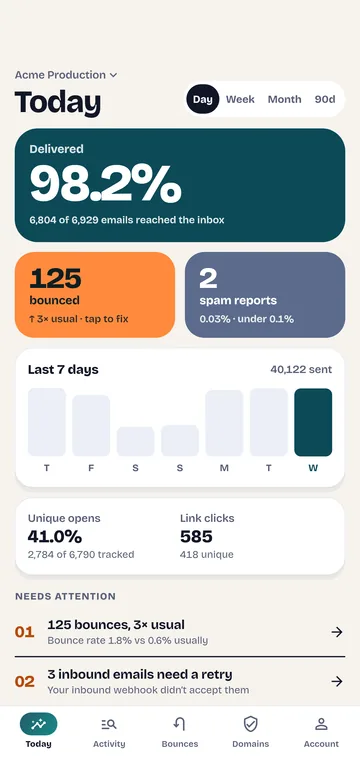
Most dashboards divide bounced messages by messages sent over the period. Three things make the figure misleading:
- Low volume. Two bounces out of 40 emails is 5%. Look at counts as well as percentages on quiet days.
- Soft bounces. Some dashboards count temporary failures, some do not. A rate inflated by a full mailbox or Gmail throttling (
421 4.7.28) needs a different fix from one full of550 5.1.1. - Suppressed sends. Messages your provider refused to send because the address was already suppressed may or may not count. They do not reach the receiving server, but they show your app is still generating mail to dead addresses.
Spot a problem early
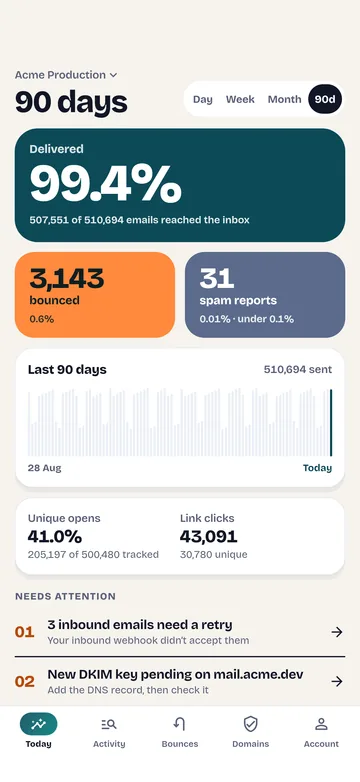
A single bad day is the common failure: a CSV import of old customers, a sign-up form hit by bots, or a code change that sends to the wrong field. Compare today with your normal level rather than with an industry figure; a server that usually runs at 0.3% and jumps to 3% has a problem even though 3% is under Postmark's limit. A useful rule is to look whenever today's rate is a multiple of your recent average, and to group the bounces by recipient domain: one domain means a recipient-side issue; many domains with 5.1.1 means bad addresses; many domains with 5.7.x means your reputation or authentication.
Questions
Is a 2% bounce rate good?
For transactional email it is acceptable but worth a look: check whether the bounces are typos at sign-up or old accounts. Postmark's guidance is well under 5%.
Do soft bounces count towards the bounce rate?
It depends on the dashboard. Hard bounces are the ones that signal bad addresses, so judge your list by those.
What happens if I go over the limit?
On Postmark the server shows red when it exceeds 10% bounces or 0.1% spam complaints, and the account may be reviewed. Other providers have their own review processes.
Related
- Hard bounce vs soft bounce: what each means, what to doA hard bounce is a permanent failure (5xx, e.g. 550 5.1.1): stop sending to it. A soft bounce is temporary (4xx, e.g. full mailbox): retry, then stop.
- Gmail and Yahoo spam rate limit: the 0.3% rule explainedGmail and Yahoo require a spam complaint rate below 0.3%; Gmail says aim under 0.1%. How it is measured, who it applies to, what it means for receipts.
- 550 5.1.1 user unknown: the address does not exist550 5.1.1 means the recipient's server says the mailbox does not exist. It is a hard bounce: suppress the address and get a corrected one. Don't resend.
- How to monitor email delivery from your phoneWatch bounce rate, spam complaints, failed inbound and DNS status from your phone, with spike alerts and widgets for Postmark, Mailgun, SendGrid, Resend.
- Transactional vs marketing email: send them separatelyTransactional email is triggered by a user action; marketing goes out on your schedule. Split them by stream, IP and subdomain to protect receipts.