Bouncewise › Features › Email bounce checker app: exact server replies
Bounces and suppressions, with the receiving server's exact reply
The Bounces tab lists every bounce and spam complaint from Postmark, Mailgun, SendGrid or Resend, and each one opens to the receiving server's exact reply, the original message and whether your provider is still sending to that address. A Suppression list view shows who your provider won't send to, and with Pro you can reactivate or remove an address after a confirmation.
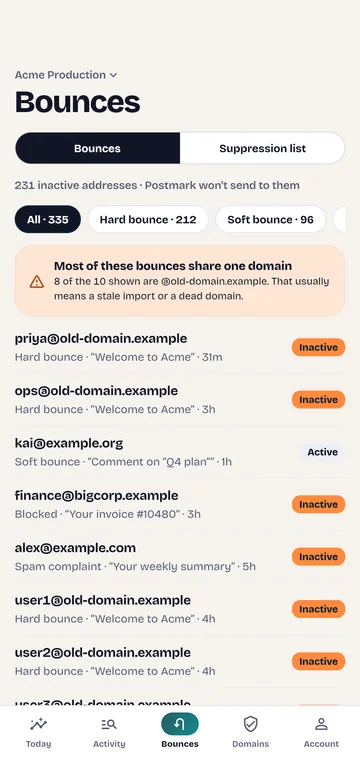
The list: what bounced, and why so many
Bounces opens with how many addresses are inactive and the latest bounces, filterable by type. If most of the bounces shown share one domain, it says so: Most of these bounces share one domain, which usually means a stale import or a dead domain.
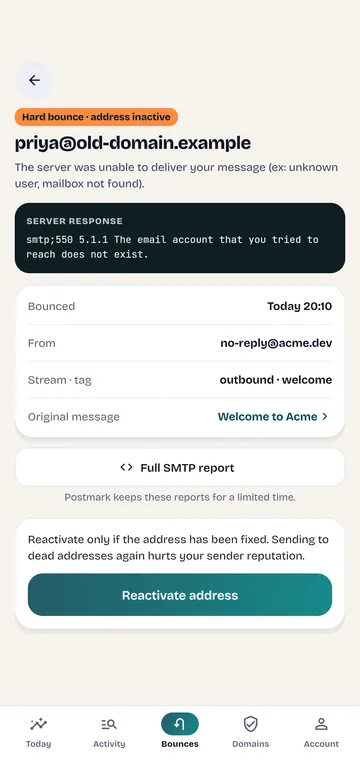
One bounce: the server's own words
Each bounce shows its type, the address and a SERVER RESPONSE block with the reply exactly as the provider recorded it, such as a 550 5.1.1 user-unknown reply, ready to select and copy. Below are when it bounced, From, stream and tag, and a link to the original message. On Postmark, Full SMTP report opens the complete exchange while Postmark still keeps it.
If the address can be reactivated, the app says to do so only once it has been fixed, because sending to dead addresses hurts your reputation. Spam complaints can't be reactivated.
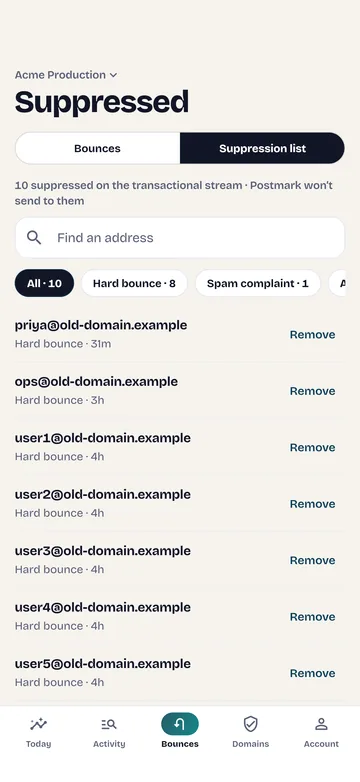
Suppression lists
Switch Bounces to Suppression list to search everyone your provider won't send to and filter by reason. It brings together Postmark's per-stream suppressions, Mailgun's bounces, complaints and unsubscribes, SendGrid's bounces, blocks, spam reports, invalid emails and unsubscribes, and Resend's suppressions. Removing an address asks first and warns when it will just bounce again.
Questions
Can I reactivate an address from my phone?
Yes, with Pro, when your provider allows it. Every reactivation asks first, and read-only mode hides the button.
Why can't I remove a spam complaint?
Postmark keeps people who complained suppressed to protect your sending reputation, so the app marks them as can't be removed.
Related
- Hard bounce vs soft bounce: what each means, what to doA hard bounce is a permanent failure (5xx, e.g. 550 5.1.1): stop sending to it. A soft bounce is temporary (4xx, e.g. full mailbox): retry, then stop.
- SMTP bounce codes: full list and what to do for eachEvery SMTP reply code (421 to 555) and enhanced status code (X.1.1 to X.7.7) from RFC 5321 and RFC 3463, with what each means and what to do next.
- 550 5.1.1 user unknown: the address does not exist550 5.1.1 means the recipient's server says the mailbox does not exist. It is a hard bounce: suppress the address and get a corrected one. Don't resend.
- Reactivate a bounced address in Postmark (UI and API)Reactivate in the stream's Suppressions tab, with PUT /bounces/{id}/activate or the suppressions delete endpoint. Spam complaints need Postmark support.
- Bouncewise read-only mode: look, never changeRead-only mode hides every action in Bouncewise: reactivate, retry, bypass, remove suppression, DNS checks and test sends. Turn it on in Account › Safety.