How to reactivate a bounced email address in Postmark
Open the server, go to the message stream's Suppressions tab, search for the address and click Reactivate; it becomes active again immediately. Through the API, call PUT /bounces/{bounceid}/activate or POST /message-streams/{stream_id}/suppressions/delete with a Server API token. Addresses suppressed by a spam complaint can't be reactivated by you: Postmark support does it if the recipient asks.
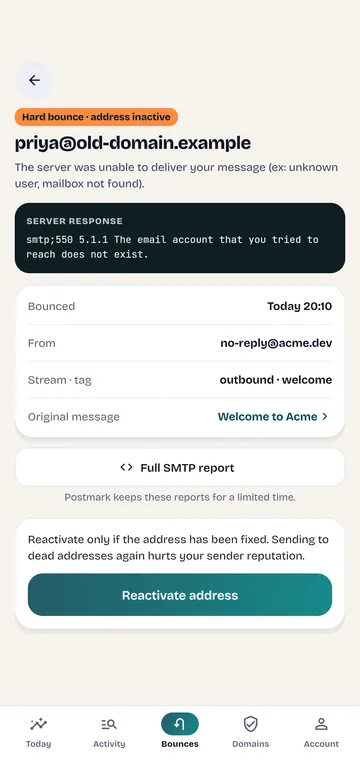
- Check why it bounced Open the bounce and read its type and details. If the mailbox still doesn't exist, reactivating only causes another hard bounce.
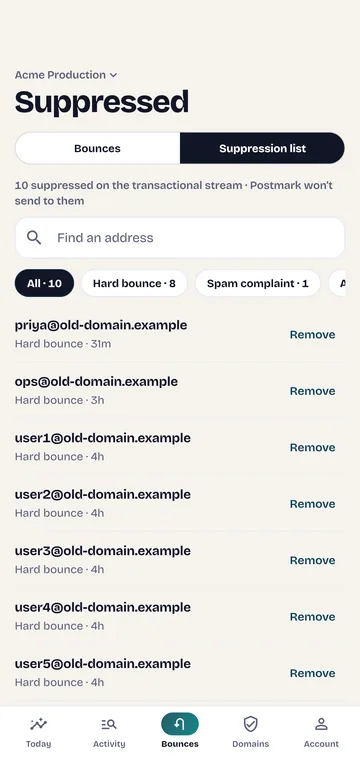
- Open the stream's Suppressions tab In Postmark, pick the server, then the message stream you send through, then Suppressions.
- Search and reactivate Search for the address and click Reactivate. It is active again straight away.
- Send the email again Reactivation doesn't resend anything, so trigger the message again from your app.
Before you reactivate
Reactivating removes Postmark's protection for that address. It is the right call when:
- the recipient tells you their mailbox works again (it was full, disabled or misconfigured);
- a hard bounce came from a temporary fault on the receiving side that was reported with a permanent code;
- you or a colleague suppressed the address by mistake;
- someone who unsubscribed asks to receive your emails again.
It is the wrong call for a 550 5.1.1 user-unknown bounce that nobody has fixed: the next message bounces and the address is suppressed again. Postmark's own advice is to honour unsubscribes and only reactivate addresses when asked to, or when mistakes happen.
In the Postmark web app
Hard bounces, unsubscribes and manually added suppressions all reactivate the same way: open the message stream's Suppressions tab, search for the address and click Reactivate. The suppression reason shown there tells you which kind it was.
If you can't find the address, check that you are in the right server and stream: the search only covers the stream whose tab you opened.
Suppressions are kept per stream. If the address is also suppressed in another stream (for example your broadcast stream), reactivate it there separately, and only if that stream's reason allows it.
With the Bounce API
Find the bounce ID for the address. Add messagestream= if the bounce wasn't on the default outbound stream:
curl "https://api.postmarkapp.com/bounces?count=10&offset=0&[email protected]&inactive=true" \
  -H "Accept: application/json" \
  -H "X-Postmark-Server-Token: $POSTMARK_SERVER_TOKEN"
Check that CanActivate is true, then activate it:
curl "https://api.postmarkapp.com/bounces/692560173/activate" \
  -X PUT \
  -H "Accept: application/json" \
  -H "Content-Type: application/json" \
  -H "X-Postmark-Server-Token: $POSTMARK_SERVER_TOKEN" \
  -d ""
A successful call returns "Message": "OK" and the bounce with "Inactive": false. If the bounce type can't be reactivated, Postmark answers with ErrorCode 1003, Due to the type of bounce, this address cannot be reactivated.; an unknown ID gives ErrorCode 1001.
With the Suppressions API (several at once)
The suppressions endpoint works per stream and takes up to 50 addresses per call. It also handles unsubscribes and manual suppressions, which have no bounce to activate. Postmark notes that deleting a HardBounce suppression is the equivalent of reactivating the bounce.
curl "https://api.postmarkapp.com/message-streams/outbound/suppressions/delete" \
  -X POST \
  -H "Accept: application/json" \
  -H "Content-Type: application/json" \
  -H "X-Postmark-Server-Token: $POSTMARK_SERVER_TOKEN" \
  -d '{"Suppressions": [
        {"EmailAddress": "[email protected]"},
        {"EmailAddress": "[email protected]"}
      ]}'
The call returns HTTP 200 even when some addresses fail, so read each result:
{
  "Suppressions": [
    {"EmailAddress": "[email protected]", "Status": "Deleted", "Message": null},
    {"EmailAddress": "[email protected]", "Status": "Failed",
     "Message": "You do not have the required authority to change this suppression."}
  ]
}
When you can't reactivate: spam complaints
A SpamComplaint bounce has "CanActivate": false, and deleting its suppression returns Failed. Postmark won't let you reactivate it from the Suppressions tab either. If the recipient contacts you and wants your email again, ask Postmark support at [email protected] and include evidence of their request, such as a screenshot.
Questions
How long does reactivation take?
It is immediate. The next message you send to the address is delivered normally, unless it bounces again.
Does reactivating resend the emails that failed?
No. Postmark only allows new messages to the address; resend anything important from your app.
Can I reactivate many addresses at once?
Yes, POST /message-streams/{stream_id}/suppressions/delete accepts up to 50 addresses per call. Check each item's Status in the response.
Why does Postmark say I don't have the authority to change this suppression?
That is the answer for an address suppressed by a spam complaint. Only Postmark support can reactivate it, and only when the recipient asks.
Related
- Postmark error 406 inactive recipient: cause and fixPostmark ErrorCode 406 means the address is suppressed after a hard bounce, spam complaint or manual suppression. Find which, and when to reactivate it.
- Postmark spam complaints: what they mean, what to doA Postmark spam complaint (SpamComplaint, 100001) deactivates the address at once, and only Postmark support can reactivate it. How to cut the rate.
- Hard bounce vs soft bounce: what each means, what to doA hard bounce is a permanent failure (5xx, e.g. 550 5.1.1): stop sending to it. A soft bounce is temporary (4xx, e.g. full mailbox): retry, then stop.
- 550 5.1.1 user unknown: the address does not exist550 5.1.1 means the recipient's server says the mailbox does not exist. It is a hard bounce: suppress the address and get a corrected one. Don't resend.
- Postmark message streams: transactional, broadcast, inboundEach Postmark server has an outbound transactional stream and an inbound stream; you add broadcast streams. Pick one per email with MessageStream.