Postmark spam complaints: what they mean and what to do
A Postmark spam complaint is recorded when a recipient clicks "This is spam" or similar and their mailbox provider reports it back. Postmark logs it as bounce type SpamComplaint (TypeCode 100001), deactivates the address immediately and adds it to the stream's suppression list, so later sends to it fail with ErrorCode 406. You can't reactivate it yourself; Postmark support can, if the recipient asks and you can show it. Gmail doesn't report individual complaints, so also watch your spam rate in Gmail's Postmaster Tools.
What happens when a complaint arrives
The complaint appears in the stream's bounces with this shape (trimmed from Postmark's webhook example):
{
  "RecordType": "SpamComplaint",
  "MessageStream": "outbound",
  "ID": 692560174,
  "Type": "SpamComplaint",
  "TypeCode": 100001,
  "Name": "Spam complaint",
  "Description": "The subscriber explicitly marked this message as spam.",
  "Email": "[email protected]",
  "BouncedAt": "2026-11-05T16:33:54.9070259Z",
  "Inactive": true,
  "CanActivate": false,
  "Subject": "Your weekly summary"
}Inactiveistrue: Postmark won't send to the address on that stream again.CanActivateisfalse: the Bounce API's activate call and the suppressions delete call both refuse it.Frommay be missing: Postmark notes that spam complaints don't always include the original sender.- The address shows in the stream's Suppressions tab with reason
SpamComplaint.
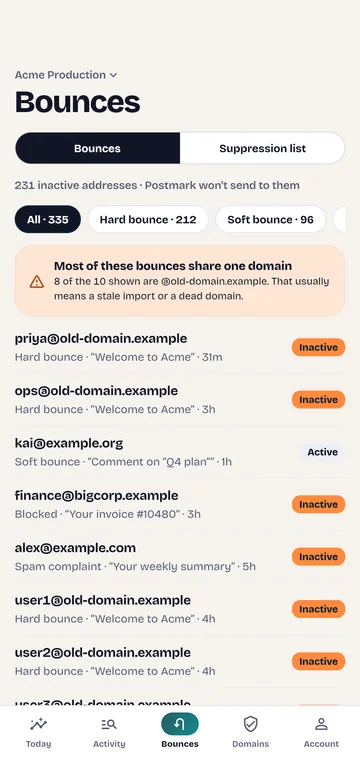
Where complaints come from, and what you don't see
Mailbox providers that run feedback loops send a report for each complaint; Postmark's docs mention clients such as Yahoo, Hotmail and AOL. That is what turns into a SpamComplaint record.
Gmail works differently. Its feedback loop gives large senders aggregate complaint data in Postmaster Tools, keyed on a Feedback-ID header and only for @gmail.com recipients, without naming the people who complained. So a Gmail user who marks your mail as spam usually won't appear as an individual complaint. A low count in Postmark doesn't mean a low complaint rate at Gmail.
Find your complaints
List them for a stream (the Bounce API defaults to outbound):
curl "https://api.postmarkapp.com/bounces?count=100&offset=0&type=SpamComplaint&messagestream=outbound" \
  -H "Accept: application/json" \
  -H "X-Postmark-Server-Token: $POSTMARK_SERVER_TOKEN"
Get daily counts; without messagestream this adds up every stream on the server:
curl "https://api.postmarkapp.com/stats/outbound/spam?fromdate=2026-11-01&todate=2026-11-25" \
  -H "Accept: application/json" \
  -H "X-Postmark-Server-Token: $POSTMARK_SERVER_TOKEN"
To react in real time, add a webhook on the stream with the Spam Complaint trigger on (Triggers.SpamComplaint.Enabled in the Webhooks API) and stop sending from your side when it fires.
Why people complain, most common first
- They don't recognise the sender. An unfamiliar From name or domain, or an email arriving long after sign-up.
- They didn't expect this kind of email. Marketing or digests sent through a transactional stream, or to users who never opted in.
- Unsubscribing is harder than reporting. With no visible unsubscribe link, the spam button becomes the unsubscribe button.
- Too many notifications. A burst of alerts or reminders on the same day.
- Old or imported addresses that now belong to someone else or were never confirmed.
Keep the rate low
Google asks senders to keep the spam rate reported in Postmaster Tools below 0.10% and never reach 0.30%. To stay well below that:
- Put one-to-many mail in a broadcast stream, which has Postmark's unsubscribe handling, and keep the transactional stream for mail users trigger.
- Mirror complaints into your own database through the webhook, so other systems stop mailing those people too.
- Use a recognisable From name and a domain users know, authenticated with DKIM and a custom Return-Path.
- Let users turn off non-essential notifications in your app.
- Only ask Postmark to reactivate an address when the recipient asked you to, with their request as evidence.
Questions
Can I reactivate an address after a Postmark spam complaint?
Not yourself. If the recipient asks to receive your email again, contact Postmark support with evidence of their request, such as a screenshot, and they can reactivate it.
Why does Postmark show almost no spam complaints but Gmail Postmaster Tools shows a spam rate?
Gmail doesn't send per-recipient complaint reports. Its feedback loop is aggregate data in Postmaster Tools, so Gmail complaints mostly don't appear as individual records in Postmark.
Does a spam complaint affect other message streams?
The address is suppressed on the stream where the complaint happened; suppression lists are kept per stream. Your own app should still stop sending that person non-essential mail.
What is a good spam complaint rate?
Google's guideline is below 0.10% in Postmaster Tools, and never 0.30% or higher.
Related
- Gmail and Yahoo spam rate limit: the 0.3% rule explainedGmail and Yahoo require a spam complaint rate below 0.3%; Gmail says aim under 0.1%. How it is measured, who it applies to, what it means for receipts.
- Postmark error 406 inactive recipient: cause and fixPostmark ErrorCode 406 means the address is suppressed after a hard bounce, spam complaint or manual suppression. Find which, and when to reactivate it.
- Reactivate a bounced address in Postmark (UI and API)Reactivate in the stream's Suppressions tab, with PUT /bounces/{id}/activate or the suppressions delete endpoint. Spam complaints need Postmark support.
- Postmark message streams: transactional, broadcast, inboundEach Postmark server has an outbound transactional stream and an inbound stream; you add broadcast streams. Pick one per email with MessageStream.
- Transactional emails going to spam: a checklist that worksCheck in order: SPF, DKIM and DMARC pass and align; links and content; reputation; complaint rate; list hygiene. Start with the message headers.