Bouncewise › Features › Bounce alerts on your phone
Bounce, spam and inbound alerts on your phone
Bouncewise checks your Postmark, Mailgun, SendGrid or Resend account in the background and sends a notification when bounces spike, a new spam complaint arrives or inbound mail fails, plus an optional summary of yesterday each morning. The checks run on your phone when the system allows, so alerts arrive within minutes to about an hour rather than instantly. Alerts are part of Pro.
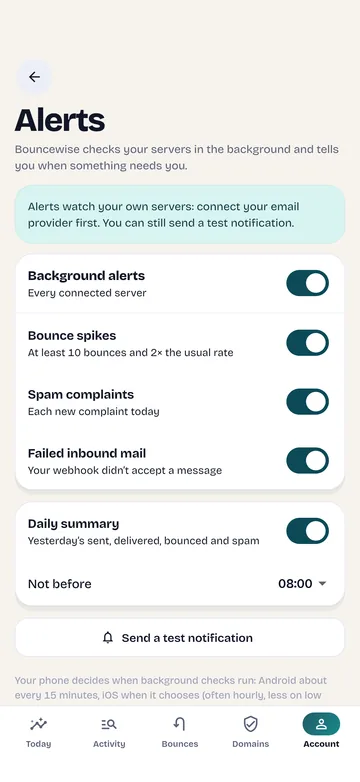
Four alerts you can switch on and off
- Bounce spikes: at least 10 bounces today and at least twice your usual rate over the previous 7 days. One alert per server per day, for example Bounce spike on Production: 125 bounces today, 3× usual (1.8%).
- Spam complaints: each new complaint today.
- Failed inbound mail: a message your inbound webhook didn't accept (Postmark).
- Daily summary: yesterday's sent, delivered, bounced and spam, not before an hour you choose.
A tap takes you to the problem
Tapping a spike or complaint alert selects the server it's about and opens Bounces, where each bounce shows the receiving server's reply. A failed inbound alert opens the inbound list with Retry. Alerts from different servers are grouped by server.
How it works, honestly
There's no Bouncewise server watching your account. Your phone runs the check, calls your provider directly with the key stored on it and posts a local notification. Android runs checks about every 15 minutes; iOS runs them when it chooses, often hourly and less on low battery. The Alerts screen shows when the last check ran. Instant alerts through provider webhooks are planned.
Questions
Are these push notifications?
They're local notifications posted by background checks on your phone, so they arrive after a delay rather than the moment something happens.
Does Bouncewise see my data to send alerts?
No. The checks run on your phone and talk only to your email provider.
Can I test an alert?
Yes: Account › Alerts › Send a test notification.
Related
- Bouncewise alerts: bounce spikes, spam, inboundTurn on Bouncewise alerts for bounce spikes, spam complaints, failed inbound mail and a daily summary. They come from background checks, not instant push.
- Email delivery widgets for iPhoneSee today's delivered rate, bounces, spam reports and failed inbound mail on your iPhone Home Screen and Lock Screen: four widgets, 16 layouts.
- Email bounce checker app: exact server repliesEvery bounce with the receiving server's exact reply, plus suppression lists and reactivation, for Postmark, Mailgun, SendGrid and Resend.
- What is a good email bounce rate? Limits and targetsFor transactional email, keep your bounce rate well under 5%; Postmark requires under 10%. Most bounces should be rare hard bounces, so watch for spikes.
- Gmail and Yahoo spam rate limit: the 0.3% rule explainedGmail and Yahoo require a spam complaint rate below 0.3%; Gmail says aim under 0.1%. How it is measured, who it applies to, what it means for receipts.