Bouncewise › Features › Test email templates on your phone
Preview email templates and send test emails from your phone
Bouncewise lists your provider's email templates, fills them with sample data you can edit and shows the result, then sends a test to your own address from a verified sender. Postmark renders previews itself; for Mailgun, SendGrid and Resend the preview is filled in on the phone. Sending tests is part of Pro and asks before every send.
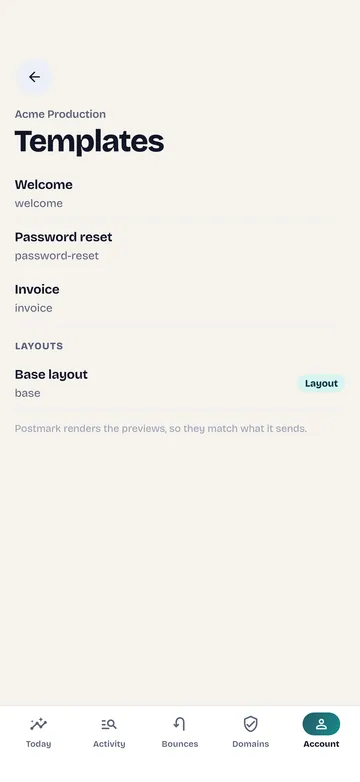
Every template, one tap away
Account › Templates lists the selected server's templates with their alias or status (SendGrid's active version, Resend's Published or Draft). Postmark layouts appear in their own section.
Preview with your own data
A template opens with its subject and a preview filled from sample data: Postmark suggests a model from the template's variables, SendGrid uses the version's test data and Resend each variable's fallback value. Edit the JSON (for example { "name": "Ann" }), tap Update preview, and switch between phone width, desktop width and dark mode. The preview runs in the safe viewer: no scripts, no remote images.
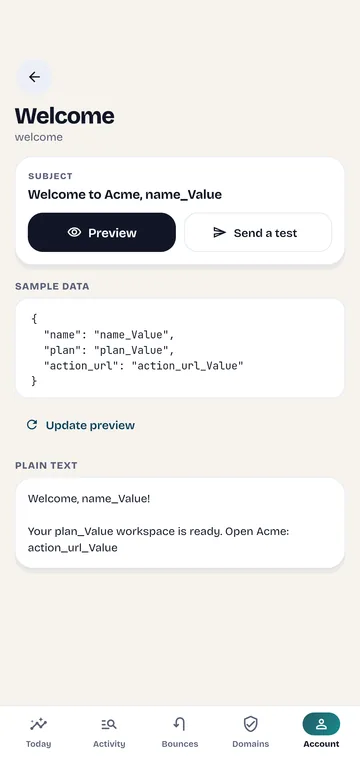
Send a test to yourself
Tap Send a test, choose a From address from your verified senders and enter your own To. Bouncewise confirms first, then shows the message ID and a link to the message once it shows in Activity. Each provider's sender rule is explained in plain words if it refuses, for example that a Mailgun sandbox domain only sends to authorised recipients. Tests are tagged bouncewise-test.
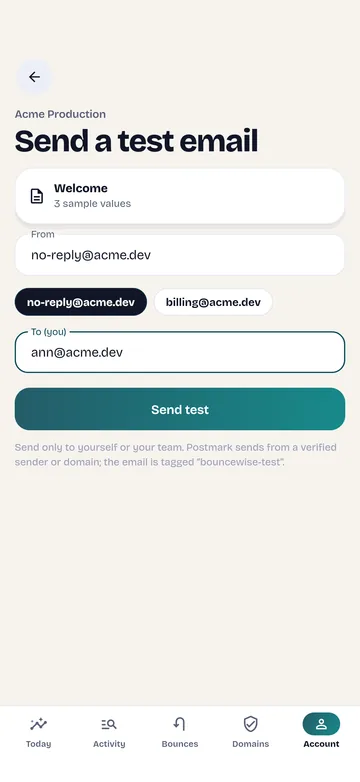
Questions
Can I edit templates in the app?
No. You can preview them with any sample data and send tests; editing stays in your provider's dashboard.
Is a test email free?
It's a real email sent by your provider, so it counts towards your sending like any other.
Which providers support templates?
Postmark, Mailgun, SendGrid (dynamic templates) and Resend.
Related
- Bouncewise: preview templates, send a test emailPreview your Postmark, Mailgun, SendGrid or Resend templates with sample data and send a test to yourself. Per-provider sender rules and common errors.
- Email activity search app for your phoneSearch sent email by recipient, subject or tag, follow each message's timeline and read its HTML, text and source safely: viewing never counts as an open.
- Mailgun sandbox domain: authorized recipients and limitsA Mailgun sandbox domain only sends to up to 5 authorized recipients who clicked the activation link. How to add them, and how to send to anyone else.
- SendGrid 403: from address not a verified Sender IdentitySendGrid returns 403 when the From address isn't a verified single sender or on an authenticated domain. The fix, and the other 403: access forbidden.