Preview templates and send a test email
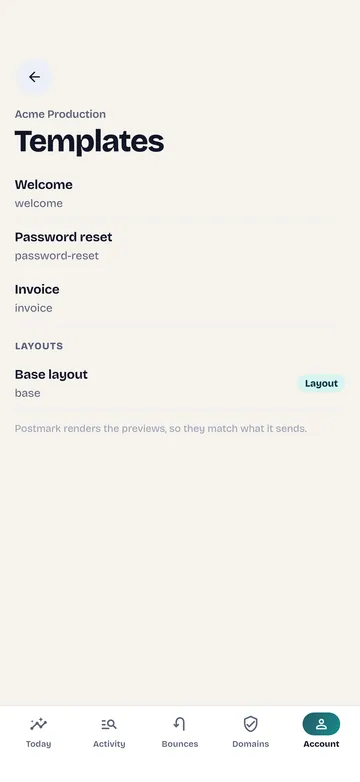
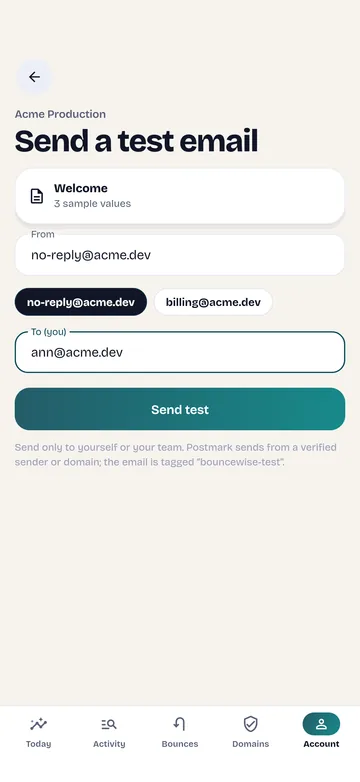
Go to Account › Templates & testing › Templates, open a template and edit the sample data to see the preview change. Tap Send a test, enter a From address your provider has verified and your own To address, and confirm. Test sends are part of Pro, are hidden in read-only mode, and are tagged bouncewise-test so you can find them in Activity.
- Open Templates Account › Templates & testing › Templates lists the selected server's templates (and Postmark layouts).
- Fill in sample data Open a template, edit the JSON under Sample data and tap Update preview.
- Start a test Tap Send a test. For a plain test without a template, use Send a test email in Account or on the Domains tab.
- Enter From and To Use a verified sender or an address on a verified domain as From, and your own address as To. Bouncewise remembers the last To.
- Confirm Tap Send test and confirm. When the provider accepts it, Open the message takes you to it once it shows in Activity.
How previews are made
Postmark renders the preview itself through its template validation call, so the preview matches what Postmark sends, and it suggests sample data from the template's variables. Mailgun, SendGrid and Resend previews are filled in on your phone with the sample values (SendGrid's test data, Resend's fallback values, or placeholders); the note under the list warns that the provider may render some template logic differently. The preview opens in the same safe viewer as Activity, so images and tracking pixels don't load.
Sender rules and errors by provider
| Provider | What the test needs | Error you may see |
|---|---|---|
| Postmark | From must be a confirmed sender signature or on a verified domain | Postmark only sends from a confirmed sender signature or a verified domain. |
| Mailgun | Sandbox domains only send to authorised recipients (up to 5) | … is a Mailgun sandbox domain: it only sends to authorized recipients. |
| SendGrid | A verified sender or authenticated domain, and a key with Mail Send access | SendGrid only sends from a verified sender or an authenticated domain. or This SendGrid key can't send email (it needs Mail Send access). |
| Resend | A published template and a verified domain | Resend only sends published templates. Publish it in Resend first. |
Good to know
- Every test asks first: Send a test email to …? It counts like any other email you send.
- Postmark tests go through the
outboundstream with the tagbouncewise-test; Mailgun uses the tag, SendGrid the category and Resend asourcetag with the same value. - Layouts can be previewed but not sent on their own.
- With read-only mode on, Send a test is hidden and the send screen says Read-only mode is on: turn it off in Account to send.
Questions
Can I send a test to a customer?
The app is built for sending to yourself or your team. Tests are real emails that count towards your volume and reputation.
Why doesn't my SendGrid template appear?
Bouncewise lists SendGrid dynamic templates. The key also needs Read access to templates.
Why is Send a test missing?
Either read-only mode is on, or you opened a layout rather than a template.
Related
- Test email templates on your phonePreview Postmark, Mailgun, SendGrid and Resend email templates with sample data on your phone, then send a test to yourself from a verified sender.
- Bouncewise read-only mode: look, never changeRead-only mode hides every action in Bouncewise: reactivate, retry, bypass, remove suppression, DNS checks and test sends. Turn it on in Account › Safety.
- Mailgun sandbox domain: authorized recipients and limitsA Mailgun sandbox domain only sends to up to 5 authorized recipients who clicked the activation link. How to add them, and how to send to anyone else.
- SendGrid 403: from address not a verified Sender IdentitySendGrid returns 403 when the From address isn't a verified single sender or on an authenticated domain. The fix, and the other 403: access forbidden.
- Resend domain not verified: records, pending and failedResend verifies a domain from the resend._domainkey DKIM record and SPF records on send. What pending and failed mean, and the usual DNS fixes.