SPF, DKIM and DMARC for transactional email: a working setup
Publish the DKIM record your provider gives you so mail is signed with your own domain, point a Return-Path (bounce) subdomain at the provider so SPF passes on your domain too, and add a DMARC record at _dmarc.example.com starting with p=none. DMARC passes when SPF or DKIM passes on a domain that aligns with the From address, so aligned DKIM alone is enough, and both is safer.
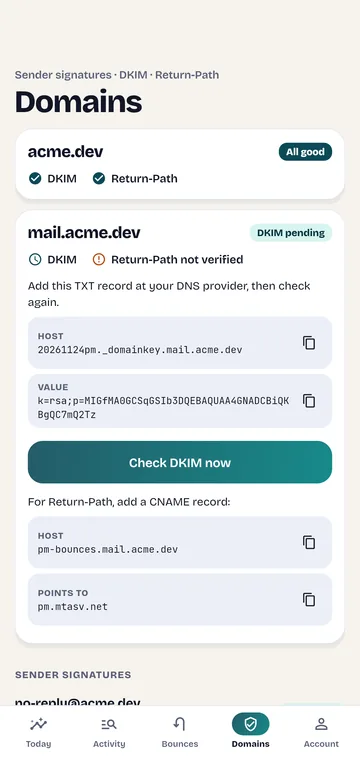
- Add the DKIM record Copy the DKIM host and value from your provider and publish them exactly, without extra spaces.
- Add the Return-Path record Create the bounce subdomain your provider asks for (Postmark pm-bounces CNAME, SendGrid em CNAME, Resend send subdomain) so SPF passes on your domain.
- Verify in the provider Use the provider's verify button and wait for DNS to propagate if it is still pending.
- Publish DMARC at p=none Add a TXT record at _dmarc with v=DMARC1; p=none and a reporting address.
- Check a real message Send to Gmail and confirm dkim, spf and dmarc all pass in Authentication-Results.
- Tighten the policy After the reports show only aligned mail from known sources, move to quarantine and then reject.
What each one checks
| Checks | Domain it looks at | Breaks when | |
|---|---|---|---|
| SPF | Is this server allowed to send for the domain? | The envelope sender (Return-Path, smtp.mailfrom) | Mail is forwarded; the Return-Path is the provider's domain, not yours |
| DKIM | Was the message signed by the domain and left unchanged? | The d= domain in the signature | Something rewrites the body or signed headers; the DNS key is missing |
| DMARC | Does SPF or DKIM pass for a domain that matches the visible From? | The From header domain | Neither SPF nor DKIM passes in alignment |
Alignment is the part people miss. RFC 7489 defaults to relaxed alignment: the SPF or DKIM domain must share the organisational domain with the From address. pm-bounces.example.com aligns with From: [email protected]; the provider's own bounce domain does not. A passing but unaligned SPF result does not help DMARC.
The records, provider by provider
Always copy values from your provider's dashboard: keys and IDs are generated per domain. The names below show the shape.
| Provider | DKIM | SPF / Return-Path |
|---|---|---|
| Postmark | TXT at a host like 20230601123456pm._domainkey | CNAME pm-bounces.example.com → pm.mtasv.net (custom Return-Path). Postmark handles SPF for its default Return-Path. |
| Mailgun | TXT from the domain's DNS records page in Mailgun | TXT v=spf1 include:mailgun.org ~all on the sending domain (for example mg.example.com); optional MX mxa.mailgun.org, mxb.mailgun.org for receiving; tracking CNAME → mailgun.org |
| SendGrid | CNAMEs s1._domainkey and s2._domainkey → s1.domainkey.u0000000.wl000.sendgrid.net and s2.domainkey.u0000000.wl000.sendgrid.net (automated security; IDs vary) | CNAME em1234.example.com → u0000000.wl000.sendgrid.net, which carries SPF and bounces |
| Resend | TXT at resend._domainkey (some domains get CNAMEs instead) | MX and TXT on send.example.com; the Return-Path defaults to send.example.com |
Then add DMARC once, for the whole domain:
_dmarc.example.com. TXT "v=DMARC1; p=none; rua=mailto:[email protected]"SendGrid's domain authentication shows the same v=DMARC1; p=none; starting point. If you already publish SPF on example.com for your office mail, leave it alone: the providers above put SPF on a subdomain, and a domain may only have one SPF record, so merge rather than add a second.
Rolling out DMARC without losing mail
- Start with
p=noneand aruaaddress. Gmail and Yahoo acceptp=nonefor their bulk-sender requirement. - Read the aggregate reports for a few weeks. Find every service sending as your domain: CRM, helpdesk, billing, office mail. Each needs aligned DKIM or SPF.
- Move to
p=quarantine, thenp=reject, once the reports show only aligned passes from sources you recognise.
The common mistake is jumping to p=reject on day one and silently losing invoices from a billing tool nobody remembered. Microsoft, for example, rejects with 550 5.7.509 Access denied, sending domain [$SenderDomain] does not pass DMARC verification and has a DMARC policy of reject.
Confirm it works
Check DNS from the command line:
dig +short TXT _dmarc.example.com
dig +short CNAME pm-bounces.example.com
Then send a real message to a Gmail address, open it, choose Show original, and read the Authentication-Results header. You want all three to pass, on your domain:
Authentication-Results: mx.google.com;
  dkim=pass [email protected];
  spf=pass smtp.mailfrom=pm-bounces.example.com;
  dmarc=pass header.from=example.com
If dkim=pass shows the provider's domain in header.i or header.d, your own DKIM is not live yet.
Questions
Do I need both SPF and DKIM?
DMARC needs only one aligned pass, but Gmail and Yahoo require both SPF and DKIM for bulk senders, and having both keeps DMARC passing when forwarding breaks SPF.
Should I send from a subdomain like mail.example.com?
It is a common choice for transactional mail and keeps its records separate from your office mail. DMARC still aligns under relaxed mode because the organisational domain is the same.
Why does my DKIM say pending?
Usually the DNS host appended your domain twice, the value was split or quoted wrongly, or DNS has not propagated yet. Check the record with dig before verifying again.
Related
- Custom Return-Path domain: why and how to set it upA custom Return-Path puts bounces on your own subdomain so SPF aligns for DMARC. On Postmark: CNAME pm-bounces.example.com to pm.mtasv.net, then verify.
- Transactional emails going to spam: a checklist that worksCheck in order: SPF, DKIM and DMARC pass and align; links and content; reputation; complaint rate; list hygiene. Start with the message headers.
- Postmark DKIM pending or Return-Path not verified: fixPostmark verifies a DKIM TXT record at the host it gives you and a pm-bounces CNAME to pm.mtasv.net. Fix appended names, Cloudflare proxying and typos.
- SendGrid domain authentication: CNAMEs and fixing VerifySendGrid domain authentication adds three CNAMEs (em…, s1._domainkey, s2._domainkey) plus DMARC. What each record does and why Verify fails.
- Mailgun domain not verified: DNS records to checkMailgun verifies a domain from SPF and DKIM TXT records; MX and the tracking CNAME serve receiving and tracking. Values, DNS mistakes and re-checking.
- Resend domain not verified: records, pending and failedResend verifies a domain from the resend._domainkey DKIM record and SPF records on send. What pending and failed mean, and the usual DNS fixes.