Postmark DKIM and Return-Path not verified: how to fix
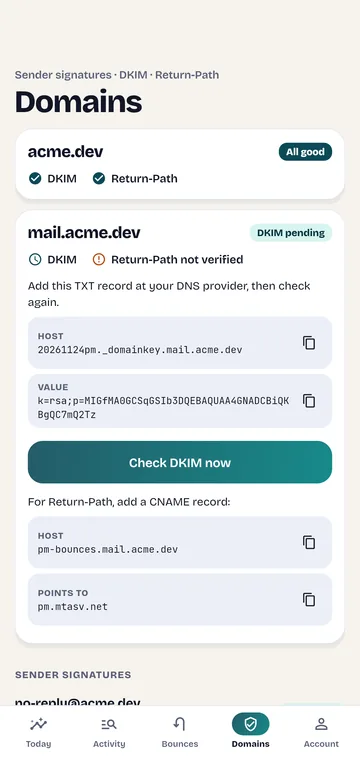
Postmark marks DKIM verified once it finds a TXT record with its public key at the exact host it shows you (a selector under _domainkey, such as 20131031155228pm._domainkey.example.com), and the Return-Path verified once pm-bounces.example.com is a CNAME to pm.mtasv.net. When either stays pending, the usual causes are a DNS host that appends your domain to the name or value, a Cloudflare-proxied CNAME, or a mistyped key. DNS can take up to 48 hours; after fixing, click Verify or call PUT /domains/{domainid}/verifyDkim and /verifyReturnPath.
- Copy the records from Postmark Open Sender Signatures, choose DNS Settings for the domain, and copy the DKIM and Return-Path hostnames and values.
- Add them at your DNS host Add a TXT record for DKIM and a CNAME record pointing to pm.mtasv.net for the Return-Path, in the zone your nameservers actually serve.
- Check them from outside Run dig for both names and confirm the answers match Postmark exactly.
- Ask Postmark to verify Click Verify for each record, or call the verifyDkim and verifyReturnPath endpoints with an Account API token.
What Postmark is looking for
| Record | Type | Host | Value |
|---|---|---|---|
| DKIM | TXT | The hostname on the domain's DNS Settings page, for example 20131031155228pm._domainkey.example.com | The public key Postmark shows, starting k=rsa; p= |
| Return-Path | CNAME | pm-bounces.example.com (unless you chose another subdomain of your From domain) | pm.mtasv.net |
Adding these doesn't affect your other DNS records or mail you send from the domain through other services. Once DKIM is verified Postmark signs your messages with it; once the Return-Path is verified your messages pass SPF alignment.
Why verification stays pending, most common first
- Your DNS host appended the zone to the name. You entered the full
pm-bounces.example.comand the panel storedpm-bounces.example.com.example.com. If the panel adds the domain itself, enter onlypm-bounces, and for DKIM only the part before.example.com. - Your DNS host appended the zone to the value. The CNAME ends up as
pm.mtasv.net.example.com. Postmark's fix: enter the value with a trailing dot,pm.mtasv.net. - Cloudflare is proxying the CNAME. Turn the orange cloud off (DNS only) for the Return-Path record.
- The DKIM key was pasted wrongly: a missing character, an added line break or space, or the wrong record type.
- The records are at the wrong provider. If your nameservers point elsewhere (a registrar's old zone, a CDN), records added in the other panel are never seen.
- Something else already lives at that name. A CNAME can't share its name with other records, so an existing TXT or A record at
pm-bouncesblocks it. - It just hasn't propagated. Postmark says to allow up to 48 hours.
Check the records yourself
Query public DNS before you press Verify again. The answers must match what Postmark shows, character for character:
# DKIM: use the exact host Postmark shows for your domain
dig +short TXT 20131031155228pm._domainkey.example.com
"k=rsa; p=MIGfMA0GCSqGSIb3DQEBAQUAA4GNADCBiQKBgQCFn..."

# Return-Path
dig +short pm-bounces.example.com CNAME
pm.mtasv.net.
An empty answer means the record isn't published at that name; look for the appended-zone mistake first. A value ending in your own domain is the appended-value mistake.
Re-run verification and read the result
In the web app, use the Verify button next to each record. Through the API, the Domains endpoints need an Account API token, not a server token:
curl "https://api.postmarkapp.com/domains/36735/verifyDkim" \
  -X PUT \
  -H "Accept: application/json" \
  -H "X-Postmark-Account-Token: $POSTMARK_ACCOUNT_TOKEN" \
  -d ""

curl "https://api.postmarkapp.com/domains/36735/verifyReturnPath" \
  -X PUT \
  -H "Accept: application/json" \
  -H "X-Postmark-Account-Token: $POSTMARK_ACCOUNT_TOKEN"
Both return the domain. The fields that matter:
"DKIMVerified": false,
"DKIMHost": "",
"DKIMPendingHost": "20131031155228pm._domainkey.example.com",
"DKIMPendingTextValue": "k=rsa; p=MIGfMA0GCSqGSIb3DQEBAQUAA4GNADCBiQKBgQCFn...",
"DKIMUpdateStatus": "Pending",
"ReturnPathDomain": "pm-bounces.example.com",
"ReturnPathDomainVerified": false,
"ReturnPathDomainCNAMEValue": "pm.mtasv.net"
Two gotchas. DKIMVerified says whether DKIM has ever been verified and stays true even if you later delete the record. And after a DKIM rotation, DKIMUpdateStatus goes back to Pending with a new DKIMPendingHost: add that new TXT record and keep the old one until SafeToRemoveRevokedKeyFromDNS is true.
Do you still need an SPF record?
Postmark's Domains API marks its SPF fields as deprecated: with a verified custom Return-Path, the bounce address is on your own subdomain and SPF is checked against Postmark's record behind pm.mtasv.net. Add a DMARC record once DKIM and Return-Path are verified; Postmark suggests starting with p=none to monitor.
Questions
How long does Postmark DKIM verification take?
Postmark checks automatically and says to allow up to 48 hours for DNS. If dig already shows the right record, click Verify to check straight away.
Why does my DKIM show Pending when it was verified before?
A DKIM rotation or renewal is in progress. Add the TXT record from DKIMPendingHost and DKIMPendingTextValue; Postmark switches to the new key once it finds it.
Can I use a name other than pm-bounces for the Return-Path?
Yes. It must be a subdomain of your From domain with a CNAME pointing to pm.mtasv.net; set it in the domain's settings or with ReturnPathDomain in the Domains API.
Which token do the verify endpoints need?
The Account API token in the X-Postmark-Account-Token header. A server token gets a 401.
Related
- Custom Return-Path domain: why and how to set it upA custom Return-Path puts bounces on your own subdomain so SPF aligns for DMARC. On Postmark: CNAME pm-bounces.example.com to pm.mtasv.net, then verify.
- SPF, DKIM and DMARC for transactional email: setupSign with DKIM on your domain, align SPF via a custom Return-Path, start DMARC at p=none. The records for Postmark, Mailgun, SendGrid and Resend.
- Postmark Server API token vs Account API tokenThe Server token (X-Postmark-Server-Token) sends mail and reads one server. The Account token (X-Postmark-Account-Token) manages servers and domains.
- Transactional emails going to spam: a checklist that worksCheck in order: SPF, DKIM and DMARC pass and align; links and content; reputation; complaint rate; list hygiene. Start with the message headers.