Custom Return-Path (bounce) domain: why and how to set it up
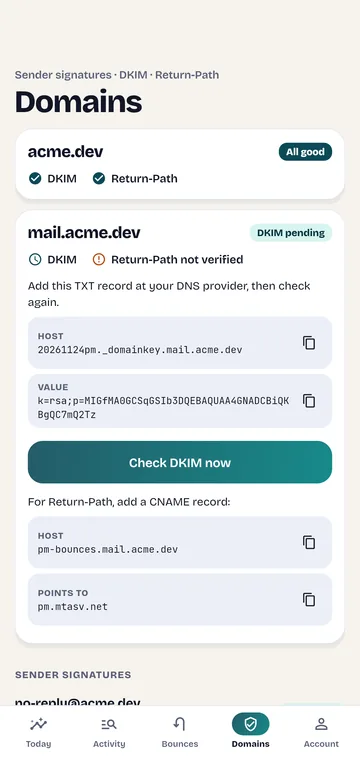
The Return-Path is the envelope sender where bounces go, and it is the domain SPF checks. By default your provider uses its own domain, so SPF passes for them but does not align with your From address for DMARC. A custom Return-Path is a subdomain of yours (on Postmark, a CNAME such as pm-bounces.example.com pointing to pm.mtasv.net) that makes SPF pass in alignment.
- Choose a subdomain Use an unused subdomain of your From domain, such as pm-bounces.example.com on Postmark.
- Add the CNAME Point it at your provider's bounce host (pm.mtasv.net for Postmark), DNS-only, with no other records at that name.
- Enter it in your provider In Postmark: Sender Signatures, the domain, DNS Settings, Return-Path section.
- Verify Run the provider's verification once dig shows the CNAME.
- Check a sent message Confirm the Return-Path ends in your subdomain and SPF passes for it.
What the Return-Path is and why it matters
Every message has two senders. The From header is what people see. The envelope sender (SMTP MAIL FROM) is where bounce reports go; receivers record it as the Return-Path header. SPF checks the envelope sender's domain, not the From.
DMARC passes if SPF or DKIM passes on a domain aligned with the From. With the provider's default Return-Path you rely entirely on DKIM. That works until something breaks DKIM: a key rotated wrongly, a DNS change, or a system that modifies the message. A custom Return-Path gives you a second, independent aligned pass.
It also tidies what recipients see: Gmail's message details show the envelope domain under "mailed-by", and with a custom Return-Path that is your domain.
Bounce processing is unchanged. The subdomain points at your provider, so bounce reports still reach it and still feed its suppression list; you do not need to run a mail server for the bounce domain.
Set it up on Postmark
Postmark's default hostname is pm-bounces. Add one CNAME at your DNS host:
pm-bounces.example.com. CNAME pm.mtasv.net.Then in Postmark open Sender Signatures, choose the domain, open DNS Settings and enter the subdomain in the Return-Path section, and verify. If your DNS host adds the zone automatically, enter only pm-bounces as the name; otherwise you end up with pm-bounces.example.com.example.com.
The equivalent on other providers
- Resend: the Return-Path defaults to
send.example.com, set up by the MX and TXT records on that subdomain when you add a domain. You can choose a custom path. - SendGrid: domain authentication creates an
em1234.example.comCNAME (number varies) that carries SPF for your domain, so you get an aligned Return-Path as part of the standard setup. - Mailgun: you add
v=spf1 include:mailgun.org ~allto the sending domain itself (for examplemg.example.com). Check Mailgun's current docs for how it sets the envelope sender on your domain.
Whatever the provider, the subdomain must sit under the same organisational domain as your From address. A bounce domain on example-mail.com will not align with From: [email protected].
Gotchas and how to confirm
- A CNAME cannot share its name with other records. Do not put an MX or TXT record on
pm-bounces.example.com; pick an unused subdomain. - Proxying. If your DNS host offers a proxy (Cloudflare's orange cloud), keep these records DNS-only.
- One Return-Path per provider. Do not reuse the same bounce subdomain for two providers; give each its own, such as
pm-bounces.example.comandsend.example.com. - Stale records after a DNS move. When you change DNS host, the Return-Path CNAME is the record most often forgotten. Mail keeps flowing, but SPF quietly stops aligning.
Confirm with dig +short CNAME pm-bounces.example.com, which should print pm.mtasv.net., then send a message and check its headers: the Return-Path address should end in @pm-bounces.example.com, and Authentication-Results should show spf=pass with smtp.mailfrom on that subdomain.
Questions
Do I need a custom Return-Path if DKIM already passes?
DMARC will pass with aligned DKIM alone. The custom Return-Path is a second aligned pass, which keeps DMARC working if DKIM breaks.
Will bounces still reach my provider?
Yes. The CNAME points the subdomain at the provider's servers, so bounce processing works as before.
Can I use the root domain as the Return-Path?
Not with a CNAME, because the root of a domain cannot be a CNAME and usually already has MX and TXT records. Use a subdomain.
Related
- SPF, DKIM and DMARC for transactional email: setupSign with DKIM on your domain, align SPF via a custom Return-Path, start DMARC at p=none. The records for Postmark, Mailgun, SendGrid and Resend.
- Postmark DKIM pending or Return-Path not verified: fixPostmark verifies a DKIM TXT record at the host it gives you and a pm-bounces CNAME to pm.mtasv.net. Fix appended names, Cloudflare proxying and typos.
- Transactional emails going to spam: a checklist that worksCheck in order: SPF, DKIM and DMARC pass and align; links and content; reputation; complaint rate; list hygiene. Start with the message headers.
- SendGrid domain authentication: CNAMEs and fixing VerifySendGrid domain authentication adds three CNAMEs (em…, s1._domainkey, s2._domainkey) plus DMARC. What each record does and why Verify fails.
- Resend domain not verified: records, pending and failedResend verifies a domain from the resend._domainkey DKIM record and SPF records on send. What pending and failed mean, and the usual DNS fixes.