Postmark Server API token vs Account API token
The Server API token, sent in the X-Postmark-Server-Token header, belongs to one server and is what your app uses to send email and to work with that server's bounces, messages, streams, suppressions, stats, templates and webhooks. The Account API token, sent in X-Postmark-Account-Token, is for account-level work: creating and managing servers, domains and sender signatures. Give applications the server token; keep the account token for admin tooling, because it can reach every server.
Side by side
| Server API token | Account API token | |
|---|---|---|
| Header | X-Postmark-Server-Token | X-Postmark-Account-Token |
| Scope | One server | The whole account |
| Where to find it | The server's API Tokens tab | API Tokens in the Account section |
| Who can see it | Account Owners, Account Admins, and Server Admins for their servers | Account Owner and Account Admins |
| How many | Up to 3 per server | Up to 3 |
| Used for | Sending (Email, batch, templates), Bounce, Messages, Message Streams, Suppressions, Stats, Webhooks, Server API; also the default SMTP credentials | Servers API, Domains, Sender Signatures, pushing templates between servers, data removal requests |
Each endpoint's reference page names the header it needs. The header name and value are case-insensitive.
Which one does my request need?
Anything about mail on one server takes the server token:
curl "https://api.postmarkapp.com/bounces?count=10&offset=0" \
  -H "Accept: application/json" \
  -H "X-Postmark-Server-Token: $POSTMARK_SERVER_TOKEN"
Anything about the account's structure takes the account token:
curl "https://api.postmarkapp.com/servers?count=50&offset=0" \
  -H "Accept: application/json" \
  -H "X-Postmark-Account-Token: $POSTMARK_ACCOUNT_TOKEN"
Send the wrong one and Postmark answers 401 with ErrorCode 10: Request does not contain a valid Server or Account token, or the wrong token type was used for the endpoint.
HTTP/1.1 401 Unauthorized
{"ErrorCode": 10, "Message": "..."}
The common mistakes: calling /domains or /servers with a server token, and trying to send with the account token. The account token can't send mail; the Email API only accepts a server token.
Least privilege: what each token can change
Neither token is read-only, so treat both as secrets:
- Server token: send email from your confirmed senders through that server, reactivate bounces, add and remove suppressions, retry or bypass inbound mail, edit the server's settings and webhooks.
- Account token: create and edit servers, add domains and sender signatures, change a domain's Return-Path and rotate its DKIM keys. The Servers API also returns each server's
ApiTokens, so whoever holds the account token can get every server token too.
For SMTP, prefer an SMTP Token generated in a stream's Settings tab: it is tied to that one stream, and its secret key is only shown once.
Rotate a token
For a server token: open the server, choose API Tokens, select Generate New, deploy the new token, then delete the old one. For the account token: on the Account page's API Tokens tab, click Generate another token; existing tokens keep working until you delete them, and with three tokens you must delete one before generating another.
Keep both tokens on the server side: in a secret store or environment variable, never in front-end JavaScript, a public repository or a log line. If one leaks, generate a new one first, switch your app to it, and only then delete the old token so sending doesn't stop. Give each application or environment its own server (and so its own token) where you can; then revoking one doesn't affect the rest.
For tests that shouldn't deliver mail, pass POSTMARK_API_TEST as the server token value; Postmark checks the request without sending it.
Questions
Can the Postmark account token send email?
No. Sending endpoints take the X-Postmark-Server-Token header; use the token of the server you want to send from.
Where is my Postmark server token?
Open the server in Postmark and go to its API Tokens tab. Account Owners and Admins see tokens for every server; Server Admins see them for their own servers.
Is the server token the same as the SMTP password?
The server API token also works as the default SMTP credentials. You can generate per-stream SMTP Tokens instead, with an access key and a secret key.
Why do I get a 401 with a token I just copied?
Usually the token is in the wrong header for that endpoint (server vs account), or has extra whitespace. Postmark returns ErrorCode 10 for both.
Related
- Postmark API error codes: every code and what to doPostmark returns an ErrorCode with a Message, mostly with HTTP 422. Table of codes from 10 to 1502 with meanings, HTTP status and whether to retry.
- Postmark message streams: transactional, broadcast, inboundEach Postmark server has an outbound transactional stream and an inbound stream; you add broadcast streams. Pick one per email with MessageStream.
- Postmark DKIM pending or Return-Path not verified: fixPostmark verifies a DKIM TXT record at the host it gives you and a pm-bounces CNAME to pm.mtasv.net. Fix appended names, Cloudflare proxying and typos.
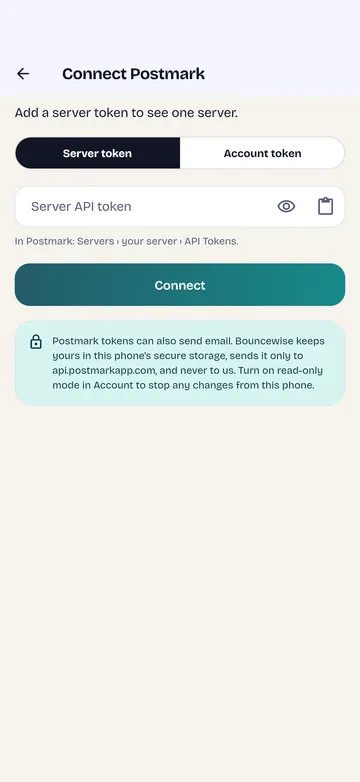
- Bouncewise Postmark token: server or account tokenConnect Postmark with a Server API token (one server) or an Account API token (every server, plus domains). Where to find each and what it unlocks.
- Bouncewise read-only mode: look, never changeRead-only mode hides every action in Bouncewise: reactivate, retry, bypass, remove suppression, DNS checks and test sends. Turn it on in Account › Safety.
- How Bouncewise keeps your email API keys safeBouncewise keeps API keys in the iOS Keychain or Android Keystore, sends them only to your provider, never to us, and has a read-only mode.