Connect Postmark to Bouncewise
Bouncewise connects to Postmark with either a Server API token, which shows one server, or an Account API token, which lists every server and also unlocks the Domains tab and sender signatures. Find the server token in Postmark under Servers › your server › API Tokens, and the account token under Account › API Tokens. Paste it on the Connect Postmark screen; the token stays in your phone's secure storage and is sent only to api.postmarkapp.com.
- Choose the token type On the Connect Postmark screen, pick Server token or Account token at the top. Use an account token if you want domains, sender signatures and all your servers.
- Copy the token from Postmark Server token: Servers › your server › API Tokens. Account token: Account › API Tokens (account owners and admins).
- Paste and connect Tap the paste icon in the token field, then Connect. Bouncewise checks the token with Postmark before it saves anything.
- Turn on read-only mode if you want Postmark tokens can also send email and make changes. Account › Safety › Read-only mode hides every action from this phone.
Server token or account token?
| Server API token | Account API token | |
|---|---|---|
| Where in Postmark | Servers › your server › API Tokens | Account › API Tokens |
| What Bouncewise shows | That one server: Today, Activity, Bounces, inbound mail, templates | Every server on the account, plus Domains and sender signatures |
| Domains tab | Shows Add an account token to see domains | DKIM and Return-Path status, records to copy |
| Who can get it | Anyone with access to the server | Account owners and admins |
You can add both, and more than one of each. Each appears under Account › Connections with its masked token, for example Postmark · Server token · xxxx….
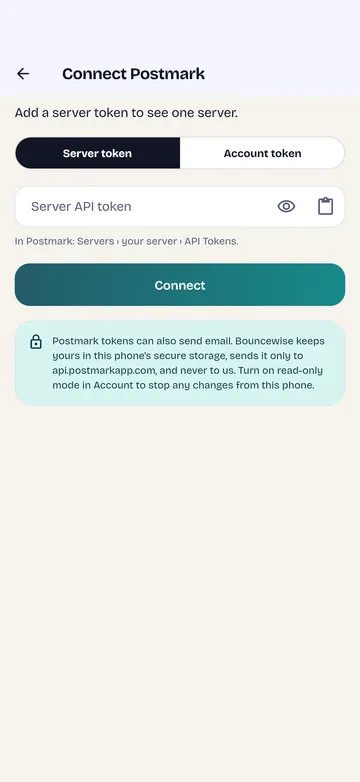
What you'll see after connecting
With a server token, the app confirms Connected to followed by the server's name. With an account token, it says how many servers it found, for example Connected: 4 servers. If the account has no servers yet, Postmark accepts the token but there's nothing to show, and the app tells you so.
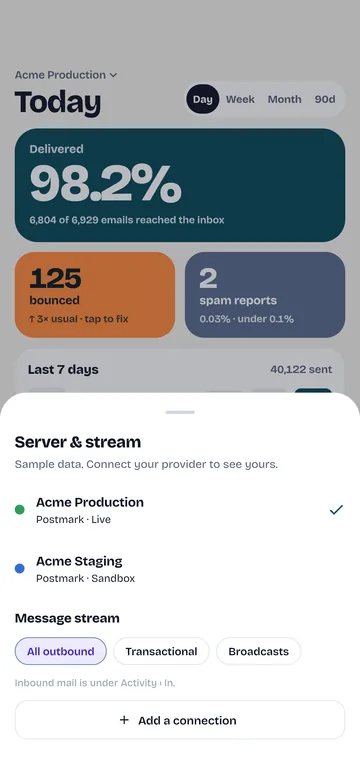
Switch servers and message streams by tapping the server name at the top of Today, Activity or Bounces. The free version shows one server; moving between servers and streams is part of Pro.
Common errors
- That doesn't look like a Postmark token. Postmark tokens are a 36-character ID in the form
xxxxxxxx-xxxx-xxxx-xxxx-xxxxxxxxxxxx. You may have copied a label, an SMTP username or only part of the token. - Token refused. Check that you picked the right type: a server token pasted as an account token (or the other way round) won't work, because Postmark checks them on different endpoints.
- No domains. Domains need an account token. A server token can't read them.
Where the token goes
The token is stored in the iOS Keychain or Android Keystore and sent only to api.postmarkapp.com. It is never sent to us. When you remove a connection (Account › Connections › delete), Bouncewise forgets the token on this phone; nothing changes in Postmark. If you no longer trust a phone, rotate the token in Postmark as well.
Questions
Can I use a read-only Postmark token?
Postmark doesn't offer read-only API tokens. Turn on read-only mode in Bouncewise (Account › Safety) to hide reactivate, retry, bypass and the other actions on this phone.
Why does Domains ask for an account token?
Postmark only exposes domains and sender signatures through the Account API, so a server token can't list them.
Does Bouncewise need my Postmark password?
No. It uses an API token you create and copy from Postmark, and it never sees your login.
Related
- Postmark Server API token vs Account API tokenThe Server token (X-Postmark-Server-Token) sends mail and reads one server. The Account token (X-Postmark-Account-Token) manages servers and domains.
- Bouncewise read-only mode: look, never changeRead-only mode hides every action in Bouncewise: reactivate, retry, bypass, remove suppression, DNS checks and test sends. Turn it on in Account › Safety.
- Bouncewise sample data: try it without a keyExplore Bouncewise with sample data from a made-up company, Acme, before connecting a key. Start it on the welcome screens; leave it from Account.
- How Bouncewise keeps your email API keys safeBouncewise keeps API keys in the iOS Keychain or Android Keystore, sends them only to your provider, never to us, and has a read-only mode.