Postmark inbound messages failed: why, and how to retry them
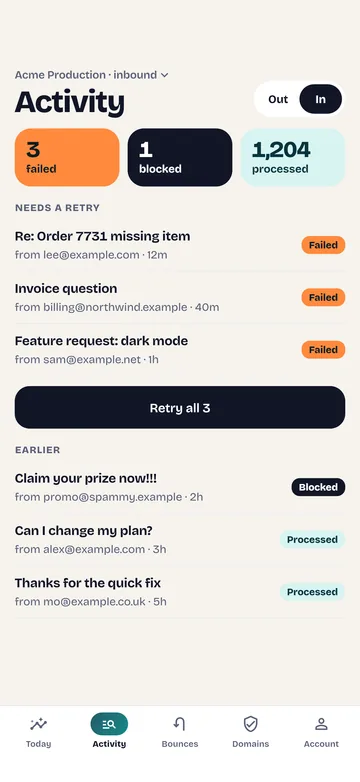
An inbound message is Failed when your webhook didn't answer with HTTP 200 to Postmark's POST or to any of the 10 retries that follow over roughly 10.5 hours (a 403 stops the retries at once). Postmark keeps the message: fix the endpoint, then retry each failed message from the inbound stream's Activity or with PUT /messages/inbound/{messageid}/retry. Blocked is a different status: your inbound blocking rules stopped the message, and it is released with /bypass, not /retry.
- Read the failure reason Open a failed message in the inbound stream's Activity; Postmark lists the cause of the failure there.
- Fix and test the endpoint Make the webhook URL return HTTP 200 quickly, and test it with a POST of sample JSON before retrying anything.
- List the failed messages Call GET /messages/inbound with status=failed; without it, the search only returns processed messages.
- Retry each one Call PUT /messages/inbound/{messageid}/retry for each MessageID, then check that they move to Processed.
What each inbound status means
| Status | What happened | What to do |
|---|---|---|
Processed | Postmark POSTed the message to your webhook and got a 200. | Nothing. |
Scheduled | Your webhook returned something other than 200; Postmark is retrying. | Fix the endpoint now and the remaining retries can still succeed. |
Failed | Ten retries in a row got no 200. Postmark has stopped trying. | Fix the endpoint, then retry the message. |
Blocked | Your inbound stream's block rules matched the message. | If it is wanted mail, bypass the rule for it. |
Queued | Webhooks are paused, for example by a failed payment on the account. | Check the account's billing and status in Postmark. |
In the web app a failed message is labelled Inbound Error, and the bounce list records it as type InboundError (TypeCode 100008): "Unable to deliver inbound message to destination inbound hook."
How Postmark retries the inbound webhook
Postmark waits 2 minutes for your server to respond. If it doesn't get a 200, it retries on a fixed schedule that you can't change:
| Retry | Interval |
|---|---|
| 1st | 1 minute |
| 2nd | 5 minutes |
| 3rd to 5th | 10 minutes each |
| 6th | 15 minutes |
| 7th | 30 minutes |
| 8th | 1 hour |
| 9th | 2 hours |
| 10th | 6 hours |
That covers about 10.5 hours. If your endpoint is down for longer, messages end up Failed and need a manual retry. A 403 response stops retries immediately, so never return 403 for a temporary problem.
Why the webhook fails, most common first
- The endpoint was down or redeploying for longer than the retry window.
- It answers with something other than 200. Postmark's docs speak of a 200 response; return exactly that, and don't redirect (for example from http to https or to a trailing slash).
- It takes longer than 2 minutes. Store the JSON, return 200, and do the slow work (attachments, parsing, AI calls) in a background job.
- A firewall or WAF blocks Postmark. Postmark lists this as a common cause while setting up: allow connections from its webhook IPs.
- No webhook URL is set on the inbound stream, or it points at an old host.
- Your framework rejects the POST with 401 or 403: basic-auth credentials that no longer match, or CSRF protection on the route. A 403 also ends the retries.
- Your handler crashes on unusual mail, such as a missing
Subject, large attachments or aDateheader in an unexpected format (Postmark passes the sending server's format through).
Test the endpoint yourself before retrying; the status line should be HTTP/1.1 200 OK or HTTP/2 200:
curl -i https://example.com/postmark/inbound \
  -X POST \
  -H "Content-Type: application/json" \
  -d '{"MessageStream": "inbound", "From": "[email protected]", "Subject": "Test", "TextBody": "Hello"}'
Retry failed messages
List them. The search defaults to status=processed, which is why failed mail seems to be missing from API results:
curl "https://api.postmarkapp.com/messages/inbound?count=500&offset=0&status=failed" \
  -H "Accept: application/json" \
  -H "X-Postmark-Server-Token: $POSTMARK_SERVER_TOKEN"
Retry one message by its MessageID:
curl "https://api.postmarkapp.com/messages/inbound/041e3d29-737d-491e-9a13-a94d3rjkjka13/retry" \
  -X PUT \
  -H "Accept: application/json" \
  -H "X-Postmark-Server-Token: $POSTMARK_SERVER_TOKEN" \
  -d ""
A success returns "ErrorCode": 0 and Successfully rescheduled failed message: …. ErrorCode 701 means the message wasn't found or can't be retried; 703 means Postmark couldn't retry it and you should contact support.
To retry everything that failed (needs jq; Postmark's examples name the list InboundMessages, its field table Messages):
curl -s "https://api.postmarkapp.com/messages/inbound?count=500&offset=0&status=failed" \
  -H "Accept: application/json" \
  -H "X-Postmark-Server-Token: $POSTMARK_SERVER_TOKEN" \
| jq -r '(.InboundMessages // .Messages)[].MessageID' \
| while read id; do
    curl -s -X PUT "https://api.postmarkapp.com/messages/inbound/$id/retry" \
      -H "Accept: application/json" \
      -H "X-Postmark-Server-Token: $POSTMARK_SERVER_TOKEN" -d ""
    echo
  done
Blocked messages: bypass instead
A Blocked message never reached your webhook, so retrying does nothing for it. Its BlockedReason says which rule matched, for example Inbound request blocked by domain rule: [email protected]. Messages can also be blocked when their spam score is over the server's InboundSpamThreshold. To deliver one anyway:
curl "https://api.postmarkapp.com/messages/inbound/792a3e9d-0078-40df-a6b0-fc78f87bf277/bypass" \
  -X PUT \
  -H "Accept: application/json" \
  -H "X-Postmark-Server-Token: $POSTMARK_SERVER_TOKEN"
The response is Successfully bypassed message: …. If a rule blocks mail you want, remove or narrow the rule so the next message isn't blocked too.
Questions
How long does Postmark retry a failed inbound webhook?
Ten retries over about 10.5 hours, from 1 minute up to 6 hours apart. After that the message is Failed and only a manual retry sends it again.
Why does GET /messages/inbound not show my failed messages?
The status filter defaults to processed. Add status=failed (or blocked, scheduled, queued) to the query.
Does returning 403 from my webhook stop the retries?
Yes. Postmark stops retrying as soon as it receives a 403, so use it only for mail you never want, not for temporary errors.
Can I change Postmark's inbound retry schedule?
No, Postmark says the schedule can't currently be customised. Retry failed messages yourself after an outage.
Related
- Postmark message streams: transactional, broadcast, inboundEach Postmark server has an outbound transactional stream and an inbound stream; you add broadcast streams. Pick one per email with MessageStream.
- Postmark API error codes: every code and what to doPostmark returns an ErrorCode with a Message, mostly with HTTP 422. Table of codes from 10 to 1502 with meanings, HTTP status and whether to retry.
- Postmark Server API token vs Account API tokenThe Server token (X-Postmark-Server-Token) sends mail and reads one server. The Account token (X-Postmark-Account-Token) manages servers and domains.
- How to monitor email delivery from your phoneWatch bounce rate, spam complaints, failed inbound and DNS status from your phone, with spike alerts and widgets for Postmark, Mailgun, SendGrid, Resend.
- Bouncewise alerts: bounce spikes, spam, inboundTurn on Bouncewise alerts for bounce spikes, spam complaints, failed inbound mail and a daily summary. They come from background checks, not instant push.