Add Bouncewise widgets to your Home Screen and Lock Screen
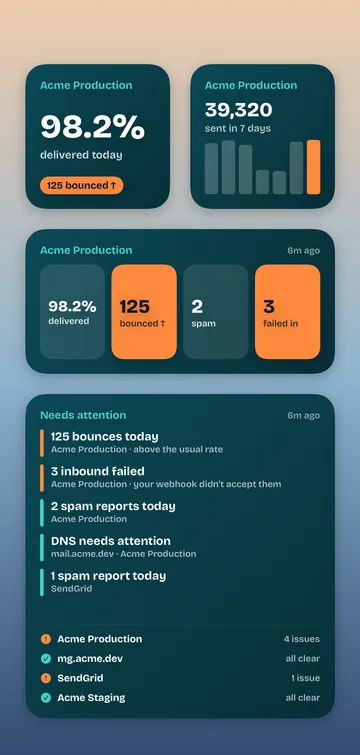
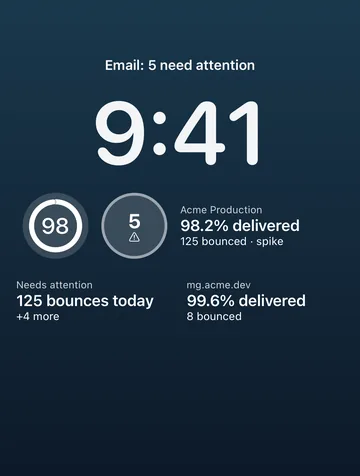
Bouncewise has four iPhone widgets: Delivery, Needs attention, All servers and 7-day trend, and Delivery and Needs attention also fit the Lock Screen. Touch and hold the Home Screen, tap Edit (or the + button), choose Add Widget, then find Bouncewise. Widgets are part of Pro and need iOS 17 or later; they show the numbers the app last fetched, refreshed when you open Today and on each background check.
- Open the widget gallery Touch and hold an empty part of the Home Screen until the apps jiggle, tap Edit or +, then Add Widget.
- Find Bouncewise Search for Bouncewise, swipe through the four widgets and sizes, and tap Add Widget.
- Choose a server For Delivery and 7-day trend, touch and hold the widget, tap Edit Widget and pick a Server. Leave it empty to follow the server you're viewing in the app.
- Add to the Lock Screen Touch and hold the Lock Screen, tap Customise, select the widget area and add Delivery or Needs attention.
The four widgets and their sizes
| Widget | Shows | Home Screen | Lock Screen |
|---|---|---|---|
| Delivery | Delivered rate, bounced, spam and failed inbound today for one server | Small, medium, large | Circular, rectangular, inline |
| Needs attention | Bounce spikes, failed inbound mail, spam reports and DNS problems across every server | Small, medium, large | Circular, rectangular, inline |
| All servers | Every connected server or domain at a glance | Medium, large | No |
| 7-day trend | One server's sends over the last week | Small, medium | No |
How fresh the numbers are
Widgets never call your email provider and hold no API key. They draw a snapshot the app saves: it is updated each time Today loads and on each background check, which runs for every Pro user whether or not alerts are on. Your phone decides when background checks run (on iPhone often about hourly, less on low battery), so a widget can be some minutes behind. Widgets redraw every 30 minutes so the updated time stays honest. Open the app to bring everything up to date.
What the placeholder messages mean
- Widgets are Pro — Unlock in Bouncewise › Account. Without Pro the widgets stay locked.
- Open Bouncewise — Connect your email provider. The app has no snapshot yet: connect a provider, or open Today once.
On Android, Bouncewise has two Home Screen widgets: one for the current server (2×2) and one for all servers (4×2).
Questions
Why doesn't my widget update straight away?
iOS limits how often apps refresh in the background. The widget shows the last numbers the app fetched; opening Today updates them at once.
Can a widget show a different server from the app?
Yes. Delivery and 7-day trend have a Server setting under Edit Widget; the others cover every server.
Do widgets need alerts turned on?
No. With Pro, the background check keeps widgets fresh even when alerts are off.
Related
- Email delivery widgets for iPhoneSee today's delivered rate, bounces, spam reports and failed inbound mail on your iPhone Home Screen and Lock Screen: four widgets, 16 layouts.
- Bouncewise alerts: bounce spikes, spam, inboundTurn on Bouncewise alerts for bounce spikes, spam complaints, failed inbound mail and a daily summary. They come from background checks, not instant push.
- Bouncewise Pro: price, free trial, restore purchaseBouncewise Pro is $3.99 a month, $29.99 a year with a 7-day free trial, or $69.99 once. What's included, how to restore a purchase and how to cancel.
- How to monitor email delivery from your phoneWatch bounce rate, spam complaints, failed inbound and DNS status from your phone, with spike alerts and widgets for Postmark, Mailgun, SendGrid, Resend.