Bouncewise Pro: what's included, trials and restoring purchases
Bouncewise is free for one server's day-to-day. Pro adds every server and stream, 90-day stats, older email previews, fixes from your phone, alerts, a daily summary and widgets. It costs $3.99 a month, $29.99 a year with a 7-day free trial, or $69.99 once; the App Store and Google Play show prices in your currency. To restore, open the Pro screen and tap Restore purchases.
- Open the Pro screen Tap Bouncewise Pro at the top of Account, or any Pro feature.
- Restore an earlier purchase Tap Restore purchases at the bottom. Use the same Apple ID or Google account you bought with.
- Manage or cancel With Pro on, Account shows Bouncewise Pro is on with a Manage button that opens your App Store or Google Play subscriptions.
Free and Pro
| Free | Pro |
|---|---|
| One server: stats for a day, week or 30 days | Every server and stream, and 90-day stats |
| Activity, message timelines, bounces, inbound mail, domains | Same, on every server |
| HTML, text and source previews from the last 24 hours | Older previews, for as long as your provider keeps the content |
| Read everything | Fixes: reactivate, retry and bypass inbound, retry all, remove suppressions, check DNS, send test emails |
| — | Background alerts and the daily summary |
| — | Home Screen and Lock Screen widgets |
Sample data follows the same rules, so you can see where Pro starts before you connect anything.
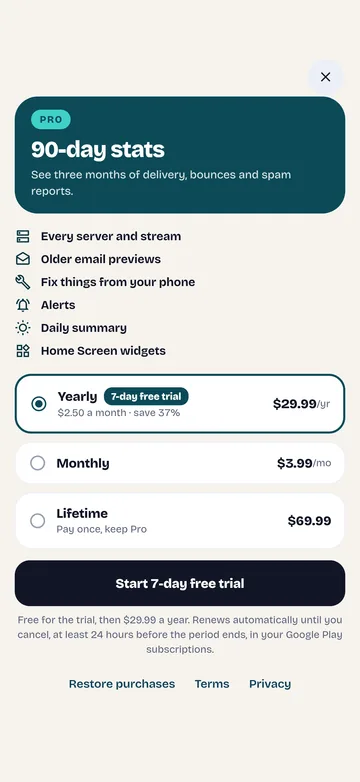
Plans and the free trial
- Yearly: $29.99 with a 7-day free trial if your store account is eligible; the button then reads Start 7-day free trial.
- Monthly: $3.99, no trial.
- Lifetime: $69.99 once. Pro stays unlocked on every device signed in to this Apple ID or Google account.
Subscriptions renew automatically until you cancel at least 24 hours before the period ends, in your App Store or Google Play subscriptions. Prices above are US dollars; the store shows your local price.
If Pro doesn't show as unlocked
- Tap Restore purchases. Pro restored. means it worked; No Pro purchase found for this Apple ID or Google account. means the store has nothing for the account signed in on this phone.
- A purchase on iPhone doesn't carry over to Android, or the other way round, because each store keeps its own purchases.
- Bouncewise remembers the last answer so Pro works offline, and asks the store again each time the app opens.
Questions
How do I cancel the free trial?
Cancel in your App Store or Google Play subscriptions (Account › Manage) at least 24 hours before the trial ends, and you won't be charged.
Do I need an account with Bouncewise?
No. Purchases belong to your Apple ID or Google account, and restoring uses that.
Can I get a refund?
Refunds are handled by Apple or Google under their store policies.
Related
- Bouncewise widgets: Home Screen and Lock ScreenFour Bouncewise widgets: Delivery, Needs attention, All servers and 7-day trend. How to add them, choose a server with Edit Widget, and how they refresh.
- Bouncewise alerts: bounce spikes, spam, inboundTurn on Bouncewise alerts for bounce spikes, spam complaints, failed inbound mail and a daily summary. They come from background checks, not instant push.
- Bouncewise sample data: try it without a keyExplore Bouncewise with sample data from a made-up company, Acme, before connecting a key. Start it on the welcome screens; leave it from Account.
- Email delivery widgets for iPhoneSee today's delivered rate, bounces, spam reports and failed inbound mail on your iPhone Home Screen and Lock Screen: four widgets, 16 layouts.