Connect SendGrid to Bouncewise
Create a SendGrid API key under Settings › API Keys › Create API Key, choose Custom Access and give it Read access to stats, email activity, suppressions and domain (sender) authentication. Paste it into Bouncewise, choosing Global or EU to match where the account lives. A read-only key is enough to look; add Delete on Suppressions to remove addresses, and Mail Send to send test emails.
- Create the key in SendGrid Go to Settings › API Keys and click Create API Key. Name it, for example "Bouncewise phone".
- Choose Custom Access Set Read access on Stats, Email Activity, Suppressions and Domain (sender) Authentication. Add Templates read if you want to preview templates.
- Copy the key once Click Create & View, copy the key (it starts with SG.) and keep it somewhere private until you have pasted it.
- Pick the region and connect In Bouncewise choose SendGrid, select Global or EU, paste the key and tap Connect.
The permissions Bouncewise uses
| For | Scope | Access |
|---|---|---|
| Today (sent, delivered, bounces, spam reports) | stats.read | Read |
| Activity (Email Logs, last 30 days) | email_activity.read | Read |
| Bounces and suppression lists | suppression.read | Read |
| Removing a suppressed address (Pro) | Suppressions | Delete |
| Domains | whitelabel.read | Read |
| Templates preview | templates.read | Read |
| Test emails (Pro) | mail.send | Full |
Bouncewise reads /v3/scopes when you connect. If the key has none of stats, email activity or suppressions, it stops with This SendGrid key can't read anything Bouncewise shows. Anything else a key lacks shows up as an error on that one screen.
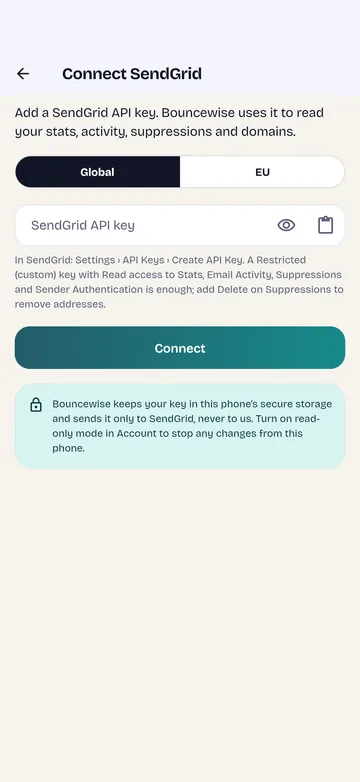
Global or EU
Choose EU only if the key belongs to an EU regional subuser; SendGrid serves those on api.eu.sendgrid.com. Everything else is Global (api.sendgrid.com). The connection then appears as SendGrid or SendGrid (EU). If you picked the wrong one, remove the connection and add it again with the other region.
What SendGrid shows and what it doesn't
- Activity comes from SendGrid's Email Logs: the last 30 days, searchable by recipient,
tag:categoryor subject words. Each message shows its latest status and reason. - Bounces combine SendGrid's five lists: bounces, blocks, spam reports, invalid emails and unsubscribes.
- No message content. SendGrid's API doesn't return the body of sent mail, so the HTML, Text and Source views aren't offered.
Questions
Can I use a Full Access key?
It works, but a Custom Access key with only the Read permissions above is safer on a phone: if it leaks, it can't send mail or change settings.
Why does sending a test fail with a 403?
The key needs Mail Send access, and the From address must be a verified sender or on an authenticated domain.
Does the app work with SendGrid subusers?
A key belongs to one account or subuser, and the app shows what that key can read. Add another connection for another subuser.
Related
- SendGrid API key permissions: Full, Custom and BillingSendGrid API keys are Full Access, Custom Access (chosen scopes) or Billing Access. The scopes sending and read-only monitoring need, and how to check.
- SendGrid Email Activity history: 30 days and missing mailSendGrid Email Logs keeps 30 days of events for every customer. The older Email Activity Feed needs a paid add-on for 30 days. Why a message may not show.
- SendGrid bounces vs blocks vs invalid emailsIn SendGrid a bounce is a problem with the address and stays suppressed; a block is about your IP or content and isn't. How all six lists differ.
- Bouncewise read-only mode: look, never changeRead-only mode hides every action in Bouncewise: reactivate, retry, bypass, remove suppression, DNS checks and test sends. Turn it on in Account › Safety.