SendGrid API key permissions: full, custom and read-only
SendGrid API keys come in Full Access (every endpoint except billing), Custom Access (only the permissions you pick, stored as scopes such as mail.send or stats.read) and Billing Access (billing endpoints only, never combined with anything else). For an app that only sends, give a Custom Access key Mail Send and nothing more; for a dashboard or monitoring tool, give only read permissions. The key is shown once, when you create it, and you can check what any key can do with GET /v3/scopes.
The key types
| Type | What it can do | Use it for |
|---|---|---|
| Full Access | All API endpoints, full access to your account (not billing) | Admin scripts you control; avoid in apps |
| Custom Access | Only the endpoints and access levels you choose | Almost everything: sending, monitoring, webhooks setup |
| Billing Access | All billing endpoints | Billing integrations only |
| Email Address Validation Access | Validation API, plus read access to the reporting console | Email validation (a separate paid feature) |
A key can cover either billing permissions or any other set of permissions, never both. And you can't give a key more permissions than your own teammate account has, so a key created by a restricted teammate is limited too.
Create and edit keys under Settings > API Keys. You can change a key's name and permission levels later from its action menu (Edit API Key), so you don't need a new key to add a missing permission. An account can have at most 100 API keys.
Scopes: what the console's checkboxes become
Behind the console, each permission is a scope string on the key. A few you'll meet most:
| Area | Scopes |
|---|---|
| Sending | mail.send |
| Stats | stats.read, stats.global.read |
| Email Activity / Email Logs | email_activity.read |
| Suppressions | suppression.bounces.read, suppression.blocks.read, suppression.spam_reports.read, suppression.invalid_emails.read, suppression.unsubscribes.read (each also has .create, .update, .delete) |
| Domain authentication | whitelabel.read (and .create, .update, .delete) |
| Templates | templates.read and friends |
| API keys | api_keys.read and friends: don't give these to an app |
A missing scope shows up as HTTP 403 with access forbidden in errors[].message, not as 401. A 401 means the key itself is wrong, deleted or missing.
Check what a key can do
Ask SendGrid for the key's scopes:
curl -s https://api.sendgrid.com/v3/scopes \
-H "Authorization: Bearer $SENDGRID_API_KEY"{"scopes":["mail.send","alerts.create","alerts.read"]}If mail.send is missing, the key can't send; if it's present on a key you gave to a reporting tool, that tool can send mail as you. EU regional subusers call https://api.eu.sendgrid.com instead.
Recommended keys
- Your app or server, sending only: Custom Access with Mail Send. Nothing else. If it leaks, the attacker can send mail but can't read your lists, change DNS settings or create more keys.
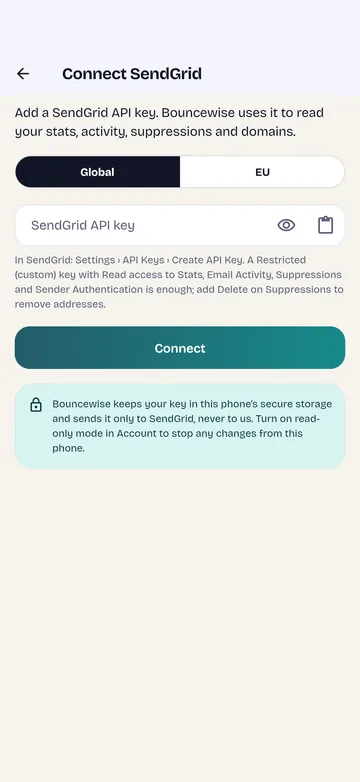
- Dashboards, monitoring and phone apps: Custom Access with read access to Stats, Email Activity, Suppressions and Sender Authentication. No Mail Send, no delete scopes. It can show you everything and change nothing.
- A tool that cleans suppressions: add the
.deletescope only for the list it manages. Removing an address from bounces or spam reports means SendGrid will mail it again. - One key per integration, named after it. When one leaks or a contractor leaves, you delete that key and nothing else breaks.
Lost, leaked or deleted keys
The console displays the key only once, at creation. If you didn't copy it, you can't see it again: create a new key and update the app. After you delete a key, SendGrid rejects every API call that uses it, and a deleted key can't be restored, so roll the replacement out first.
If a key with Mail Send leaks, delete it straight away. Sending keys are a favourite target for spammers, and the damage lands on your domain's and your account's reputation.
Questions
Is there a read-only API key in SendGrid?
Not as a separate type. Create a Custom Access key and give it only read access to the categories you need; check the result with GET /v3/scopes.
Why does my SendGrid key get 403 access forbidden?
The key, or the teammate who created it, lacks the scope for that endpoint. Edit the key under Settings > API Keys and add the permission, or use a key that has it.
Can I see an existing SendGrid API key again?
No. It is shown once at creation; if it's lost, create a new key and delete the old one.
Why does Email Activity return 403 even with full access?
The legacy Email Activity API at /v3/messages also needs the paid additional Email Activity history add-on on the account.
Related
- SendGrid 403: from address not a verified Sender IdentitySendGrid returns 403 when the From address isn't a verified single sender or on an authenticated domain. The fix, and the other 403: access forbidden.
- SendGrid Email Activity history: 30 days and missing mailSendGrid Email Logs keeps 30 days of events for every customer. The older Email Activity Feed needs a paid add-on for 30 days. Why a message may not show.
- SendGrid bounces vs blocks vs invalid emailsIn SendGrid a bounce is a problem with the address and stays suppressed; a block is about your IP or content and isn't. How all six lists differ.
- Bouncewise SendGrid API key: read-only scopesCreate a SendGrid Custom Access key with Read on Stats, Email Activity, Suppressions and Domain Authentication, then pick Global or EU in Bouncewise.
- Bouncewise read-only mode: look, never changeRead-only mode hides every action in Bouncewise: reactivate, retry, bypass, remove suppression, DNS checks and test sends. Turn it on in Account › Safety.
- How Bouncewise keeps your email API keys safeBouncewise keeps API keys in the iOS Keychain or Android Keystore, sends them only to your provider, never to us, and has a read-only mode.