Resend API key permissions: full access vs sending access
A Resend API key has one of two permissions: full_access, which can create, delete, get and update any resource, or sending_access, which can only send emails and can be restricted to one domain. A sending_access key calling anything else gets 401 restricted_api_key, "This API key is restricted to only send emails." There is no read-only key, so a tool that lists emails, domains or suppressions needs full_access. The key value is shown once; permission and domain can be changed later in the dashboard.
- Open API Keys In the Resend dashboard go to API Keys and click Create API Key.
- Name it Use a name that says where it runs, up to 50 characters.
- Choose the permission Pick Sending access for code that only sends, optionally limited to one domain; pick Full access only for tools that must read or manage resources.
- Store it once Copy the re_ key into your secret store immediately; Resend won't show it again.
The two permissions
sending_access (Sending access) | full_access (Full access) | |
|---|---|---|
| Send emails | Yes | Yes |
| Read emails, domains, suppressions, metrics | No: 401 restricted_api_key | Yes |
| Create, update, delete resources (domains, keys, suppressions) | No | Yes |
| Restrict to one domain | Optional (domain_id) | Not available |
| Use it for | Your application's send path | Admin scripts, dashboards, monitoring |
Resend's advice is to choose Sending access unless the key really needs full access. For Inboxes, a sending key can only reply, forward, create and send drafts, and a domain-restricted key only reaches inboxes on that domain.
Errors that point at the key
| Status | name | Message | Meaning |
|---|---|---|---|
| 401 | restricted_api_key | This API key is restricted to only send emails. | A sending key on a non-sending endpoint |
| 401 | missing_api_key | Missing API Key | No Authorization: Bearer header |
| 400 | validation_error | API key is invalid | Unknown or deleted key, on any endpoint except sending |
| 401 | validation_error | API key is invalid | The same on sending endpoints (also for a key that isn't active) |
| 403 | restricted_api_key | API key is not active | Key disabled; check the API Keys page |
| 403 | suspended_api_key | This API key is suspended | Contact Resend support |
| 403 | (code 1010) | No User-Agent header; every request needs one |
Branch on name, not the status: an invalid key is 400 on read endpoints but 401 when sending.
Create a key with the right permission
In the dashboard: API Keys › Create API Key, give it a name (up to 50 characters), choose Sending access or Full access, and for sending access optionally pick a domain. Copy the key straight away: Resend shows it only once.
With the API (the calling key needs full access):
curl -X POST https://api.resend.com/api-keys \
     -H "Authorization: Bearer $RESEND_API_KEY" \
     -H "User-Agent: my-app/1.0" \
     -H "Content-Type: application/json" \
     -d '{"name": "Production sender", "permission": "sending_access", "domain_id": "'$DOMAIN_ID'"}'
The response contains id and token (re_…). Later you can change a key's name, permission and domain in the dashboard; the API can only rename it.
Least privilege when one permission must read
Because reading anything needs full_access, a monitoring tool's key can also delete domains and create keys. Keep that risk small:
- Use separate keys per application and purpose, so logs show which key did what and you can revoke one without touching the others.
- Give your app servers
sending_access, restricted to their domain, and keep the full access key out of them. - Keys don't expire. Resend suggests rotating at least every 90 days: create the new key, deploy it, confirm it in the Logs page, then delete the old one. Keys unused for 30 days are flagged in the dashboard. If a key has already leaked, delete it now rather than waiting for the next rotation.
- The API Keys page shows when each key was last used and how many requests it made, with a link to that key's logs: a quick way to spot a key you no longer need.
- The default rate limit (10 requests a second) is per team, shared across all keys, so a busy dashboard key can slow your sender.
Questions
Does Resend have a read-only API key?
No. Keys are either full_access or sending_access, and every read endpoint needs full_access.
Can I change a Resend API key's permission later?
Yes, in the dashboard: name, permission and domain are editable. The API can only update the name, and the key value itself can never be viewed again.
Why do I get restricted_api_key when listing emails?
The key has sending_access, which can only send. Use a full_access key for GET /emails, /domains and /suppressions.
Do Resend API keys expire?
No. They stay valid until you delete them, so rotate them yourself; Resend suggests at least every 90 days.
Related
- Resend domain not verified: records, pending and failedResend verifies a domain from the resend._domainkey DKIM record and SPF records on send. What pending and failed mean, and the usual DNS fixes.
- Resend email statuses: delivered, bounced, delayedWhat each Resend last_event means: sent, delivered, delivery_delayed, bounced, complained, failed, suppressed and more, with the matching webhook events.
- Resend suppressed email: why, and how to remove itResend marks an email suppressed when the recipient is on your team's suppression list after a hard bounce or complaint. How to check why, and remove them.
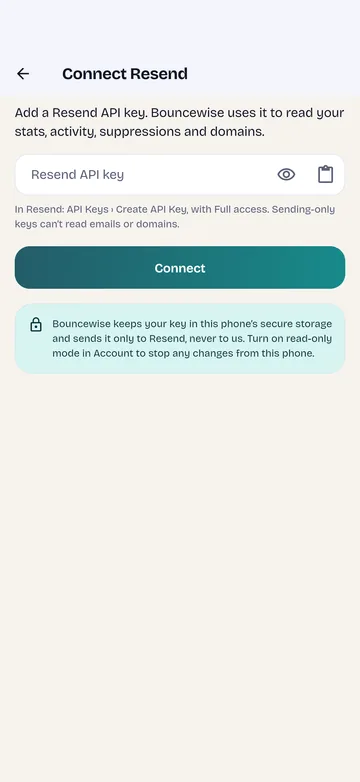
- Bouncewise Resend API key: use Full accessResend's Sending access keys can only send, so Bouncewise needs a Full access key to read emails, domains and suppressions. Create one under API Keys.