Connect Resend to Bouncewise
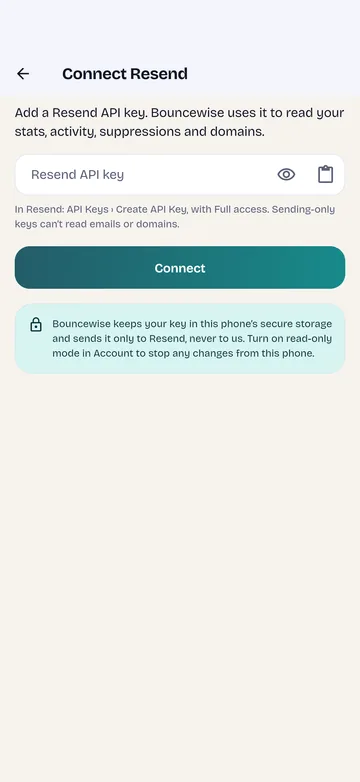
Bouncewise needs a Resend API key with Full access. Resend's other permission, Sending access, can only send email, so it can't read the emails, domains or received mail the app shows. Create the key in the Resend dashboard under API Keys › Create API Key, copy the re_ key and paste it on the Connect Resend screen.
- Create the key In Resend, open API Keys and click Create API Key. Give it a name such as "Bouncewise phone".
- Choose Full access Set the permission to Full access. Sending access keys are refused when Bouncewise tries to read.
- Copy it Copy the key, which starts with re_, before you close the dialog.
- Connect In Bouncewise choose Resend, paste the key into the Resend API key field and tap Connect.
Why it has to be Full access
Resend has two key permissions: full_access, which can create, delete, get, and update any resource, and sending_access, which can only send emails. Every endpoint Bouncewise reads (emails, domains, received mail) needs the first. A sending key gets Resend's restricted_api_key error, which the app explains as it can only send email; create a Full access key.
Because a Full access key can also change things, turn on read-only mode (Account › Safety) if you only want to look.
What you'll see
The connection appears as Resend team with one source, Resend. Then:
- Activity lists your latest 100 emails with their last event. Resend's API can't search emails, so there's no search box for Resend.
- Bounces come from Resend's suppressions (bounces and complaints).
- Inbound shows received mail as a plain list.
- Domains shows each domain's DNS records and status.
If it won't connect
- That doesn't look like a Resend API key. Resend keys start with
re_; check you copied the whole key. - Resend says this API key is invalid. The key was deleted or mistyped. Create a new one.
- It can only send email. The key has Sending access. Create a Full access key, or change the key's permission in the Resend dashboard.
Questions
Can I restrict the key to one domain?
Resend's domain restriction applies to sending keys, and Bouncewise needs Full access to read, so use an unrestricted Full access key and read-only mode in the app.
Why only 100 emails?
Resend's API returns a list of recent emails without search, so the app shows the latest 100 and says so above the list.
Related
- Resend API key permissions: full vs sending accessResend API keys are full_access or sending_access. Sending keys only send and get 401 restricted_api_key on reads, so reading data needs full access.
- Resend email statuses: delivered, bounced, delayedWhat each Resend last_event means: sent, delivered, delivery_delayed, bounced, complained, failed, suppressed and more, with the matching webhook events.
- Resend suppressed email: why, and how to remove itResend marks an email suppressed when the recipient is on your team's suppression list after a hard bounce or complaint. How to check why, and remove them.
- Bouncewise read-only mode: look, never changeRead-only mode hides every action in Bouncewise: reactivate, retry, bypass, remove suppression, DNS checks and test sends. Turn it on in Account › Safety.