Resend suppressed recipients: why an email was suppressed and how to remove it
Resend marks an email suppressed, and doesn't send it, when the recipient is on your team's suppression list. Addresses join it after a hard bounce (origin bounce), a spam complaint (origin complaint), or when you add them (origin manual), and the list applies across all your domains. Remove an address on the Suppressions page or with DELETE https://api.resend.com/suppressions/{id or email}, but only once the cause is fixed: if it bounces or complains again, it goes straight back on.
- Find out why Look up the address on the Suppressions page or with GET /suppressions/{email} and note its origin and source_id.
- Check the cause is fixed Open the email in source_id. Remove only if the address now works or the recipient asked for mail again.
- Remove the suppression Choose Remove email address on the Suppressions page, or call DELETE /suppressions/{email} with a full access key.
- Send again and watch Send one email and check it reaches delivered; a new bounce or complaint suppresses the address again.
What a suppressed email looks like
The API call succeeds and the email appears on the Emails page with the status suppressed. Nothing was sent to the recipient's server. If you use webhooks, you get email.suppressed; Resend's example payload reads:
"suppressed": {
  "message": "Resend has suppressed sending to this address because it is on the account-level suppression list. This does not count toward your bounce rate metric",
  "type": "OnAccountSuppressionList"
}
Open the email in the dashboard and the suppression details show the reason and suggested fixes. A suppression.added webhook fires when an address joins the list and suppression.removed when it leaves.
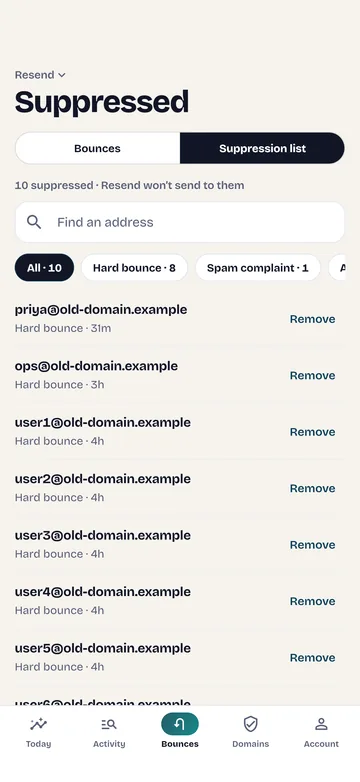
Why an address is on the list
origin | Added when | Typical cause |
|---|---|---|
bounce | The recipient's server permanently rejected an email | A typo, an address that doesn't exist, or a server that permanently blocks delivery |
complaint | The recipient marked one of your emails as spam | Unwanted or unexpected mail |
manual | You (or your code) added it | Dashboard, CSV import or the API |
Soft bounces (Transient) don't suppress an address; only permanent rejections do. Suppressions are team-wide: an address that bounced from updates.example.com is also skipped for news.example.com, for transactional emails and Broadcasts alike.
Look up the suppression and the email that caused it
curl https://api.resend.com/suppressions/[email protected] \
     -H "Authorization: Bearer $RESEND_API_KEY" \
     -H "User-Agent: my-app/1.0"
{
"object": "suppression",
"id": "e169aa45-…",
"email": "[email protected]",
"origin": "bounce",
"source_id": "4ef9a417-…",
"created_at": "2026-10-06 23:47:56.678+00"
}source_id is the id of the email that triggered it (null for manual entries). Fetch that email with GET /emails/{source_id} and check its bounce details in the dashboard. To list everything of one kind, use GET /suppressions?origin=bounce (or complaint, manual); pages hold up to 100.
Remove an address
In the dashboard, open Suppressions, search for the address, open the more-options menu and choose Remove email address. From an individual suppressed email you can also click Remove from suppression list. Over the API, by email or by suppression id:
curl -X DELETE https://api.resend.com/suppressions/[email protected] \
     -H "Authorization: Bearer $RESEND_API_KEY" \
     -H "User-Agent: my-app/1.0"
Resend also offers a batch endpoint that removes up to 100 suppressions at once. All of these need a full_access API key. Before a clean-up, use Download CSV on the Suppressions page to keep a copy of the list as it was.
When removing is the right call
bounce: only if the address now exists (a typo corrected in your database, a mailbox recreated). If the original bounce said the user doesn't exist, the next send bounces and the address is suppressed again, at a cost to your reputation.complaint: removing it resumes mail to someone who reported you as spam. Do it only when they ask to receive mail again.manual: whoever added it should know why; check before you undo it.
Resend warns that removal doesn't guarantee delivery. Fix the address in your own data first; the suppression list is a safety net, not the place to clean your list.
Questions
Is the Resend suppression list per domain?
No. It applies to your whole team, so a suppressed address is skipped from every domain and subdomain, for transactional emails and Broadcasts.
Does a suppressed email count toward my bounce rate?
No. Resend's email.suppressed example says suppressed sends don't count toward your bounce rate metric.
Can I add addresses to the Resend suppression list myself?
Yes: click Add email address on the Suppressions page to add one or import a CSV, or use the API to add one address or up to 100 at a time.
Why was the address suppressed again after I removed it?
It bounced or was marked as spam again. Fix the underlying problem before removing it a second time.
Related
- Resend email statuses: delivered, bounced, delayedWhat each Resend last_event means: sent, delivered, delivery_delayed, bounced, complained, failed, suppressed and more, with the matching webhook events.
- Hard bounce vs soft bounce: what each means, what to doA hard bounce is a permanent failure (5xx, e.g. 550 5.1.1): stop sending to it. A soft bounce is temporary (4xx, e.g. full mailbox): retry, then stop.
- Gmail and Yahoo spam rate limit: the 0.3% rule explainedGmail and Yahoo require a spam complaint rate below 0.3%; Gmail says aim under 0.1%. How it is measured, who it applies to, what it means for receipts.
- Resend API key permissions: full vs sending accessResend API keys are full_access or sending_access. Sending keys only send and get 401 restricted_api_key on reads, so reading data needs full access.
- Bouncewise Resend API key: use Full accessResend's Sending access keys can only send, so Bouncewise needs a Full access key to read emails, domains and suppressions. Create one under API Keys.