Return-Path vs Reply-To vs From: which address does what
From is the address people see, and the domain DMARC protects. Reply-To, if set, is where a reply goes when someone presses Reply. Return-Path is the envelope sender (the SMTP MAIL FROM): bounces are sent there, SPF is checked against its domain, and the receiving server writes it into the Return-Path header on delivery. You set From and Reply-To per message; the Return-Path comes from your provider's bounce domain.
The three addresses side by side
| Return-Path (envelope from) | From (header from) | Reply-To | |
|---|---|---|---|
| Where it is set | SMTP MAIL FROM command | Message header | Message header |
| Who sees it | Hidden in the full headers | Everyone | Shown when replying |
| What uses it | Bounces and delivery failure reports | Display, filters, DMARC | The recipient's Reply button |
| Authentication | SPF checks this domain (smtp.mailfrom) | DMARC requires SPF or DKIM to align with it (header.from) | Not checked by SPF, DKIM or DMARC |
| Also called | Envelope sender, 5321.MailFrom, bounce address | 5322.From, author | - |
Envelope from vs header from
An email travels like a letter in an envelope. The SMTP conversation carries the envelope; the message inside carries the headers. They do not have to match, and for mail sent through a provider they almost never do:
MAIL FROM:<[email protected]>     <- envelope sender
RCPT TO:<[email protected]>                        <- envelope recipient
DATA
From: Example App <[email protected]>         <- what people see
Reply-To: Example Support <[email protected]>  <- where replies go
To: [email protected]
Subject: Your receipt
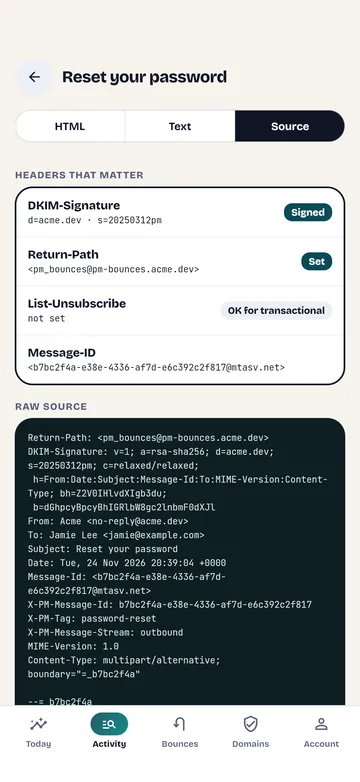
RFC 5321 says the server that makes final delivery inserts a Return-Path line copied from the MAIL FROM, and that the reverse-path "MUST be used as the target of any mail containing delivery error messages". So the delivered message looks like this:
Return-Path: <[email protected]>
Authentication-Results: mx.example.org;
  spf=pass smtp.mailfrom=pm-bounces.example.com;
  dkim=pass header.d=example.com;
  dmarc=pass header.from=example.com
From: Example App <[email protected]>
Reply-To: Example Support <[email protected]>
The same RFC says a sending system should not add its own Return-Path header, and that the final server may remove one before adding its own. Putting Return-Path in your API call's custom headers is not how you change it.
Where replies, bounces and checks go
| What happens | Address used |
|---|---|
| Someone presses Reply | Reply-To if present, otherwise From |
| The receiving server rejects or bounces the message later | Return-Path, so your provider can record the bounce and suppress the address |
| SPF check | The Return-Path domain (or the HELO name for bounces, which have an empty envelope sender) |
| DMARC check | The From domain, compared with the SPF and DKIM domains |
This is why a From: [email protected] with Reply-To: [email protected] is fine: Reply-To plays no part in authentication. A Reply-To on another domain is also fine for DMARC, though recipients may find it odd.
Setting each one with your provider
| Provider | From and Reply-To per message | Return-Path |
|---|---|---|
| Postmark | From, ReplyTo (defaults to the sender signature's Reply-To) | Custom Return-Path domain, e.g. pm-bounces.example.com CNAME to pm.mtasv.net |
| SendGrid | from, reply_to object or reply_to_list (not both) | The em CNAME created by domain authentication |
| Mailgun | from; other headers with the h: prefix, e.g. h:Reply-To | The sending domain you verified; check Mailgun's docs for its envelope settings |
| Resend | from, reply_to (string or array) | Defaults to send.example.com from the domain setup |
The Return-Path is a domain setting, not a per-message field, because the provider needs to receive and process the bounces. Setting one up on your own domain is covered in custom Return-Path domain.
Mistakes to avoid
- Expecting bounces at Reply-To. Bounces go to the Return-Path, which your provider handles. To see them, look at your provider's bounce list, not your support inbox.
- Adding the provider's SPF include to your root domain and expecting it to help. SPF is checked on the Return-Path domain; see SPF fail.
- A Return-Path on an unrelated domain. SPF can pass and still not align with From, so DMARC relies on DKIM alone. See why DMARC fails.
- Sending From a free mailbox address such as Gmail through a provider. You cannot authenticate a domain you do not control.
Questions
What is the Return-Path in an email?
The envelope sender address from the SMTP MAIL FROM command, written into the Return-Path header by the receiving server. Bounces are sent to it and SPF checks its domain.
Is the envelope from the same as the From header?
Not necessarily. The envelope from is used by servers for bounces and SPF; the From header is what people see and what DMARC protects. Providers usually use their own bounce address as the envelope from.
Does Reply-To affect deliverability or DMARC?
It is not part of SPF, DKIM or DMARC. Keep it to an address people would expect for your brand.
Can I set the Return-Path per message?
Usually not. With transactional providers it comes from the provider's bounce domain or the custom Return-Path you configure for your domain, and a Return-Path header you add yourself is not how it is set.
Related
- Custom Return-Path domain: why and how to set it upA custom Return-Path puts bounces on your own subdomain so SPF aligns for DMARC. On Postmark: CNAME pm-bounces.example.com to pm.mtasv.net, then verify.
- SPF fail, softfail and neutral: what they meanSPF fail: the sending IP isn't in the Return-Path domain's SPF record and it ends in -all. Softfail (~all) is weaker, neutral (?all) says nothing.
- Why DMARC fails, even when SPF or DKIM passesDMARC fails when no SPF or DKIM pass is aligned with the From domain. A pass on your provider's domain doesn't count. The causes and fixes.
- SPF, DKIM and DMARC explained, with a working setupSign with DKIM on your domain, align SPF via a custom Return-Path, start DMARC at p=none. The records for Postmark, Mailgun, SendGrid and Resend.
- Hard bounce vs soft bounce: what each means, what to doA hard bounce is a permanent failure (5xx, e.g. 550 5.1.1): stop sending to it. A soft bounce is temporary (4xx, e.g. full mailbox): retry, then stop.