550 5.7.1: what it means and how to fix it
550 5.7.1 means "delivery not authorized, message refused": the receiving server's policy turned your message away. The address usually exists, so this is not a dead mailbox. The words after the code name the policy (a mail flow rule, relaying, a restricted group, low reputation, a malformed header) and the fix depends on which one it is, and on whether it is the recipient's rule or your sending setup.
- Copy the full text Open the bounce and read everything after 550 5.7.1, including the server name and tags such as gcdp or TRANSPORT.RULES.
- Count the domains Check whether the 5.7.1s come from one company or from many recipients at one mailbox provider. One company means their rule; many means your reputation or message.
- If it is their rule, reach them another way Ask the recipient to send the full bounce to their email admin, who can allow your sending domain or change the rule.
- If it is your message, fix it and test Correct missing or duplicate From and Message-ID headers, check SPF, DKIM and DMARC, and send a test to an affected mailbox provider.
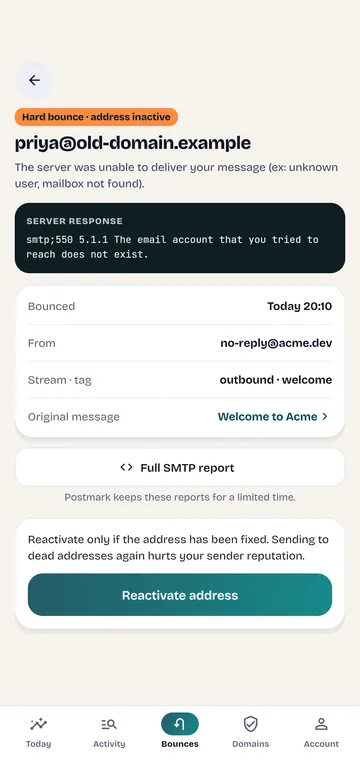
- Reactivate only after the fix If your provider suppressed the address, reactivate it once the cause is gone; that resumes sending to it.
What 550 5.7.1 means
550 is the basic SMTP reply for "requested action not taken", which RFC 5321 says can mean the command was rejected for policy reasons. 5.7.1 is the enhanced code RFC 3463 titles Delivery not authorized, message refused and describes as: The sender is not authorized to send to the destination. This can be the result of per-host or per-recipient filtering.
So the server did not say the mailbox is missing (that is 5.1.1); it said you may not deliver this message there. That decision can sit with the recipient (a rule their admin wrote) or with you (reputation, authentication, a broken message). Microsoft's own troubleshooting page for 5.7.1 says the same advice covers every code from 5.7.0 to 5.7.999, which is why the code alone tells you so little.
Gmail marks rules written by a Google Workspace admin with gcdp. Its example: 550 5.7.1 This message violates example.com email policy. - gcdp <sessionid> - gsmtp. If you see gcdp, the block is the recipient organisation's choice, not Gmail's.
Read the text after the code
These are the 5.7.1 texts the big mailbox providers document, and what each one points at.
| Text (start) | Who sends it | What it means | Who fixes it |
|---|---|---|---|
TRANSPORT.RULES.RejectMessage; the message was rejected by organization policy | Exchange / Microsoft 365 | A mail flow (transport) rule matched and rejected the message. Microsoft's reject action uses 5.7.1 by default, with the default text Delivery not authorized, message refused. | Recipient's admin |
Delivery not authorized | Exchange Online | You may not send to this recipient, typically a group that only accepts mail from members or internal senders. | Group owner or admin |
Unable to relay | Exchange | The server is not the final destination for that domain and will not pass your mail on: a stale MX record at the recipient, or a client relaying without permission. | Whoever owns the MX or relay setup |
Client was not authenticated | Exchange | The receiving server only accepts authenticated (usually internal) senders. | Recipient's admin |
Service unavailable; Client host [x.x.x.x] blocked using Blocklist 1 | Microsoft 365 | The sending IP is on Microsoft's block list. Microsoft says to forward the NDR to [email protected]. | Owner of the sending IP |
The user or domain that you are sending to (or from) has a policy that prohibits the email that you sent. | Gmail | A domain policy on either side refused it. | Recipient's admin, or yours |
This message is likely unsolicited email. / This message is likely suspicious due to the very low reputation of the sending domain. | Gmail | Spam filtering and reputation. | You |
This message is not RFC 5322 compliant because the From: header is missing. / Messages missing a valid Message-ID: header are not accepted. | Gmail | The message itself is malformed. Gmail also refuses multiple From headers and duplicate headers. | You |
This message does not meet IPv6 sending guidelines regarding PTR records and authentication. | Gmail | Sent over IPv6 without a PTR record or authentication. | You (or your provider) |
Searches like "550 5.7.1 relaying denied" and "policy violation" are the same two families with other servers' wording: relaying means the server will not accept mail for that domain from you; policy violation means a local rule or filter.
Causes, most common first
- The recipient organisation's rule. Most 5.7.1s from transactional senders hit one company: a distribution list such as
support@that only takes internal mail, a mail flow rule that rejects external senders or certain attachments, or a Workspace rule taggedgcdp. One domain, every message to it, and other mail flows normally. - Reputation or content at Gmail. The
likely unsolicitedandvery low reputationtexts across many Gmail recipients at once. Check authentication, complaint rate and what changed in your content or links. - A malformed message. A template bug or hand-built MIME that drops the From header, adds a second one or omits Message-ID. Every Gmail recipient fails at once, from the moment you deployed.
- Relaying. Your app submits mail to an SMTP server that is not the destination and does not know you, or the recipient's MX still points at an old server after a migration.
- A block list. On a provider's shared IPs this is rare and the provider deals with it; on your own server it is common.
What your provider does with it
It is a 5xx reply, so it is not retried: RFC 5321 says the client should not repeat the exact request. How it is labelled varies. Postmark has a Blocked bounce type ("Blocked from this ISP due to content or blacklisting") as well as HardBounce; Mailgun records a failed event with severity permanent; SendGrid adds a bounce_classification such as Content or Reputation, with type bounce or blocked; Resend has a ContentRejected subtype for content refusals.
Whatever the label, check whether the address ended up suppressed. The mailbox is probably fine, so once the cause is fixed you may want to reactivate it. Doing so resumes sending to that person, so only do it when you know the block is gone.
550 5.7.1 or 554 5.7.1?
Same enhanced code, same family of reasons. The basic code mostly tells you the software: Exchange and Gmail send 550, while Postfix and many filtering gateways send 554 for relay and block-list refusals. See 554 5.7.1 for those texts. If the code is 5.7.26 instead, it is an authentication failure, covered in 550 5.7.26.
Questions
Is 550 5.7.1 a hard bounce?
It is a permanent failure, so your provider will not retry it, but the address usually exists. Treat it as a block to fix, not as an address to delete.
What does 550 5.7.1 TRANSPORT.RULES.RejectMessage mean?
A mail flow rule in the recipient's Exchange or Microsoft 365 organisation rejected the message. Only their admin can change the rule; you can only change the message so it no longer matches.
What does 550 5.7.1 unable to relay mean?
The server you reached is not the final destination for that domain and will not forward your mail. Usually the recipient's MX record points at the wrong server, or your app is submitting through a server that does not know it.
Can I fix 550 5.7.1 myself?
Only when the cause is on your side: reputation, authentication or a malformed message. Recipient rules, restricted groups and relay settings need the recipient's admin.
Related
- 554 5.7.1 error: message rejected, causes and fixes554 5.7.1 is a permanent policy refusal, usually from Postfix or a spam filter: relay access denied, a listed IP or an access rule. How to tell them apart.
- 550 5.7.26: Gmail blocked unauthenticated email550 5.7.26 is Gmail rejecting mail that failed SPF and DKIM, failed a -all SPF record, or failed DMARC. Fix: DKIM for your own domain and an aligned From.
- SMTP codes and email bounce codes: the full listEvery SMTP reply code (421 to 555) and enhanced status code (X.1.1 to X.7.7) from RFC 5321 and RFC 3463, with what each means and what to do next.
- Hard bounce vs soft bounce: what each means, what to doA hard bounce is a permanent failure (5xx, e.g. 550 5.1.1): stop sending to it. A soft bounce is temporary (4xx, e.g. full mailbox): retry, then stop.
- Transactional emails going to spam: a checklist that worksCheck in order: SPF, DKIM and DMARC pass and align; links and content; reputation; complaint rate; list hygiene. Start with the message headers.
- SendGrid bounces vs blocks vs invalid emailsIn SendGrid a bounce is a problem with the address and stays suppressed; a block is about your IP or content and isn't. How all six lists differ.