550 5.7.26: Gmail blocked unauthenticated email
550 5.7.26 is Gmail rejecting a message that failed authentication. The most common version says the sender is unauthenticated: neither SPF nor DKIM passed. The other two mean SPF failed against a -all record, or the From domain's DMARC policy told Gmail to reject. With a transactional provider the fix is almost always to verify your domain there so mail is DKIM-signed for your own domain, and to send From an address on that domain.
- Identify the variant Read the start of the text: sender unauthenticated, SPF hard fail, or DMARC policy.
- Check the From domain Make sure mail goes From an address on a domain you have verified at your provider, never a visitor's address.
- Verify the domain at your provider Publish the DKIM (and Return-Path or SPF) records the provider shows and wait until they show as verified.
- Test against Gmail Send to a Gmail account and confirm dkim=pass for your domain and dmarc=pass in Authentication-Results.
- Reactivate blocked recipients Clear suppressions created by the 5.7.26 bounces, then send once to confirm.
The three 5.7.26 messages
RFC 7372 registered X.7.26 as Multiple authentication checks failed, with basic code 550. Gmail uses it for three distinct failures; the start of the text tells you which:
| Gmail text (start) | What failed | Usual fix |
|---|---|---|
This email has been blocked because the sender is unauthenticated. Gmail requires all senders to authenticate with either SPF or DKIM. It continues with Authentication results: DKIM = did not pass SPF [domain] with ip: [ip] = did not pass. | Both SPF and DKIM | Set up DKIM at your provider; make sure the envelope domain's SPF covers the sending IPs. |
The (E)MAIL FROM domain [domain] has an SPF record with a hard fail policy (-all) but it fails to pass SPF checks with the ip: [ip]. | SPF, with -all | Add the missing sender to that SPF record, or move the Return-Path to the provider. |
Unauthenticated email from [domain] is not accepted due to domain's DMARC policy. | DMARC, with p=reject (or quarantine) | Make SPF or DKIM pass for the From domain (alignment). |
Temporary relatives: 421 4.7.26 (rate limited because unauthenticated) and 451 4.7.26 (DMARC could not be checked because of DNS failures). For bulk senders Gmail also has 5.7.27 (SPF), 5.7.30 (DKIM) and 5.7.32 (From not aligned).
Causes, most common first
- The From address is on a domain you do not authenticate. A contact form that sends From the visitor's own
@gmail.comaddress, or a new app sending From your company domain through a provider where that domain was never verified. If the From domain publishes DMARCp=reject, you get the DMARC version. Google's sender guidelines say not to impersonate Gmail From headers. Send From your domain and put the visitor in Reply-To. - DKIM records lost in a DNS change. A move to a new DNS host drops the provider's DKIM record. The provider's own domain still passes SPF on the Return-Path, but nothing aligns with your From domain, so DMARC fails.
- A new sending path with no authentication. A script or server sending directly, with no DKIM and no SPF entry: the "sender is unauthenticated" version.
- An SPF record with
-allthat misses a sender, often a second provider added later. - Forwarding. Mail forwarded to Gmail can fail SPF; Google has a separate best-practice page for forwarders.
Check what Gmail saw
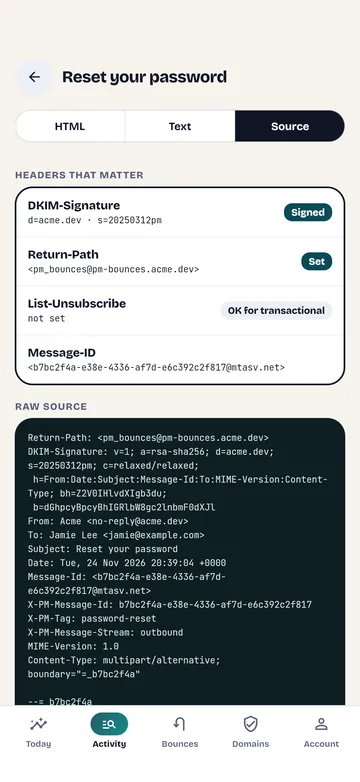
Send a test to a mailbox you can read (a Gmail account once the fix is in, any other inbox meanwhile) and open the message source; in Gmail that is Show original. Look for the Authentication-Results header. Simplified, a passing message looks like this:
Authentication-Results: mx.google.com;
  dkim=pass [email protected];
  spf=pass smtp.mailfrom=pm-bounces.example.com;
  dmarc=pass (p=REJECT) header.from=example.com
What matters is that dkim=pass is for your domain ([email protected], not the provider's) and that dmarc=pass. If DKIM passes only for the provider's domain, DMARC will fail once your policy is enforced.
Fix it at your provider
Each provider signs with DKIM for your domain once the domain is verified there:
- Postmark: DKIM plus a custom Return-Path; see DKIM and Return-Path not verified.
- Mailgun: the domain's SPF and DKIM records; see Mailgun domain verification.
- SendGrid: domain authentication CNAMEs; see SendGrid domain authentication.
- Resend: DKIM and SPF on the sending subdomain; see Resend domain not verified.
Then publish or keep a DMARC record, for example _dmarc.example.com TXT "v=DMARC1; p=none; rua=mailto:[email protected]". Gmail requires DMARC for senders of more than 5,000 messages a day (the policy can be none), and requires their From domain to align with the SPF or DKIM domain. Why DMARC fails covers alignment in detail.
Providers record 5.7.26 as a permanent failure; Postmark has a dedicated DMARCPolicy bounce type, "Email rejected due DMARC Policy". The recipients are fine, so after the fix, reactivate addresses suppressed by these bounces, knowing that resumes sending to them.
Questions
What does unauthenticated email from [domain] is not accepted due to domain's DMARC policy mean?
The From domain's DMARC record asks receivers to reject mail that fails DMARC, and your message failed: neither SPF nor DKIM passed for a domain aligned with the From address.
Does Gmail require DMARC?
For senders of more than 5,000 messages a day to Gmail accounts, yes, with a policy that can be none. All senders need SPF or DKIM.
Why does it fail when SPF passes?
SPF passed for the provider's bounce domain, not your From domain. DMARC needs SPF or DKIM to pass for a domain aligned with the From address.
Do Microsoft and Yahoo use 5.7.26?
Not as Gmail does. Microsoft's DMARC rejection is 5.7.509; Yahoo returns 553 or 554 for mail that fails DMARC or DKIM checks.
Related
- Why DMARC fails, even when SPF or DKIM passesDMARC fails when no SPF or DKIM pass is aligned with the From domain. A pass on your provider's domain doesn't count. The causes and fixes.
- SPF, DKIM and DMARC explained, with a working setupSign with DKIM on your domain, align SPF via a custom Return-Path, start DMARC at p=none. The records for Postmark, Mailgun, SendGrid and Resend.
- Custom Return-Path domain: why and how to set it upA custom Return-Path puts bounces on your own subdomain so SPF aligns for DMARC. On Postmark: CNAME pm-bounces.example.com to pm.mtasv.net, then verify.
- Gmail and Yahoo bulk sender requirements: checklistBulk senders to Gmail and Yahoo need SPF, DKIM, DMARC, From alignment, PTR, a low spam rate and one-click unsubscribe. The checklist and the errors.
- 550 5.7.1: what it means and how to fix it550 5.7.1 means the receiving server refused your message by policy: a mail rule, relaying, a block list or a bad header. The text after it says which.
- SMTP codes and email bounce codes: the full listEvery SMTP reply code (421 to 555) and enhanced status code (X.1.1 to X.7.7) from RFC 5321 and RFC 3463, with what each means and what to do next.