Remove an email from a SendGrid suppression list
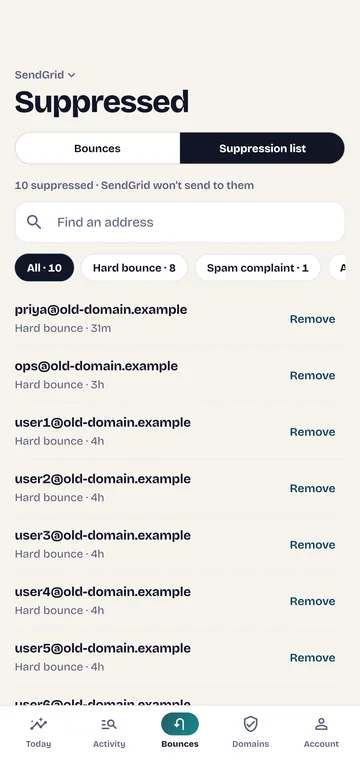
In the SendGrid console, open Suppressions, choose the list the address is on (Bounces, Blocks, Spam Reports, Invalid Emails, Global Unsubscribes or an unsubscribe group), tick the address and delete it. Over the API, send a DELETE to that list's endpoint, for example /v3/suppression/bounces/{email}, which answers 204. SendGrid sends to the address again from then on, so remove it only once the cause is fixed, and leave spam reports alone unless the person asked for your email again.
- Find the list Read the drop reason in Email Logs, or look the address up in Suppressions, to see which list holds it.
- Check the reason Read the original bounce or complaint. Remove the address only if the cause is fixed or the recipient asked for your email again.
- Delete the entry In Suppressions, tick the address and delete it, or send DELETE to the list's endpoint with the URL-encoded address.
- Confirm and send A 204 means it's gone. Send one message and check Email Logs shows processed and delivered rather than dropped.
Find which list the address is on
Each list is separate, and deleting from the wrong one changes nothing. If sends are being dropped, the drop reason in Email Logs names the list: Bounced Address is Bounces, Spam Reporting Address is Spam Reports, Unsubscribed Address is Global Unsubscribes, Group Unsubscribe is an unsubscribe group and Invalid is Invalid Emails. You can also look the address up directly:
curl -s "https://api.sendgrid.com/v3/suppression/bounces/ann%40example.com" \
  -H "Authorization: Bearer $SENDGRID_API_KEY"

curl -s "https://api.sendgrid.com/v3/asm/suppressions/global/ann%40example.com" \
  -H "Authorization: Bearer $SENDGRID_API_KEY"
Read the bounce reason before you delete anything: a 550 5.1.1 mailbox that doesn't exist will bounce again.
Console path and API endpoint for each list
| List | Console | Remove one address |
|---|---|---|
| Bounces | Suppressions > Bounces | DELETE /v3/suppression/bounces/{email} |
| Blocks | Suppressions > Blocks | DELETE /v3/suppression/blocks/{email} |
| Spam reports | Suppressions > Spam Reports | DELETE /v3/suppression/spam_reports/{email} |
| Invalid emails | Suppressions > Invalid Emails | DELETE /v3/suppression/invalid_emails/{email} |
| Global unsubscribes | Suppressions > Global Unsubscribes | DELETE /v3/asm/suppressions/global/{email} |
| Group unsubscribes | Suppressions > Group Unsubscribes | DELETE /v3/asm/groups/{group_id}/suppressions/{email} |
The "global suppression list" in the API is the Global Unsubscribes list: people who opted out of everything you send. Group unsubscribes apply only to one unsubscribe group, so a recipient can be on several groups and not on the global list.
In the console, tick the checkbox next to the address and use the delete or remove button at the top of the list. Bounces also has Delete All behind the gear icon; over the API the same is DELETE /v3/suppression/bounces with {"delete_all": true}, or {"emails": [...]} for a selection. Spam reports have the same bulk form.
Remove it with the API
URL-encode the address (@ becomes %40). A successful delete answers 204 with no body:
curl -s -o /dev/null -w "%{http_code}\n" -X DELETE \
  "https://api.sendgrid.com/v3/suppression/bounces/ann%40example.com" \
  -H "Authorization: Bearer $SENDGRID_API_KEY"

curl -s -X DELETE "https://api.sendgrid.com/v3/suppression/bounces" \
  -H "Authorization: Bearer $SENDGRID_API_KEY" \
  -H "Content-Type: application/json" \
  -d '{"emails": ["[email protected]", "[email protected]"]}'
The key needs the matching delete permission, for example suppression.bounces.delete or suppression.spam_reports.delete; a read-only key gets 403. EU regional subusers use https://api.eu.sendgrid.com. See SendGrid API key permissions.
Before you remove: which ones are safe
- Bounces: safe once the recipient has fixed their mailbox or corrected a typo. SendGrid will send to the address again straight away; if it bounces again, it goes straight back on the list and hurts your bounce rate.
- Blocks: removing makes no difference to sending, because blocks don't keep suppressing. Fix the reputation, authentication or content problem instead; see bounces vs blocks.
- Spam reports: SendGrid's own API reference says removal "should be avoided unless a recipient indicates they wish to receive email from you again".
- Invalid emails: only after correcting the address, which usually means a different address, not this one.
- Unsubscribes: only on the recipient's request, for example after they re-subscribe in your app.
For a single message that must reach a suppressed address, like a password reset to someone who unsubscribed from marketing, use a bypass setting on that send instead of editing the list: mail_settings.bypass_unsubscribe_management, bypass_bounce_management, bypass_spam_management, or bypass_list_management for all of them.
Questions
Can I send to an address after removing it from the SendGrid bounce list?
Yes. SendGrid lets you send to that recipient again once the bounce entry is removed. If the mailbox still doesn't exist, the next send bounces and the address is suppressed again.
How do I clear the whole SendGrid bounce list?
In Suppressions > Bounces, use the gear icon and Delete All, or call DELETE /v3/suppression/bounces with {"delete_all": true}. Do this only if you know why the addresses bounced.
Should I remove spam reports in SendGrid?
Almost never. SendGrid advises against it unless the recipient has said they want your email again, because sending to people who reported you hurts deliverability.
Related
- SendGrid bounces vs blocks vs invalid emailsIn SendGrid a bounce is a problem with the address and stays suppressed; a block is about your IP or content and isn't. How all six lists differ.
- SendGrid dropped vs bounce: every event status explainedDropped means SendGrid never attempted delivery; bounce means the receiving server refused it. Deferred is retried for 72 hours. Every event and reason.
- SendGrid API key: create one with the right permissionsSendGrid API keys are Full Access, Custom Access (chosen scopes) or Billing Access. The scopes sending and read-only monitoring need, and how to check.
- SendGrid not sending emails: a troubleshooting checklistNo 202 Accepted? SendGrid refused the request. Got 202? Find it in Email Logs: dropped, deferred, bounced or delivered each point to a different fix.
- Gmail and Yahoo spam rate limit: the 0.3% rule explainedGmail and Yahoo require a spam complaint rate below 0.3%; Gmail says aim under 0.1%. How it is measured, who it applies to, what it means for receipts.
- Email bounce checker app: exact server repliesEvery bounce with the receiving server's exact reply, plus suppression lists and reactivation, for Postmark, Mailgun, SendGrid and Resend.