SendGrid not sending emails: a troubleshooting checklist
Start with the API response: anything other than 202 Accepted means SendGrid refused the request and nothing was queued, and the errors array says why. If you got 202, look the message up in Email Logs: dropped means the recipient is suppressed, deferred means the receiving server is delaying it, bounced or blocked means it was rejected, and delivered means SendGrid's part worked and the problem is on the recipient's side, usually the spam folder.
- Check the API response Log the status code and body of the Mail Send call. Only 202 means the message was queued; anything else comes with an errors array explaining why.
- Look the message up in Email Logs Search by recipient in the console or with POST /v3/logs, in the same account, subuser and region that sent it.
- If dropped, check the suppression lists The drop reason names the list. Read the original bounce or complaint before removing the address.
- If deferred, bounced or blocked, read the server's response Fix the address for bounces; fix authentication, reputation or content for blocks. Deferrals are retried for up to 72 hours.
- If delivered, check the recipient's side Ask the recipient to search spam, tabs and quarantine, and check your SPF, DKIM and DMARC alignment.
1. What did SendGrid answer?
Log the status code and body of every Mail Send call. Most "SendGrid isn't sending" reports end here:
| Response | What happened | Next |
|---|---|---|
202 | Accepted and queued | Go to step 2 |
200 | Sandbox mode is on: the request was only validated, never delivered, with no events and no credits used | Remove mail_settings.sandbox_mode |
400 | The JSON body is wrong | Read errors[].message and field |
401 "The provided authorization grant is invalid, expired, or revoked" | The API key was deleted, mistyped or changed | Check Settings > API Keys |
401 "Maximum credits exceeded" | Your plan's credits are used up | Upgrade or wait for the reset |
401 "Account Disabled" | The account was suspended or deactivated | Look for an email from SendGrid's Consumer Trust team |
403 "The from address does not match a verified Sender Identity" | The From domain isn't authenticated in this account | See SendGrid 403 sender identity |
403 Access Forbidden | The key lacks the Mail Send permission | See API key permissions |
403 "You are temporarily blocked from sending emails due to repeated bad requests." | Too many bad requests in a short time | Fix the bad sender or recipient data, then wait |
429 | Rate limit | Back off until X-RateLimit-Reset |
Over SMTP the same problems look different: 451 Authentication failed: Maximum credits exceeded, or 550 Unauthenticated Senders Not Allowed when the client didn't log in. The SMTP username is the literal string apikey and the password is the API key. Every code is in SendGrid error codes.
2. Find the message in Email Logs
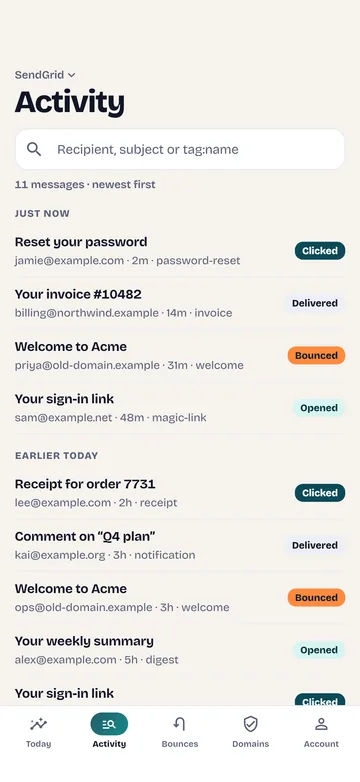
A 202 means the message exists in SendGrid. Search Email Logs by recipient (in the console, or with POST /v3/logs) and read its status:
- Processed only: still queued. Check again in a few minutes.
- Dropped: step 3.
- Deferred, Bounced or Blocked: step 4.
- Delivered: step 5.
If there's no entry at all, you're probably looking in the wrong place: another account, a subuser (EU regional subusers send through https://api.eu.sendgrid.com), or the send was older than Email Logs' 30 days. A code path that never called SendGrid, or swallowed the error, also produces no entry. What each status means in detail: SendGrid event statuses.
3. Dropped: the recipient is suppressed
The drop reason names the list: Bounced Address, Spam Reporting Address, Unsubscribed Address, Group Unsubscribe or Invalid. This is the classic "it works for me but not for one customer": the address bounced once, months ago, and every send since has been dropped. Look at the original bounce reason first. If the mailbox exists now, remove the address; see remove an email from a SendGrid suppression list. For one-off messages that must reach unsubscribed users, such as password resets, the Mail Send API has bypass settings; don't use them to push mail at bounced or complaining addresses.
4. Deferred, bounced or blocked: the receiving server said no
Read the response text the receiving server sent; it's on the event. Deferred mail is retried for up to 72 hours, so a delay of minutes or hours is not yet a failure. A bounce like 550 5.1.1 means the address doesn't exist (550 5.1.1 user unknown). A block is about you, not the address: missing authentication, IP reputation or content. Unauthenticated mail is the top cause at Gmail, Yahoo and Microsoft; check SendGrid domain authentication and 550 5.7.26.
5. Delivered but never received
SendGrid handed the message over and the recipient's server accepted it, so the next place is the recipient's side: spam or junk folder, a Gmail tab, a quarantine on a company mail filter, or a forwarding rule. Ask the recipient to search all mail for the subject. If it's in spam, the fix is authentication, alignment and reputation: transactional emails going to spam.
Questions
Why does SendGrid return 202 but the email never arrives?
202 only means SendGrid accepted the request. Look the message up in Email Logs: it may have been dropped because the address is suppressed, deferred by the receiving server, bounced, or delivered into a spam folder.
Does SendGrid sandbox mode send email?
No. With sandbox mode on, SendGrid only validates the request and answers 200 instead of 202. Nothing is delivered, no events are created and no credits are used.
Why is my SendGrid email stuck at processed?
Processed means accepted and waiting for delivery. If nothing follows for a while, look for deferred events: the receiving server may be delaying it, and SendGrid retries for up to 72 hours.
Related
- SendGrid API error codes: 400, 401, 403, 413, 429SendGrid Mail Send answers 202 on success and an errors array otherwise. What 400, 401, 403, 406, 413, 429 and 500 mean, with the exact messages and fixes.
- SendGrid dropped vs bounce: every event status explainedDropped means SendGrid never attempted delivery; bounce means the receiving server refused it. Deferred is retried for 72 hours. Every event and reason.
- SendGrid 403: from address not a verified Sender IdentitySendGrid returns 403 when the From address isn't a verified single sender or on an authenticated domain. The fix, and the other 403: access forbidden.
- Remove an email from a SendGrid suppression listIn SendGrid open Suppressions, pick the list, tick the address and delete it, or call DELETE /v3/suppression/{list}/{email}. Endpoints for all six lists.
- SendGrid Email Activity history: 30 days and missing mailSendGrid Email Logs keeps 30 days of events for every customer. The older Email Activity Feed needs a paid add-on for 30 days. Why a message may not show.
- Transactional emails going to spam: a checklist that worksCheck in order: SPF, DKIM and DMARC pass and align; links and content; reputation; complaint rate; list hygiene. Start with the message headers.