Postmark bounce types: HardBounce, SoftBounce, Transient and more
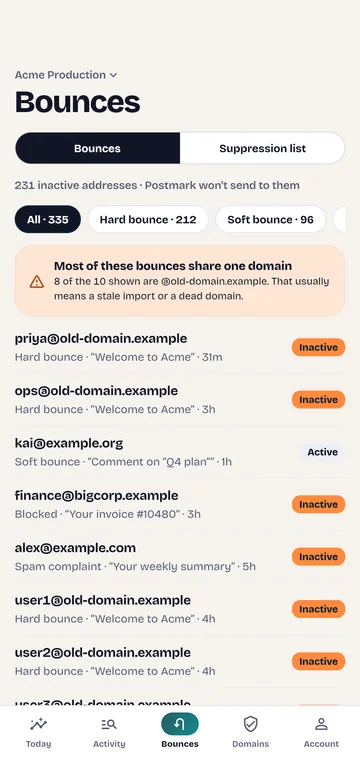
In Postmark a hard bounce (Type HardBounce, TypeCode 1) means the receiving server was unable to deliver your message, for example an unknown user or a mailbox that doesn't exist. Postmark deactivates the address and adds it to the message stream's suppression list, so later sends to it fail with error 406 until it is reactivated. Postmark records 22 bounce types in all; only some deactivate the address, and the Inactive and CanActivate fields on each bounce tell you what happened and whether you can undo it.
Every Postmark bounce type and TypeCode
Each bounce from the Bounce API or the bounce webhook has a Type (string), a TypeCode (integer) and a Name. Descriptions are Postmark's, some shortened:
| Type | TypeCode | Name and Postmark's description | What to do |
|---|---|---|---|
HardBounce | 1 | Hard bounce: The server was unable to deliver your message (ex: unknown user, mailbox not found). | Deactivates the address. Fix it with the user; don't just reactivate. |
Transient | 2 | Message delayed/Undeliverable: The server could not temporarily deliver your message (ex: Message is delayed due to network troubles). | Usually nothing; watch for a later hard or soft bounce. |
Unsubscribe | 16 | Unsubscribe request: Unsubscribe or Remove request. | Stop mailing the address. |
Subscribe | 32 | Subscribe request: Subscribe request from someone wanting to get added to the mailing list. | Handle in your app if you care. |
AutoResponder | 64 | Auto responder: Automatic replies, including nondescript NDRs and some out-of-office replies. | Usually an out-of-office reply; read Details. |
AddressChange | 128 | Address change: The recipient has requested an address change. | Ask the user for the new address. |
DnsError | 256 | DNS error: A temporary DNS error. | Retry later; check the domain if it repeats. |
SpamNotification | 512 | Spam notification: The message was delivered, but was either blocked by the user, or classified as spam, bulk mail, or had rejected content. | Review content and authentication. |
OpenRelayTest | 1024 | Open relay test: The NDR is actually a test email message to see if the mail server is an open relay. | Ignore. |
Unknown | 2048 | Unknown: Unable to classify the NDR. | Read Details and the dump. |
SoftBounce | 4096 | Soft bounce: Unable to temporarily deliver message (i.e. mailbox full, account disabled, exceeds quota, out of disk space). | Check Inactive; repeated soft bounces mean a dead mailbox. |
VirusNotification | 8192 | Virus notification: A virus notification warning about a virus/code infected message. | Check attachments and links. |
ChallengeVerification | 16384 | Spam challenge verification: A challenge asking for verification you actually sent the email. | Ignore for transactional mail. |
BadEmailAddress | 100000 | Invalid email address: The address is not a valid email address. | Validate addresses at sign-up. |
SpamComplaint | 100001 | Spam complaint: The subscriber explicitly marked this message as spam. | Deactivated; only Postmark support can reactivate. |
ManuallyDeactivated | 100002 | Manually deactivated: The email was manually deactivated. | Reactivate only if it was a mistake. |
Unconfirmed | 100003 | Registration not confirmed: The subscriber has not clicked on the confirmation link upon registration or import. | Rare for transactional mail. |
Blocked | 100006 | ISP block: Blocked from this ISP due to content or blacklisting. | A reputation or content problem, not a bad address. |
SMTPApiError | 100007 | SMTP API error: An error occurred while accepting an email through the SMTP API. | Fix the SMTP submission (see Details). |
InboundError | 100008 | Processing failed: Unable to deliver inbound message to destination inbound hook. | Your inbound webhook failed. |
DMARCPolicy | 100009 | DMARC Policy: Email rejected due DMARC Policy. | Fix SPF/DKIM alignment for the From domain. |
TemplateRenderingFailed | 100010 | Template rendering failed: An error occurred while attempting to render your template. | Check the template and TemplateModel. |
Branch on Type or TypeCode in code, never on Name or Description, which are display text.
What a hard bounce means in Postmark
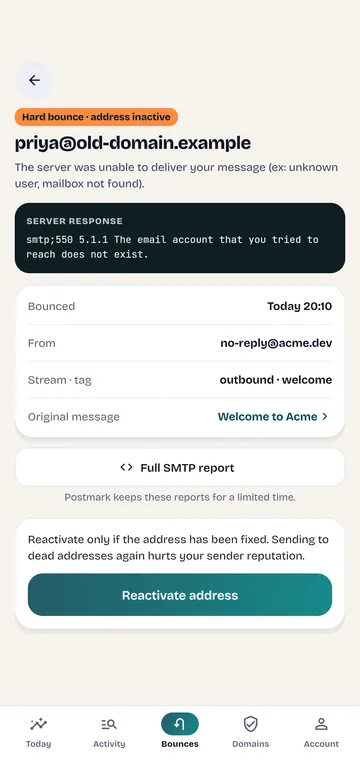
A hard bounce is a permanent refusal for that address. This one is from Postmark's Bounce API reference, shortened:
{
  "ID": 676862817,
  "Type": "HardBounce",
  "TypeCode": 1,
  "Name": "Hard bounce",
  "MessageStream": "outbound",
  "Description": "The server was unable to deliver your message (ex: unknown user, mailbox not found).",
  "Details": "smtp;554 delivery error: dd This user doesn't have a yahoo.com account ([email protected]) [0] - mta1543.mail.ne1.yahoo.com",
  "Email": "[email protected]",
  "BouncedAt": "2013-10-18T09:49:59Z",
  "DumpAvailable": false,
  "Inactive": true,
  "CanActivate": true
}
Details holds the receiving server's own words; that is where you see 550 5.1.1 user-unknown replies (550 5.1.1 explained). Inactive: true means Postmark deactivated the address, and the next send to it in that stream returns ErrorCode 406. CanActivate: true means you may reactivate it, but it will hard bounce again unless the address was corrected or the mailbox restored: how to reactivate.
Which bounce types deactivate an address
Postmark's subscription change webhook says an address is added to a stream's suppression list after a hard bounce, a spam complaint, an unsubscribe or a manual suppression. The suppression list records these as HardBounce, SpamComplaint and ManualSuppression; unsubscribes are stored as ManualSuppression.
| Event | Deactivates? | Can you reactivate? |
|---|---|---|
HardBounce | Yes | Yes (CanActivate: true) |
SpamComplaint | Yes | No; Postmark support only (spam complaints) |
ManuallyDeactivated / unsubscribe | Yes | Yes, from the suppression list |
SoftBounce and the rest | Not as a rule | Check the bounce's Inactive and CanActivate |
Postmark's own guidance for soft bounces (TypeCode 4096) is to check Inactive to see whether it deactivated the address. Don't infer it from the type: read the two booleans on every bounce you handle.
Soft bounce, Transient and Blocked: the ones people misread
SoftBounce(mailbox full, account disabled, over quota) is temporary at the mailbox. One is noise; the same address soft bouncing for weeks is a dead mailbox, so stop sending to it yourself.Transientis a delay, not a failure. The message may still arrive.Blocked(ISP block, due to content or blacklisting) says nothing about the address. Reactivating or re-entering addresses won't help; check your sending domain's authentication and reputation (checklist).DMARCPolicymeans the receiving server applied your From domain's DMARC policy. Fix DKIM and Return-Path alignment.SpamNotificationmeans the message was delivered but blocked by the user or classified as spam or bulk.AutoRespondercovers out-of-office replies and some NDRs Postmark can't classify further.InboundErrorisn't about outbound mail at all: Postmark couldn't POST an inbound message to your webhook (inbound failed).
Find and test bounces by type
List hard bounces that deactivated an address in the default transactional stream:
curl "https://api.postmarkapp.com/bounces?type=HardBounce&inactive=true&count=50&offset=0&messagestream=outbound" \
  -H "Accept: application/json" \
  -H "X-Postmark-Server-Token: $POSTMARK_SERVER_TOKEN"
count is at most 500 and count + offset can't exceed 10,000; use fromdate/todate (Eastern Time) for more. Bounces are kept for your retention period, 45 days by default, and raw dumps for 30 days. GET /deliverystats returns counts per type and the number of inactive addresses.
To test your handling, send to [email protected] with a type name in front, for example [email protected] or [email protected]. A test hard bounce acts like a real one and adds that test address to the stream's suppression list.
Questions
What is TypeCode 4096 in Postmark?
SoftBounce: Postmark couldn't deliver temporarily, for example because the mailbox is full, the account is disabled or over quota. Check the bounce's Inactive field to see whether the address was deactivated.
Does a soft bounce deactivate an address in Postmark?
Not as a rule. Hard bounces, spam complaints, unsubscribes and manual suppressions are what put an address on the suppression list; for a soft bounce, the bounce's Inactive field tells you.
How long does Postmark keep bounce records?
For your retention period, which is 45 days by default. Raw bounce dumps are kept for 30 days.
How do I trigger a test hard bounce in Postmark?
Send to [email protected]. Every bounce type has a matching address at bounce-testing.postmarkapp.com.
Related
- Postmark error 406 inactive recipient: cause and fixPostmark ErrorCode 406 means the address is suppressed after a hard bounce, spam complaint or manual suppression. Find which, and when to reactivate it.
- Reactivate a bounced address in Postmark (UI and API)Reactivate in the stream's Suppressions tab, with PUT /bounces/{id}/activate or the suppressions delete endpoint. Spam complaints need Postmark support.
- Postmark spam complaints: what they mean, what to doA Postmark spam complaint (SpamComplaint, 100001) deactivates the address at once, and only Postmark support can reactivate it. How to cut the rate.
- Postmark webhook retry schedule, events and securityPostmark retries outbound webhooks on 5xx, 408, 429 or timeouts at 1, 5, 10, 10, 10, 15 minutes; inbound 10 times. No signatures: use basic auth.
- Hard bounce vs soft bounce: what each means, what to doA hard bounce is a permanent failure (5xx, e.g. 550 5.1.1): stop sending to it. A soft bounce is temporary (4xx, e.g. full mailbox): retry, then stop.
- SMTP codes and email bounce codes: the full listEvery SMTP reply code (421 to 555) and enhanced status code (X.1.1 to X.7.7) from RFC 5321 and RFC 3463, with what each means and what to do next.